
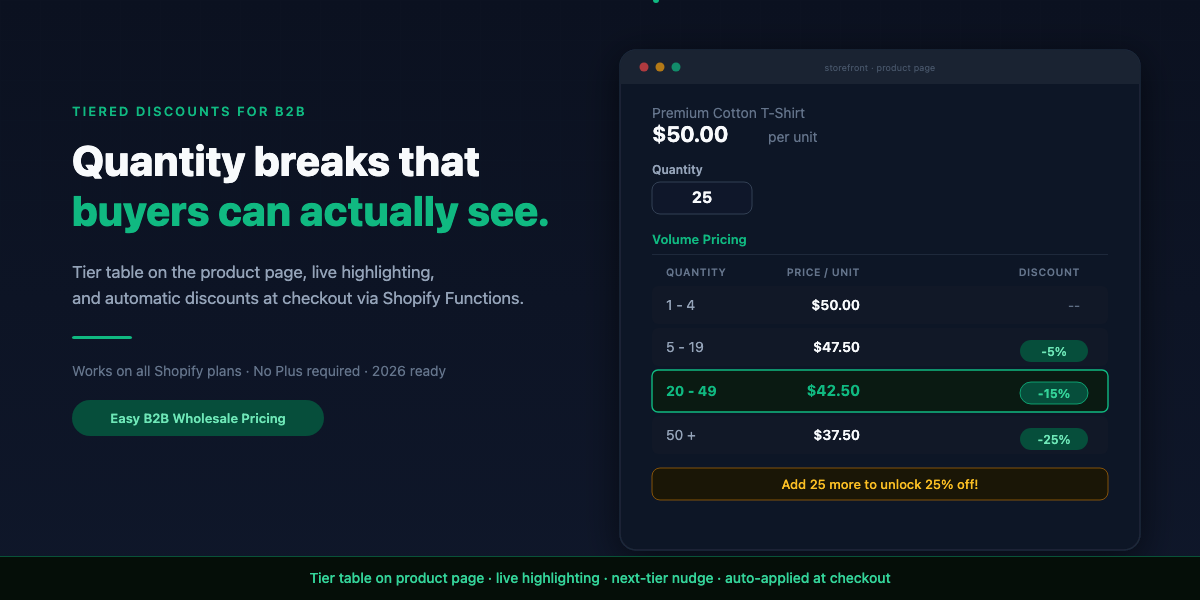
What “tiered discounts” actually means on Shopify
A tiered discount sets different price levels based on the quantity a buyer orders. The structure is simple:| Quantity | Per-unit price | Discount |
|---|---|---|
| 1-4 | $50.00 | — |
| 5-19 | $47.50 | 5% off |
| 20-49 | $42.50 | 15% off |
| 50+ | $37.50 | 25% off |
Why native Shopify discounts don’t cut it for B2B tiers
Shopify’s built-in automatic discounts can technically do a single quantity break. You could create a discount that gives 15% off when someone buys 20 or more of a product. But the moment you need real tiered pricing, the limitations stack up: 1. One automatic discount at a time. Shopify applies a single automatic discount per checkout. If you have a 5+ tier and a 20+ tier, you can’t run both as separate automatic discounts and have the right one apply based on quantity. 2. 25-discount cap. You’re limited to 25 active automatic discounts across your entire store. A catalog of 50 products with three tiers each would need 150 discount rules. That’s six times the cap. 3. No product-page visibility. Native discounts don’t show a tier table on the product page. The buyer has no idea that ordering more would get them a better price until they reach checkout. 4. No customer-group layering. You can’t say “Gold customers get 25% off, and on top of that, ordering 50+ gets another 10%.” Native discounts don’t know about your customer tiers. 5. Scripts are dead. If you were on Shopify Plus and using Shopify Scripts for tiered pricing, that ends June 30, 2026. Scripts are officially deprecated and Shopify Functions is the replacement.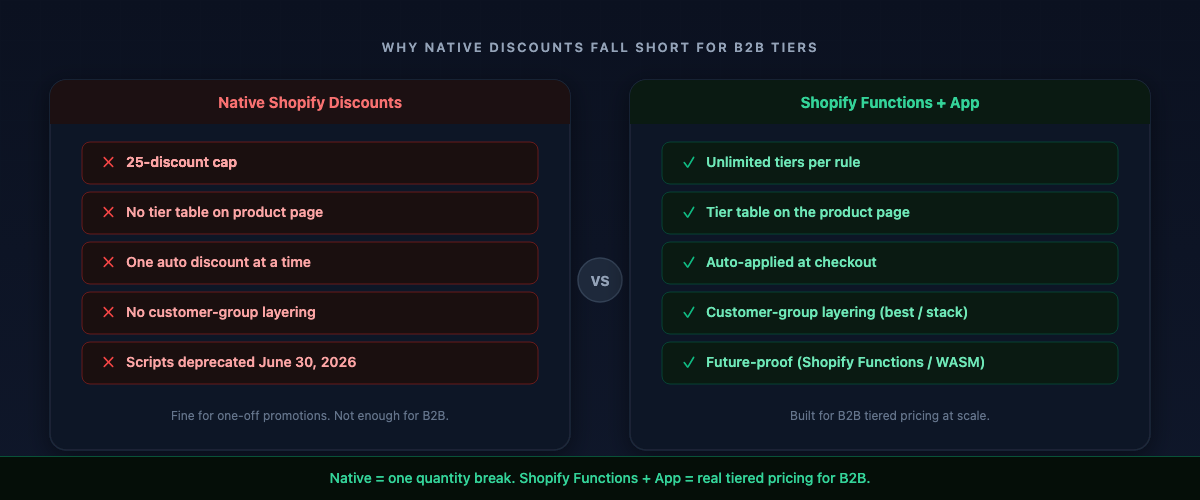
The two paths to tiered discounts in 2026
There are two realistic ways to create tiered discounts on Shopify today:
Path 1: Native automatic discounts (limited). Best for a single product or collection with one quantity break. You create an automatic discount in Shopify Admin, set a minimum quantity, and choose a percentage or fixed amount. One tier per discount, a 25-discount cap, no product-page display, and no customer-group awareness.
Path 2: A tiered-pricing app backed by Shopify Functions. Best for any B2B store with multiple products, multiple tiers, or customer groups. The app handles the tier logic, displays the pricing table on the product page, and applies the correct discount at checkout through a Shopify Function. The tier, the display, and the checkout discount are all handled in one system.
The rest of this guide follows Path 2, since that’s what B2B stores actually need.
Step 1: Define your tier structure before you touch any settings
Before creating any discount rules, write down three things:
How many tiers? Start with three. More than four is hard for buyers to scan, and you can always add one later. Set the first break just above your typical single-order quantity. If most buyers order 5 units, put the first break at 10. Set the top break at the quantity that genuinely changes your fulfillment economics.
What discount type? Each tier can be:
- Percentage off — 10% off at 10+ units. Scales with price, works for most catalogs.
- Fixed amount off — $5 off per unit at 10+ units. Reads cleanly when the per-unit saving is a round number.
- Fixed price per unit — exactly $37.50/unit at 50+. The B2B power tool. When you’ve negotiated a specific number with a buyer, set it directly instead of reverse-engineering a percentage.
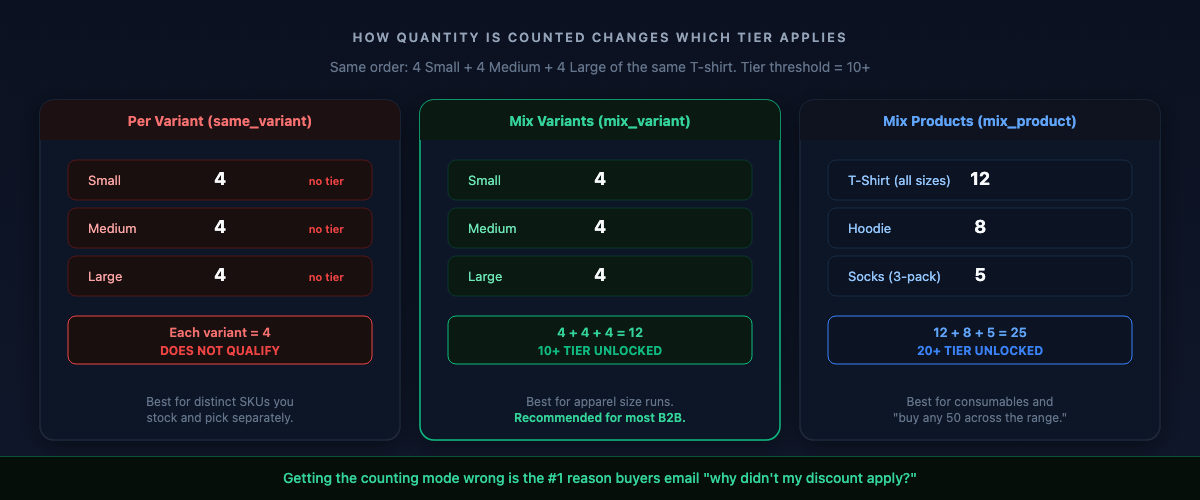
How is quantity counted? This is the question that quietly breaks tiered pricing for apparel and multi-variant catalogs:
- Per variant (same variant): each variant counted separately. 4 Small + 4 Medium + 4 Large = three counts of 4, not one count of 12. Strict, but correct for distinct SKUs.
- Mix variants (across the product): 4 + 4 + 4 = 12. Almost always what apparel buyers expect, because they buy a size run, not 10 of one size.
- Mix products (across the cart): quantities across all products in the rule add up. Best for consumables.
Getting the counting mode wrong is the single most common reason a buyer emails “why didn’t my discount apply?”
Step 2: How to create tiered discounts in Shopify with a volume pricing rule
In your tiered-pricing app, create a new volume pricing rule. Here’s what the setup looks like using Easy B2B Wholesale Pricing as an example:
- Name the rule. Something you’ll recognize later: “Apparel Volume Tiers” or “Hardware Bulk Pricing.”
- Choose the scope. Which products does this rule apply to? Options:
- All products
- Specific products (pick individually)
- Specific collections
- Products matching a tag
- Set your tiers. Add each quantity break with its discount:
- Tier 1: 5+ units, 5% off
- Tier 2: 20+ units, 15% off
- Tier 3: 50+ units, 25% off
- Choose the counting mode. Per variant, mix variants, or mix products — based on how your buyers actually order.
- Save and activate. The app registers the discount with Shopify through a Shopify Function, so the right tier applies automatically at checkout. No coupon needed.
Step 3: Make the tiers visible on the product page
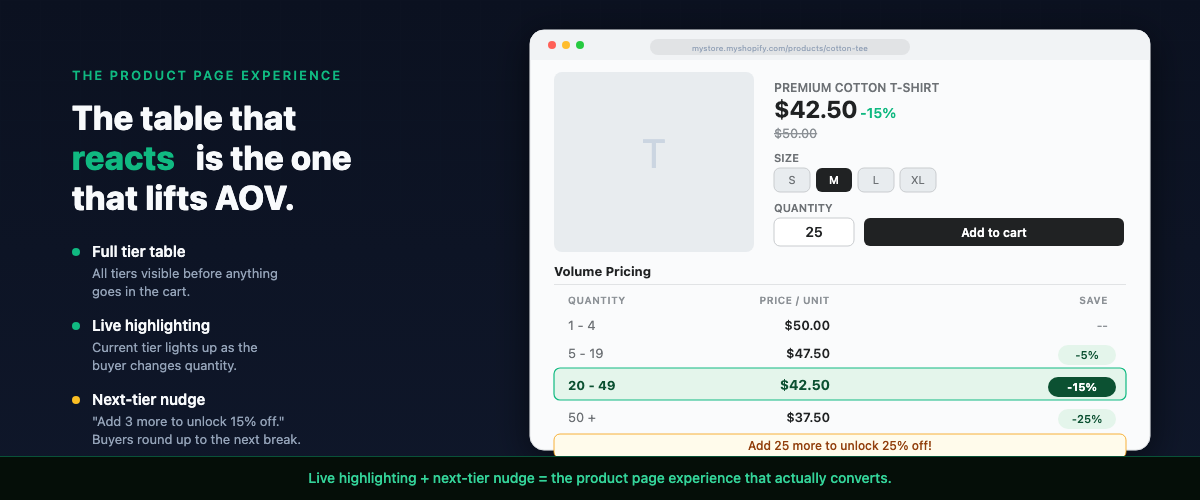
This is where most setups fail. A tiered discount that only appears at checkout doesn’t change buyer behavior. The whole point is to let the buyer think “if I add a few more, the price per unit drops” while they’re still deciding.
Three things need to happen on the product page:
A full tier table. All tiers, with per-unit prices, visible right under the product. Not behind a tab, not in a tooltip.
Live highlighting. As the buyer changes the quantity, the current tier lights up. They watch their per-unit price drop in real time.
A next-tier nudge. A single line shows how close they are to the next break: “Add 3 more to unlock 15% off.” Buyers heading for 17 round up to 20; buyers eyeing 45 bump to 50.
This is the same psychology as a free-shipping progress bar, applied to volume. The table that merely informs leaves money on the table; the table that reacts — highlight plus nudge — is the one that lifts order value.
Most tiered-pricing apps inject this table automatically on the product page through a Shopify theme app extension. No code required — you toggle it on in the theme editor.
Step 4: Layer tiered discounts on customer-group pricing
Here’s where B2B tiered discounts diverge from generic quantity breaks: you’re probably already giving wholesale buyers a group discount. A tagged “Gold” customer sees 25% off. Now they also want to order 50+ units for an additional volume break.
The question is: do those discounts stack or compete?
Best price: The customer gets whichever single discount is larger. Gold’s 25% vs. volume’s 15% at 20+ units = they get 25%. Simple, predictable, margin-safe.
Stack (compound): Both apply, and they compound. 25% then 15% is not 40% off. It’s 0.75 x 0.85 = 0.6375, about 36% off. Powerful for short promotions, dangerous as a permanent setting.
Before you turn on stacking, model it against your landed cost on your highest-volume products. If your Gold buyer’s 50+ tier stacks with their group discount and the final price is below your cost, you’re selling at a loss on your biggest orders.
To set this up:
- Create customer groups with your tier tags (Gold, Silver, Bronze) and assign a wholesale discount to each.
- Create volume pricing rules that apply across the same products.
- Set the combination mode — best price or stack — at the rule level.
This gives you the two strongest levers in B2B: rewarding who the buyer is (customer group) and how much they order (volume tiers).
Step 5: Handle per-product overrides
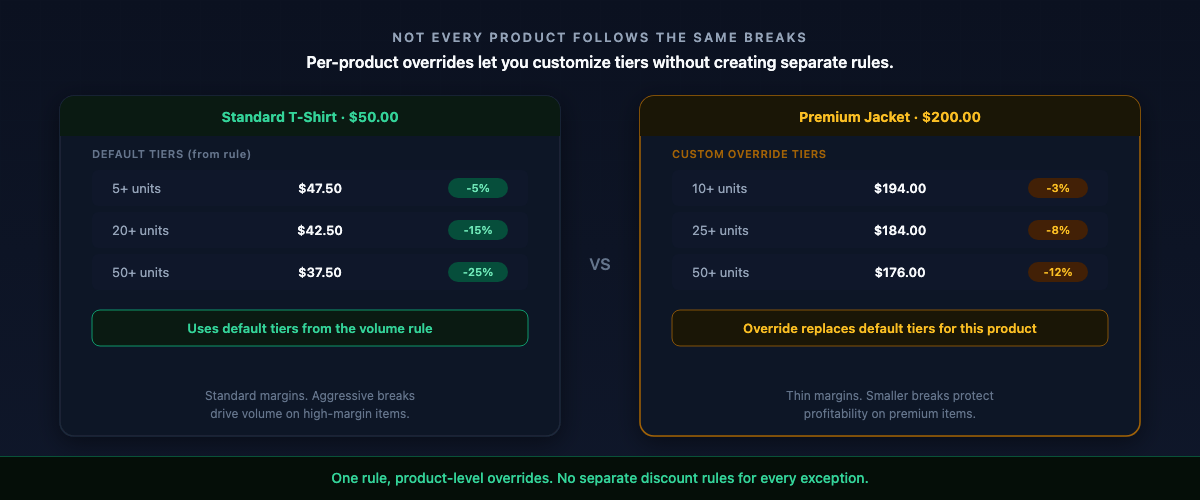
Not every product in your catalog should follow the same tiers. A $200 premium item might only need two tiers with smaller percentages. A clearance item shouldn’t get an additional volume discount at all.
Per-product overrides let you:
- Set custom tiers for specific products that override the default rule
- Exclude thin-margin products from volume discounts entirely
- Set fixed prices for products with negotiated contract pricing
This is where tiered-pricing apps earn their keep over manual discount creation. Instead of creating separate discount rules for every exception, you override at the product level and the system handles the rest.
The Shopify Scripts shutdown: what it means for tiered discounts
If you’re on Shopify Plus and using Shopify Scripts for tiered pricing, you have until June 30, 2026 to migrate. After that date, Scripts stop running and any tiered discounts built on them will silently stop applying at checkout.
The replacement is Shopify Functions — server-side code that runs in Shopify’s infrastructure and handles discount logic at checkout. Functions are faster (WebAssembly), available on all Shopify plans (not just Plus), and support the same discount types.
The good news: if you use a tiered-pricing app that already runs on Shopify Functions, you’re already migrated. The app handles the Function deployment, and your tiers keep working after June 30 with no changes.
If you’re running custom Scripts, you’ll need to port them to Functions or move to an app. Unless you have a development team maintaining custom checkout code, an app is less work and less risk.
B2B features on all Shopify plans (April 2026 change)
One more thing worth knowing: since April 2026, Shopify opened B2B features to all plans, not just Plus. You get up to 3 catalogs on Basic, Shopify, and Advanced. This means customer-group pricing, catalog visibility, and volume discounts are no longer locked behind a $2,300/month plan.
If you’ve been holding off on B2B tiered pricing because you assumed it required Plus, it doesn’t anymore. The combination of a tiered-pricing app and Shopify’s expanded B2B access gives you the full setup on any plan.
Common mistakes with tiered discounts on Shopify
- Hiding tiers behind checkout. If the buyer can’t see the price breaks while deciding, the tiers don’t change behavior. The table belongs on the product page.
- Wrong counting mode. A 12-unit size run that “doesn’t qualify” for the 10+ tier because you set per-variant counting. Use mix-variant for apparel.
- Not modeling stacked margins. “25% + 15%” feels like 40%; it compounds to ~36% on your largest orders. Check the math before turning on stacking.
- One blanket rule for everything. Thin-margin and clearance products need to be excluded or you’re discounting into the red.
- Showing only percentages. B2B buyers run margin math on the actual price, not the label. Show the per-unit price for every tier.
- Too many tiers. Start with three. Adjust after real order data, not guesswork.
Testing your tiered discounts before going live
Before turning tiered pricing on for real buyers, walk a full purchase as a test customer:
- Product page: Does the tier table appear? Does the highlighted row track the quantity?
- Size run: Add a mix of variants. Does the quantity count correctly?
- Cart: Does the per-unit price reflect the right tier before checkout?
- Checkout: Does the discount apply automatically with no code entered?
- Customer group: Log in as a tagged wholesale customer. Does the group discount combine correctly with the volume tier?
- Excluded product: Check a product outside the rule’s scope. It should stay full price.
If a tier doesn’t apply, the usual culprits are the counting mode or a product that falls outside the rule’s scope. Check those first.
FAQ
Do tiered discounts on Shopify require Shopify Plus?
No. Tiered pricing isn’t native to Basic, Shopify, or Advanced, but a tiered-pricing app powered by Shopify Functions adds it on any plan, with discounts applied automatically at checkout.
What’s the difference between tiered discounts and volume discounts?
They’re the same concept with different names. “Tiered discount” emphasizes the price breaks at each level; “volume discount” emphasizes the quantity that triggers them. Both mean: order more, pay less per unit.
Can I combine tiered discounts with customer-group wholesale pricing?
Yes. Volume tiers can layer on top of customer-group pricing. Set the combination mode to either best price (the larger single discount wins) or stack (both apply, compounding). Model the stacked math before turning it on.
Will Shopify Scripts still work for tiered pricing?
No. Shopify Scripts are deprecated and stop running after June 30, 2026. The replacement is Shopify Functions, which is faster, available on all plans, and what modern tiered-pricing apps already use.
How many tiers should I set up?
Start with three. First break just above your typical order quantity, top break where your fulfillment economics genuinely change. Refine once you have real order data.
Do the tiers show on the product page or only at checkout?
With the right app, the full tier table shows on the product page with live highlighting and a next-tier nudge. Visibility before checkout is what actually lifts order value.
Can buyers combine variants to reach a tier?
Only if you set the counting mode to mix variants. Under per-variant counting, each variant must reach the threshold on its own.
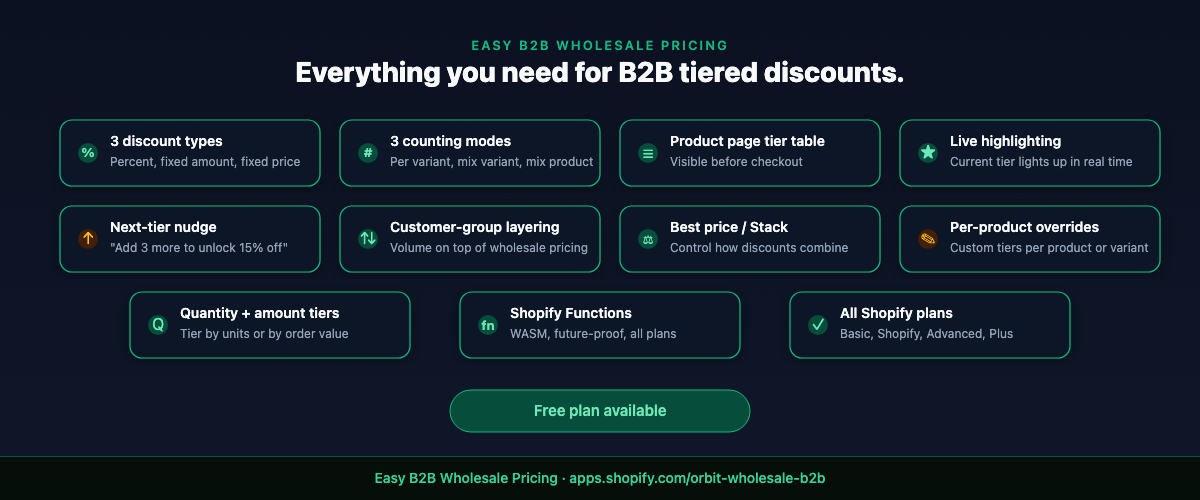
If you want tiered discounts that show on the product page with live tier highlighting, work with customer groups, and apply automatically through Shopify Functions — Easy B2B Wholesale Pricing handles quantity and amount tiers, all three discount types, per-variant or mix counting, customer-group layering, best-price or stack modes, and per-product overrides, with a free plan to test whether tiered pricing moves your average order value before you commit.
Built for B2B sellers
Stop Losing B2B Buyers to Friction.
Wholesale buyers don’t want to browse like retail shoppers — they want their price, their net terms, and the same cart they ordered last month. Give them all of it, on the Shopify storefront you already have.