
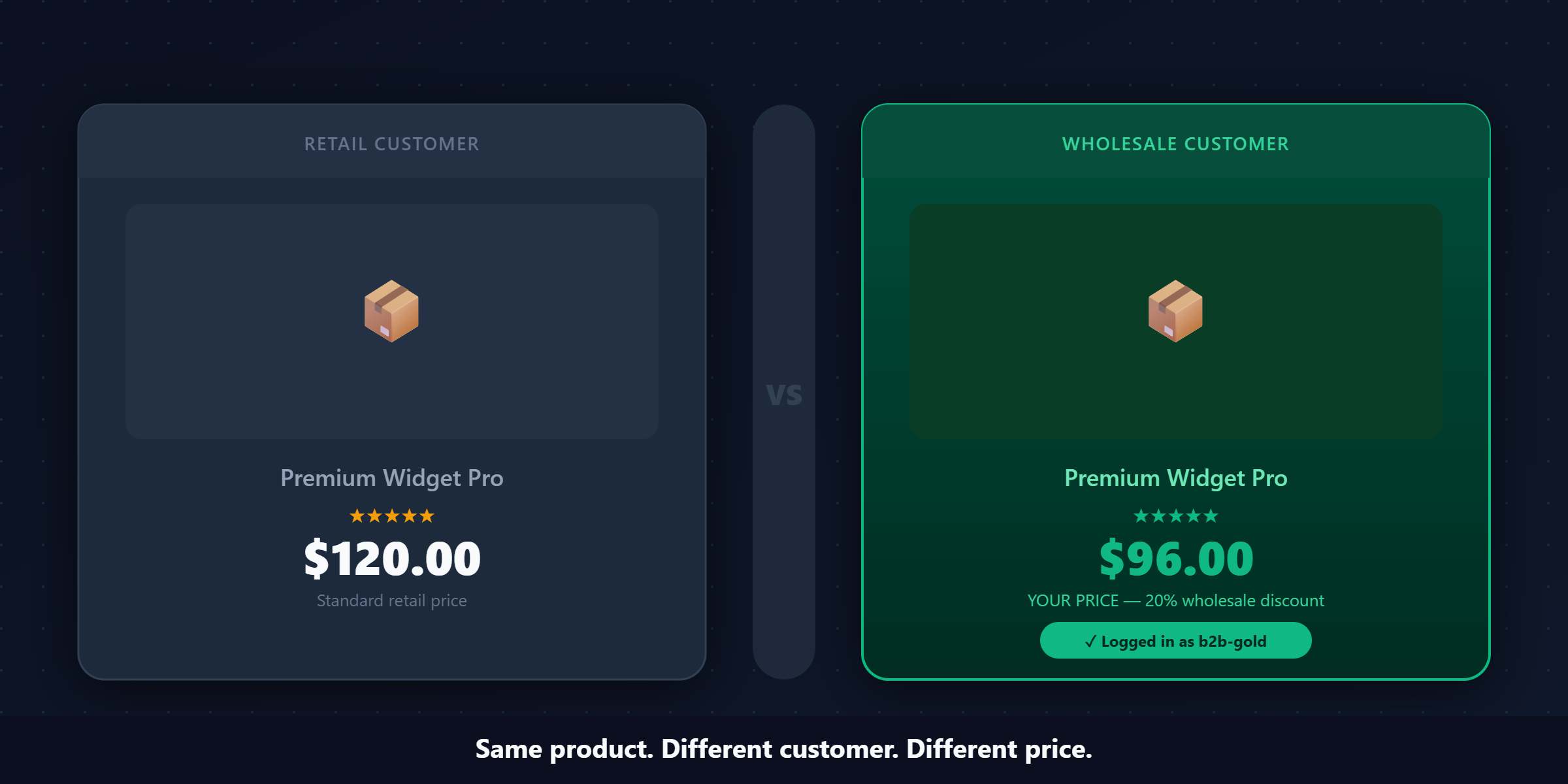
Shopify wholesale pricing — showing each B2B buyer their own negotiated price automatically, without Shopify Plus — is possible on any Shopify plan. But building it correctly is less obvious than it first looks.
You’ve probably had this conversation before.
A B2B buyer lands on your store, adds a few things to cart, reaches checkout — and stops. They email you: “Is this the right price for us?” You write back confirming yes, there’s a code, use it at checkout. They reply an hour later: “Got it, thanks.” They order.
That exchange took 24 hours, two emails, and interrupted both of you. Multiply that by every new B2B account you onboard, every buyer who forgets their code, every distributor who wants to check their margin before committing to an order.
Now multiply it by fifty accounts. By a hundred.
This is what most Shopify merchants building a B2B channel run into. Not because they made the wrong decision — but because Shopify, by design, is built for retail. Every default — one price per product, one checkout flow, the same experience for every visitor — assumes a single type of customer paying a single type of price.
B2B pricing doesn’t work that way.
A wholesale buyer expects to see their negotiated price the moment they land on your product page. Not at checkout. Not after entering a code. Not after a confirmation email. The moment they log in, the price they see should be their price — different from what a retail customer sees, reflecting the terms you’ve agreed on.
Shopify Plus has native features for this: company accounts, price lists, payment terms. But Plus starts at $2,300/month. For a merchant where B2B is a meaningful channel but not the core of the entire operation, that’s an expense that changes the math on the whole business.
So merchants build it themselves. And there are three ways to do it — each with a different failure mode, a different ceiling, and a different type of merchant it’s right for.
This guide covers all three in detail: how each one works, where exactly it breaks down, and what a mature B2B pricing setup actually looks like once you’ve moved past the workaround phase.
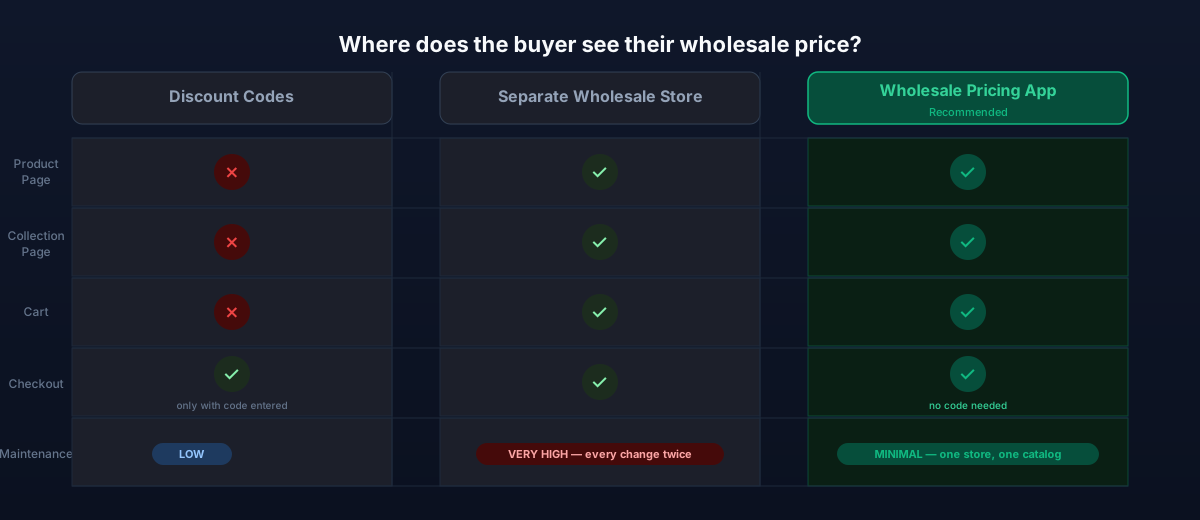
Option 1: Discount Codes
Every Shopify merchant reaches for discount codes first. They’re built-in, they’re free, and they take two minutes to create. It’s the path of least resistance, and for a very early-stage B2B channel, it’s not a wrong choice.
Here’s the complete picture — how to set it up, and exactly where it falls apart.
How to set up a wholesale discount code
The setup itself is straightforward:
- From your Shopify admin, go to Discounts → Create discount → Amount off order
- Set it as a percentage (e.g. 20% off for wholesale)
- Under “Customer eligibility,” you can leave it open or restrict to specific customer segments — though restriction is limited without additional tools
- Set usage limits if you want to prevent abuse: “Limit number of times this discount can be used in total” or “Limit to one use per customer”
- Set an expiry date if needed
- Save and copy the code
- Email it to your wholesale accounts
That’s it. A buyer gets the code, applies it at checkout, gets 20% off. Done.
Why it works at low volume
If you have five wholesale accounts and they each order once or twice a month, discount codes are genuinely fine. The overhead is low — you send the code once when they sign up, maybe resend if they forget — and the time you’d spend setting up something more complex isn’t justified by the volume.
This isn’t a consolation prize. For many merchants in the early stages of a B2B channel, this is the right choice, and it’s worth not over-engineering before you’ve validated the demand.
Where it actually breaks — in detail
Problem 1: The wrong price at the wrong moment.
This is the structural failure. A B2B buyer navigates to a product page and sees $120. In their head, they need to know if their cost is $96 (20% off) before they decide whether to add it to their order. But the page shows $120. They might mentally apply the math, or they might just note “retail price” and move on without ordering.
If they do add to cart, they see $120 in cart. They reach checkout, remember the code, type it in — and the price drops to $96. But there’s a problem: at that point, they’ve already made a mental decision about the order. The friction between “browsing” and “confirmed price” is a real drop-off point.
Compare this to an experience where the product page already shows $96. The buyer does their math in real time, builds their cart with confidence, checks out. No uncertainty. No friction.
The product page price isn’t a minor UX detail. For B2B buyers placing considered orders, it’s often where the buying decision happens.
Problem 2: Codes escape your control.
Discount codes are text strings. They get shared. A buyer who received your wholesale code might send it to a friend — “hey, they have good prices, use this code.” That friend is a retail customer. They use the code. You’ve just given a retail order a 20% discount you never intended.
Worse: codes get scraped. There are services that collect and publish Shopify discount codes. A code that was sent to twenty wholesale accounts can end up indexed on a coupon aggregator site within weeks. From that point on, any retail visitor who searches “[your brand] discount code” can find it and use it at checkout.
You can set usage limits — but if you have 20 wholesale accounts who each order multiple times a month, a “100 uses per month” limit will block legitimate orders. You can set “one use per customer” — but that breaks entirely for repeat orders.
Problem 3: One code = one discount level.
Real B2B pricing is almost never flat. Different types of buyers get different terms. A new distributor who just signed up shouldn’t get the same discount as a buyer who’s been ordering $200k a year from you for three years. Rewarding loyalty with better pricing is both fair and strategic — it gives your best buyers a reason to stay.
With discount codes, you’d need a separate code per tier. WHOLESALE10, WHOLESALE15, WHOLESALE25. Each code in circulation is a management burden and a leakage risk. When a Silver-tier buyer shares their code with a Bronze-tier buyer, you have a pricing integrity problem that’s invisible unless you’re auditing every order.
Problem 4: No native way to control access.
Anyone with the code can use it. Shopify doesn’t have a native mechanism to say “only customers in this segment can apply this code.” You can restrict to specific customer tags in some configurations, but the cart-level verification is limited on non-Plus plans. In practice, most merchants using discount codes for wholesale accept that the code is the gate — and the gate leaks.
The signal that you’ve outgrown discount codes
You know it’s time to move on from discount codes when:
- You’re getting emails like “what’s our code again?” more than once a week
- You want to give your best accounts better terms than your standard accounts
- You suspect the code is being used by customers who aren’t supposed to have it
- Your B2B buyers complain about not knowing their price before checkout
- You want to show volume pricing (buy more, pay less per unit) — which codes can’t do
Any one of these signals is enough. Two or more means you’re already losing revenue to the friction.
Verdict: Right for fewer than five B2B accounts with low order frequency. The math breaks clearly once you’re past that point.
Option 2: Separate Wholesale Store
The approach that seems clean on paper. Create a second Shopify store, set wholesale prices directly on each product, and point your B2B buyers to that URL. They see their prices natively — no codes, no apps, no workarounds.
It’s a genuinely good idea that runs into structural problems at scale.
How to set it up
- Create a second Shopify store. This requires a separate subscription — you’ll pay another monthly fee.
- Export your product catalog from your main store. Use the built-in CSV export (Products → Export).
- Edit the CSV to set wholesale prices. In the exported file, update the price column for every product and variant to reflect your wholesale rates.
- Import to the wholesale store. Products now exist on the second store with correct pricing.
- Gate the store. Either password-protect it (Shopify’s built-in password page under Online Store → Preferences) or install a login-required app so only approved customers can access the catalog.
- Share with your wholesale accounts. They log in, see their prices, order directly.
The legitimate appeal
When it works, this setup is clean. Your wholesale buyers get their own URL. They see prices correctly from the first page — no code required, no login-reveals-price mechanic. You can even customize the wholesale store’s navigation and layout for B2B ordering patterns, without affecting the retail experience.
For businesses with a catalog that genuinely differs between retail and wholesale — different pack sizes, different SKUs, products available wholesale that aren’t offered at retail — a separate store makes structural sense. The two stores serve legitimately different needs.
Where it actually breaks — in detail
Problem 1: Maintenance that compounds over time.
On day one, both stores are in sync. Prices are right, products are current, descriptions match. Six months later, the story is usually different.
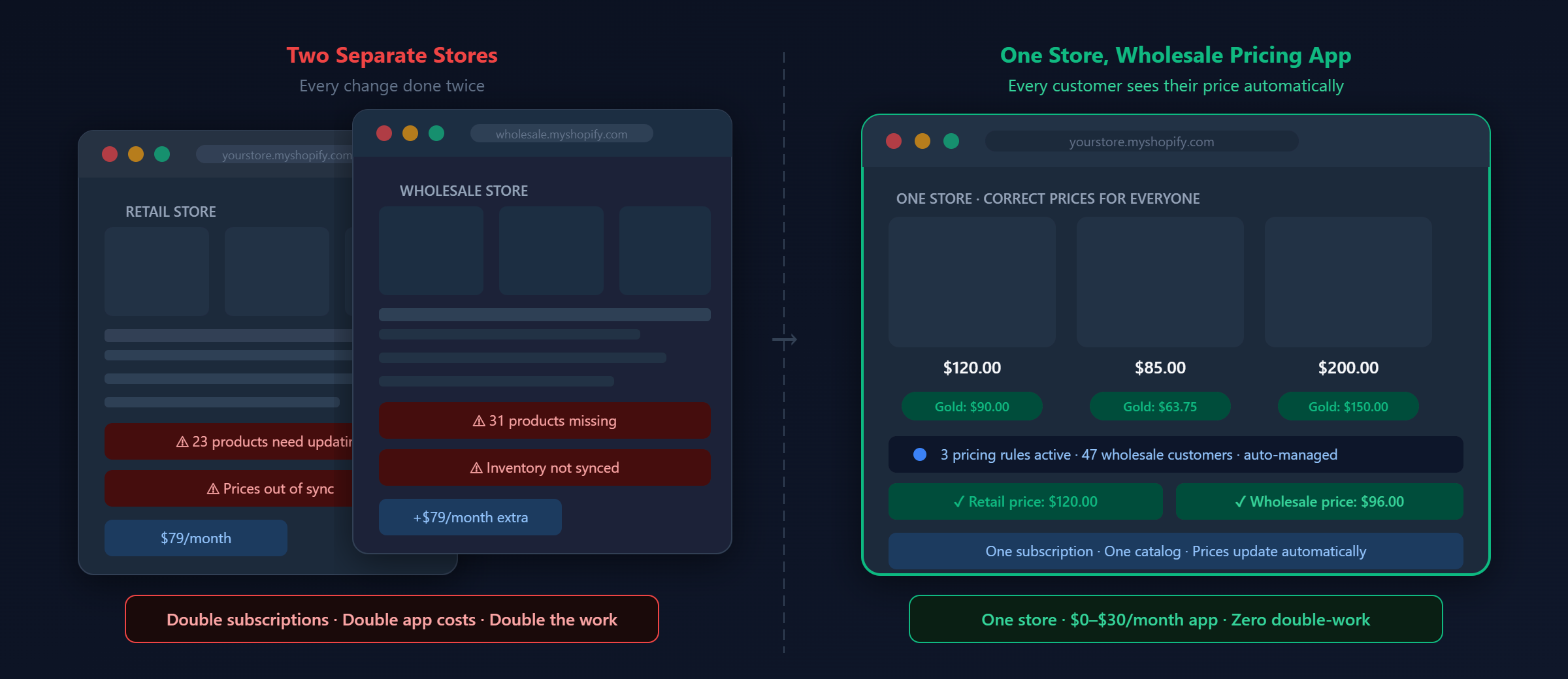
Every product you add to your retail store needs to be added to the wholesale store. Every price update. Every description change. Every new image. Every inventory threshold update. Every new variant. If you update 30 products in a week — which is normal for an active catalog — you’ve just created 60 update tasks instead of 30.
The work doesn’t feel heavy at first because you’re managing it alongside the initial setup. But as the catalog grows and the business accelerates, the second store becomes a persistent tax on every operational action you take.
Problem 2: The drift problem.
What happens in practice: a new product launches on the retail store, and the wholesale update gets scheduled for “later.” Later becomes a week. A week becomes a month. Your wholesale buyers start seeing a stale catalog — they can’t order products that are available on the retail store, or they’re seeing outdated descriptions and images.
This is nearly universal among merchants running two stores. It’s not a discipline problem — it’s a structural one. When you have a team of one or two managing the whole operation, the second store will always be the lower priority when time is short.
Problem 3: Inventory is now a shared problem.
Your physical inventory is one pool. If you have 200 units of a product and you’re selling it across two stores, you need to know in real time how many are committed to each channel. Without a sync tool, you can sell 150 units on the retail store and 100 units on the wholesale store and ship only 200 — with 50 units oversold.
Solving this requires either a third-party inventory sync app (another monthly cost, another integration to maintain) or manually managing inventory caps on each store (which means another operational task tied to every order).
Problem 4: Double the app costs.
Any app you run on your main store — reviews, live chat, analytics, loyalty, email, page builder — you’ll want on the wholesale store too. Those apps typically charge per store. Your existing app stack might be $100-200/month. A second store doubles that, on top of the additional Shopify subscription.
Problem 5: Theme work is doubled.
When you update your theme, redesign a section, or add a new feature to your storefront — you do it on two stores. A theme update that takes a day takes two days. A developer building something custom builds it twice, or you accept that the two stores have divergent experiences.
When a separate store is actually the right choice
This model works well in a specific scenario: a large operation where wholesale and retail are genuinely distinct businesses, where there’s a dedicated team managing the B2B channel, and where the catalog and operational model differ enough between channels that the maintenance overhead is justified by the control it provides.
If your wholesale channel has its own operations manager, its own order management workflow, and a product catalog that legitimately differs from retail — a separate store is a reasonable choice. The overhead is real, but it’s distributed across a team built to handle it.
For most merchants with a growing B2B channel alongside a retail operation — one team, one catalog, shared inventory — the separate store model creates more problems than it solves.
Verdict: Right for large operations with dedicated B2B teams and structurally different wholesale catalogs. For everyone else, the maintenance overhead outweighs the benefit.
Option 3: Shopify Wholesale Pricing App
The approach that scales without Shopify Plus and without the overhead of a second store. The core principle is simple: one store, but different customers see different prices. When a tagged wholesale customer logs in, every price they see across the entire storefront reflects their wholesale terms — product pages, collection pages, cart, checkout. When a retail customer (or a logged-out visitor) browses the same store, they see retail prices. Same URL, same products, same inventory — different numbers for different buyers. This is what Shopify Plus does natively with its B2B features. A wholesale pricing app brings the same functionality to merchants on Basic, Shopify, and Advanced plans, at a fraction of the cost.How it works technically
Modern wholesale pricing apps use Shopify’s Discount Functions API — a native Shopify mechanism introduced to replace the older, Plus-only cart scripts. This is important for two reasons:- It means the discount logic runs inside Shopify’s own infrastructure, making it reliable and fast.
- It means the approach is officially supported and won’t break when Shopify updates its platform.
Setting it up end-to-end
Step 1: Install the app and confirm the embed is active. After installation, the app should auto-enable its storefront embed. Verify this by going to your Shopify admin → Online Store → Themes → Customize → App embeds. You should see the wholesale pricing app listed and toggled on. Step 2: Define your customer groups. Decide how you want to segment your wholesale buyers. The most common starting structure is a single “wholesale” group — everyone gets the same discount. As you grow, you’ll add tiers. Start simple. Step 3: Tag your existing wholesale customers. In Shopify admin → Customers, find your existing wholesale accounts and add the appropriate tag (e.g.wholesale, b2b-bronze). You can do this in bulk using the bulk edit feature, or individually on each customer profile.
Step 4: Create your first pricing rule.
In the app, create a rule with:
- Audience: Customers with tag “wholesale”
- Scope: Entire catalog (or specific collections if you want to exclude anything)
- Discount type: Percentage off
- Discount value: 20% (or whatever your standard wholesale rate is)
wholesale tag, log in on your storefront in an incognito window, and navigate to any product. The price should already show the wholesale price. Walk through the full flow: product page → add to cart → cart → checkout. Verify at every step.
That’s the core setup. Everything below builds on top of it. 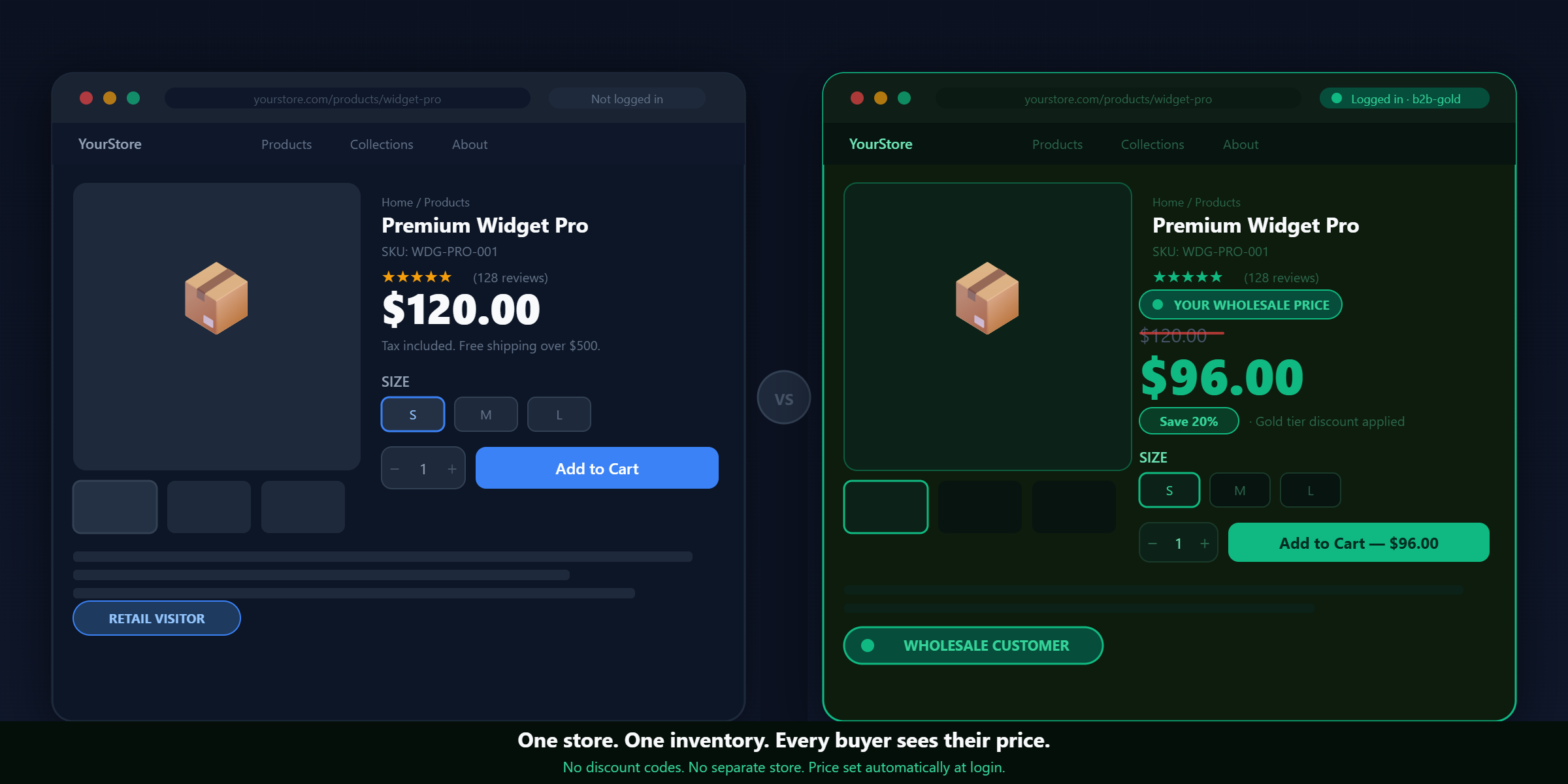
Multiple customer tiers
A flat “20% off for all wholesale buyers” is the starting point. The more powerful setup uses tiers — different discount levels for different types of buyers, reflecting their volume, their tenure, and their value to your business.
A typical tier structure:
| Tier | Customer tag | Discount | Qualifies when |
|---|---|---|---|
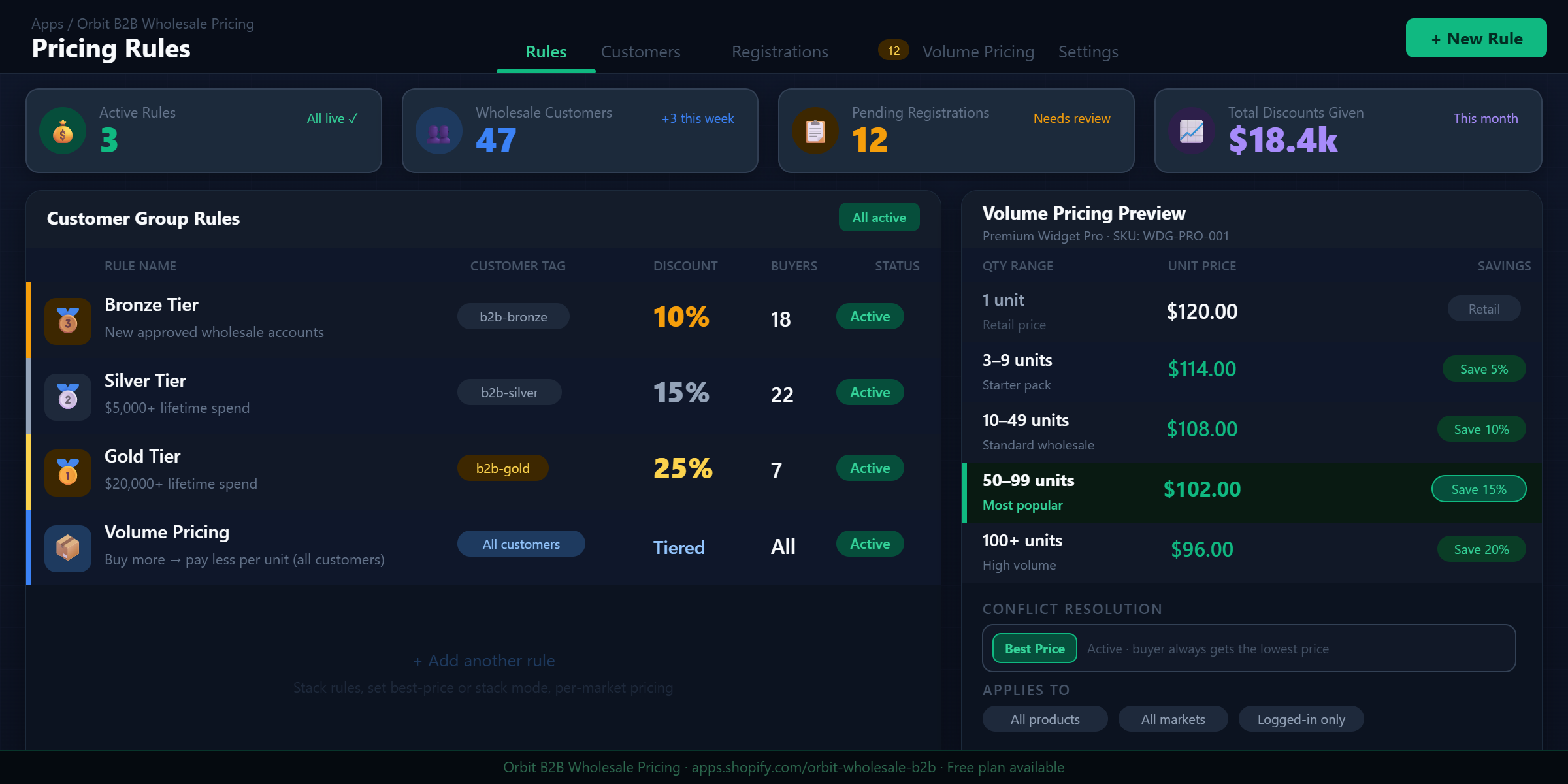
| Bronze | b2b-bronze | 10% off | New B2B account, approved by you |
| Silver | b2b-silver | 15% off | $5,000+ lifetime spend |
| Gold | b2b-gold | 25% off | $20,000+ lifetime spend |
| Platinum | b2b-platinum | 30% off + payment terms | By invitation, $50k+ annually |
Each tier is a separate pricing rule in the app, each targeting a different customer tag. A buyer’s tier is determined by their tag — move them from Bronze to Silver by updating the tag in their Shopify customer profile, and they see the new price on their next login.
This structure creates a real loyalty mechanic. A Gold buyer who’s been with you for three years isn’t just getting a better price — they know that if they move their purchasing elsewhere and lose volume, they lose the Gold tier. The pricing structure becomes a retention tool.
Volume pricing — how it works and how to set it
Volume pricing (also called quantity break pricing or tiered pricing) rewards larger individual orders. The more units ordered in a single transaction, the lower the per-unit price.
This is different from customer group pricing, which is based on who the buyer is. Volume pricing is based on what they’re ordering in a specific transaction. The two can coexist — a Gold customer who orders 50 units gets their Gold discount plus their volume break.
A standard volume pricing structure for a wholesale context:
| Quantity in order | Discount applied | Example: $50 product |
|---|---|---|
| 1–2 units | 0% (full wholesale price) | $40.00 (already 20% off retail) |
| 3–9 units | 5% off | $38.00 |
| 10–49 units | 10% off | $36.00 |
| 50–99 units | 15% off | $34.00 |
| 100+ units | 20% off | $32.00 |
This table is displayed live on the product page — not buried in a terms document, not revealed at checkout. The buyer sees the tiers, understands the incentive, and can choose their quantity accordingly. Merchants who implement visible volume pricing consistently report higher average order values because buyers consciously choose to order more to hit the next tier.
The psychology is simple: a buyer who’s planning to order 8 units sees they’re two units away from 10% off. In most cases, they round up to 10.
Stacking vs. best price — the decision that affects your margins
When a buyer qualifies for both a customer group discount and a volume break, two things can happen:
Best price mode: The buyer gets whichever single discount is higher. A Gold-tier customer (25% off) who orders 50 units (15% off) gets 25% off — the larger of the two discounts applies. The other discount is ignored.
Stack mode: Both discounts apply. 25% off from the Gold tier, then an additional 15% volume discount on top = approximately 36.25% total discount from retail (the discounts compound, not add).
Start with best price mode. It’s predictable, easy to explain to buyers, and safe for your margins. Stack mode is powerful as a time-limited promotion (“this quarter only, all Gold accounts also get their volume discount stacked”) but as a permanent default setting, it can dramatically compress margin on large orders.
Before enabling stack mode permanently, take your five highest-volume SKUs and model what the effective margin looks like at Gold + 50-unit break + stack. If the margin is still healthy, stack might be the right permanent setting. If it’s thin, stick with best price and use stack selectively.
Scope control — protecting your margins by product line
Not everything in your catalog should be discounted equally. A few common scenarios:
- Clearance items: Already reduced below normal wholesale levels. Applying an additional 20% off would sell them at a loss. These should be excluded from wholesale rules.
- New releases: You want control over the initial price period. Exclude new products for the first 30–60 days, then add them to the wholesale scope.
- High-margin products: Can absorb a deeper discount and still be profitable. Consider a separate rule with a higher discount for premium lines where margins allow it.
- Low-margin commodities: May need a reduced discount or fixed-price wholesale rate rather than percentage off.
In a wholesale pricing app, you set the scope of each rule. A rule can target “all products,” a specific collection, or exclude specific collections. You can layer multiple rules for different parts of your catalog, each with different discount levels.
The registration form — replacing email onboarding with self-service
Without a registration system, every new wholesale account requires a manual process: the buyer emails you, you verify them, you create their customer account in Shopify, you assign the tag, you email them back with their login. For five accounts, that’s manageable. For fifty, it’s a part-time job.
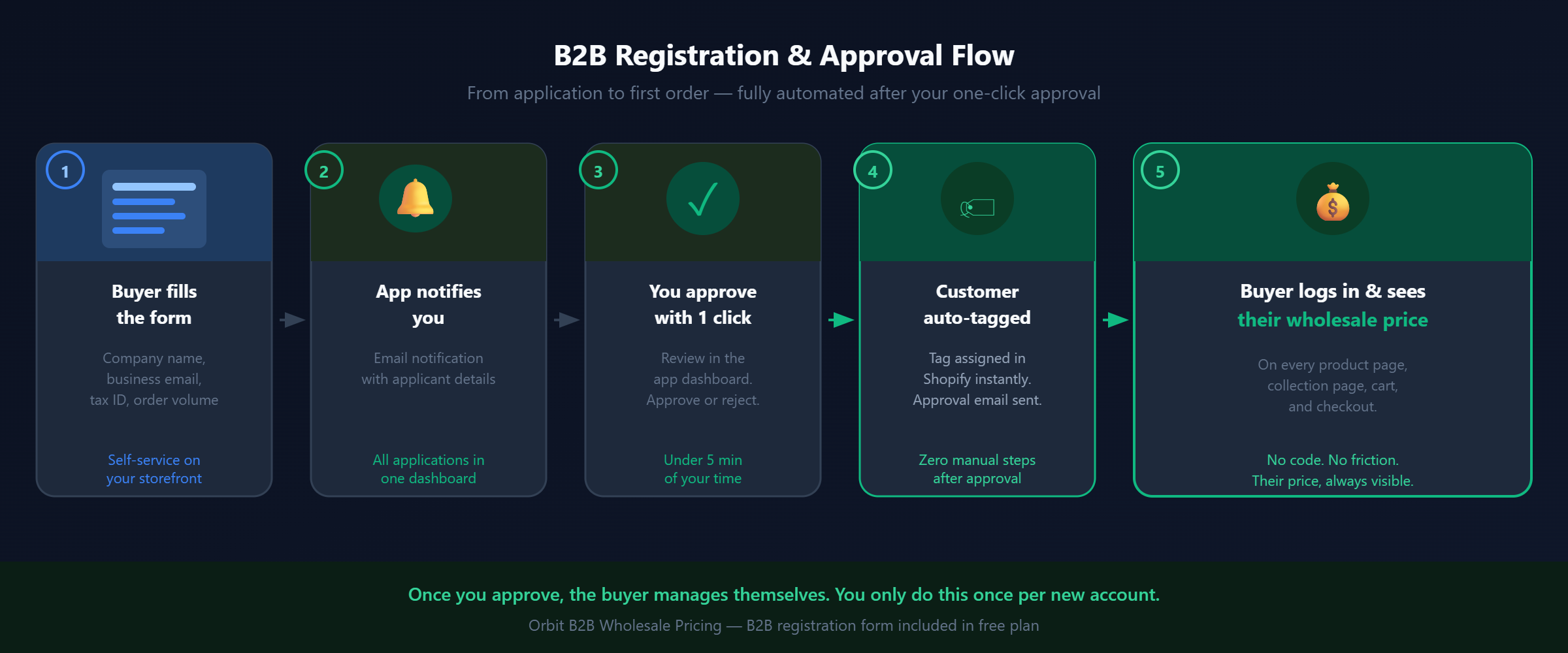
A wholesale registration form replaces that with a self-service flow:
- Publish the registration form on your storefront (usually at /pages/wholesale or /pages/trade-account)
- A prospective B2B buyer finds it and fills in: company name, business type, estimated annual order volume, tax ID or business registration number, and how they heard about you
- You receive a notification and review the application from the app dashboard
- You approve or reject with one click
- If approved: the app automatically tags the customer, and a branded confirmation email goes out telling them their account is active and explaining how to log in
- If rejected: a rejection email goes out (which you can customize)
The buyer logs in and immediately sees their wholesale price. No back-and-forth, no manual tag assignment, no forgotten steps.
A few notes on the registration form configuration:
Auto-approve vs manual review: Most merchants start with manual review and move to auto-approve once they have a sense of the buyer profile. Auto-approve with basic criteria (e.g. applicant provides a business email domain, not gmail.com) works well for high-volume lead flow. Manual review works better when you’re selective about who gets wholesale access.
What fields to ask: Company name and business email are mandatory. Tax ID / ABN / VAT number is useful if you need to verify they’re a legitimate business. “How did you hear about us?” helps with attribution. Don’t ask for too much — a long form reduces completion rates. Five fields is usually enough.
Which tier to assign automatically: New registrations should default to your entry tier (Bronze). Tier upgrades to Silver and Gold happen manually as you review their order history, or automatically via Shopify Flow rules based on cumulative spend.
Per-market pricing for international B2B
If you sell to wholesale buyers in multiple countries, your pricing terms likely differ by market. A distributor agreement in the UK might have different terms than one in the US — different margins, different competitive dynamics, different duties and tax structures. With per-market pricing rules, you can configure this precisely:| Market | Tag | Discount | Currency |
|---|---|---|---|
| United States | wholesale | 20% off | USD |
| United Kingdom | wholesale | 15% off | GBP |
| Australia | wholesale | 18% off | AUD |
| Germany | wholesale | 17% off | EUR |
wholesale tag shopping from the UK sees 15% off in GBP. The same buyer’s account shopping from the US would see 20% off in USD.
This requires Shopify Markets to be configured on your store (available on all plans). Not all wholesale pricing apps support per-market rules — verify before committing to one.
What a Complete Shopify Wholesale Pricing Setup Looks Like
Here’s how all of the above comes together in a single, running B2B pricing system. This is a configuration that handles registration, tiered pricing, volume breaks, and scope control — the full stack.Phase 1: Customer tiers
Define your tiers before creating any rules. The structure below is a starting point — adjust the thresholds to reflect your actual business:| Tier | Tag | Discount | Qualifies when | Review cadence |
|---|---|---|---|---|
| Bronze | b2b-bronze | 10% off | New approved B2B account | — |
| Silver | b2b-silver | 15% off | $5k+ lifetime spend | Review annually |
| Gold | b2b-gold | 25% off | $20k+ lifetime spend | Review annually |
| Platinum | b2b-platinum | 30% off | $50k+ annually, by invitation | Quarterly |
Phase 2: Volume breaks
Add volume pricing on top of your tier structure. These rules apply regardless of customer tag — any buyer hitting the quantity threshold gets the volume discount. Configure discount mode as “best price” initially:| Quantity per product | Volume discount | Effective discount at Gold tier (best price) |
|---|---|---|
| 1–2 units | — | 25% (Gold baseline) |
| 3–9 units | 5% off | 25% (Gold wins) |
| 10–49 units | 10% off | 25% (Gold wins) |
| 50–99 units | 15% off | 25% (Gold wins) |
| 100+ units | 28% off | 28% (volume wins) |
Phase 3: Catalog scoping
Apply the catalog scope to your wholesale rules:- Main catalog rule: applies to all products except your Clearance collection
- New Releases collection: exclude from wholesale rules for the first 60 days after a product launch, then manually add to scope
- Premium Line collection: if margins here are tighter, create a separate rule with a lower discount (e.g. 10% off instead of the standard tier discount)
Phase 4: Registration form
Publish the registration form at/pages/wholesale. Link it from your main navigation under a “Wholesale” or “Trade” menu item. Include it in your footer too.
Configure the form to collect: company name, business email, business type, country, estimated annual order volume, and tax ID. Auto-approve is off for now — you’ll review manually until you have enough volume to justify criteria-based auto-approval.
Customize the approval email to include: confirmation of their tier, their discount percentage, a link to your catalog, and a note about volume pricing. First impression of the wholesale experience matters — a well-written approval email sets a professional tone for the relationship.
Phase 5: Testing the complete flow
Before announcing the wholesale program to buyers, run a complete end-to-end test as a real buyer would experience it:- Submit a registration form application from a test email address
- Review and approve the application in the app dashboard
- Verify the auto-tag was assigned to the test customer account
- Verify the approval email arrived and looks correct
- Log in to your storefront as the test customer
- Verify wholesale prices appear on product pages and collection pages
- Add items to cart — verify cart total reflects the discount
- Proceed to checkout — verify no coupon code is required and the correct price is applied
- Check if volume pricing appears on product pages (the tier table should be visible)
- Test a quantity that triggers a volume break — verify the price updates correctly
- App embed is disabled on the active theme — re-enable it under Themes → Customize → App embeds
- Customer tag has a typo or case mismatch — tags are case-sensitive, verify exactly
- Rule is scoped to a collection that doesn’t include the product you’re testing — check scope settings
- Rule is set to a market that doesn’t match your test location — check market eligibility
The Economics: What Happens When You Get This Right
The difference between a well-configured wholesale pricing system and a manual or code-based approach isn’t just operational efficiency. It changes buyer behavior in measurable ways.Reorder rate
B2B buyers are, by nature, repeat customers. The question is how often they come back, and whether they come back without prompting. When buyers have to contact you to place an order, or remember a discount code, or navigate uncertainty about their price — they reorder when they need to, often after running out. When their price is visible and the ordering process is entirely self-service, they reorder earlier, more often, and in larger quantities because the friction is gone. A buyer who sees their gold-tier price on every product page doesn’t need to mentally commit to “placing a wholesale order” as a task. They can browse casually, see good prices, and add to cart naturally — the same way retail impulse purchasing works, except with B2B intent.Average order value
Visible volume pricing directly influences order size. When a buyer can see that 10 units means a better price per unit than 8 units, they often round up. This effect is most pronounced at tier thresholds — buyers sitting at 8 units will frequently order 10 to hit the next break. The math on AOV increase from visible volume pricing varies by product and buyer type, but it’s consistently directional — AOV goes up when the incentive is visible at the point of the decision.Support and admin overhead
The most direct impact is time. Merchants moving from manual wholesale management (Google Sheets, draft orders, email for every inquiry) to an app-based setup consistently report:- Draft order creation drops to near zero — customers self-serve
- Weekly admin time on wholesale operations drops by 80–90%
- The remaining time shifts to reviewing new registrations — the one task that actually benefits from human judgment
Common Mistakes When Setting Up Shopify Wholesale Pricing
Based on the patterns that appear most often:Mistake 1: Not testing as an actual customer before going live
This seems obvious, but it’s skipped often. The app is configured, the rules look right in the dashboard, and the merchant goes live. A wholesale buyer contacts them to say their price is wrong. Usually, the app embed was disabled on the theme, or there’s a tag mismatch. Test the full flow as a real customer before telling anyone it’s live.Mistake 2: Setting discount percentage without checking margin
A 20% wholesale discount sounds reasonable until you calculate your actual margin at that price point. Landed cost (product + freight + duties), platform fees, payment processing, and shipping costs all need to be factored in. On a product with 45% gross margin at retail, a 20% wholesale discount leaves 25% — still healthy. On a product with 30% gross margin, a 20% discount leaves 10%, which may not be viable depending on your operating costs. Do the margin math on your top 10 SKUs before setting any wholesale discount level. Know your floor.Mistake 3: Including clearance or sale items in wholesale rules
Clearance items are typically already priced below normal wholesale levels. Applying a wholesale rule on top of a clearance price can take items below cost. Exclude your clearance and sale collections from wholesale rules explicitly, or use a fixed-price override for clearance items rather than percentage off.Mistake 4: Not customizing registration and approval emails
The default email templates in most apps are functional but generic. Your wholesale account’s first experience after approval is that email. A well-written approval email — with their discount level, a link to your wholesale catalog, contact information for their account manager, and any relevant policy information (payment terms, minimum order values, return policy for trade accounts) — sets a professional tone and reduces their first set of questions.Mistake 5: Enabling stack mode without modeling the margin impact
Stacking a customer tier discount on top of a volume break sounds appealing — reward the buyer for being both loyal and high-volume. But the compound effect of stacking two discounts can be dramatic. A Gold tier (25% off) stacked with a 100-unit volume break (20% off) doesn’t give 45% off — it gives 40% off (25% off base, then 20% of the remaining 75% = another 15% off retail). At certain margin structures, this can make large B2B orders unprofitable. Model it before enabling permanently.Which Approach Fits Your Situation
| Situation | Recommendation | Why |
|---|---|---|
| Fewer than 5 wholesale accounts, low order frequency | Discount codes | No overhead justified; codes work fine at this scale |
| Large B2B operation, separate catalog, dedicated team | Separate wholesale store | Volume and team size justify the maintenance overhead |
| 10+ accounts, growing B2B channel, shared catalog | Wholesale pricing app | Scales without doubling your operational work |
| Multiple customer tiers with different discount levels | Wholesale pricing app only | Discount codes can’t cleanly separate tiers |
| Want volume pricing visible on product pages | Wholesale pricing app only | Neither codes nor separate store can do this natively |
| International B2B with different terms per country | Wholesale pricing app with market rules | Per-market rules + Shopify Markets handle this cleanly |
| Want buyers to self-register without manual onboarding | App with registration form | Registration → approval → auto-tag flow eliminates email back-and-forth |
Frequently Asked Questions
Does any of this require Shopify Plus?
No. All three approaches work on Basic, Shopify, and Advanced plans. Shopify Plus adds native B2B features — company accounts, payment terms, B2B-specific checkout — but the wholesale pricing app approach gives you the pricing layer without it. Most merchants who need wholesale pricing, not net-30 terms or complex company account structures, don’t need Plus.Will wholesale prices show on product pages, or only at checkout?
With discount codes: only at checkout. The buyer sees retail prices on the product page, collection page, and in cart — the discount appears only when they enter the code at checkout. With a wholesale pricing app: prices show on the product page, collection page, cart, and checkout. The buyer sees their price everywhere, immediately upon login. For B2B buyers doing margin calculations before building a cart, the product page is where the decision happens — the checkout display is irrelevant if they’ve already abandoned.Can I give different discounts to different customers on the same store?
With discount codes: not cleanly. You’d need multiple codes, one per tier, all in circulation simultaneously. With a wholesale pricing app: yes — each pricing rule targets a specific customer tag. A customer taggedb2b-gold sees 25% off. A customer tagged b2b-bronze sees 10% off. The same product page, the same store, different prices for different buyers.
What does a buyer see when they’re logged out?
Retail prices. Wholesale pricing is tied to the authenticated session — the app checks the logged-in customer’s tags to resolve which rule applies. A logged-out visitor, a retail customer, or anyone without a wholesale tag sees the standard retail price. This is correct behavior: the price belongs to the account, not to the URL.Can I exclude specific products or collections from wholesale rules?
Yes. When creating a rule, you can scope it to specific collections, or set your rule to apply to all products and then add exclusions. A clearance collection, a new-arrivals collection, or a premium line can all be excluded — those products show retail prices even to tagged customers.How do I handle a customer who qualifies for both a customer group discount and a volume break?
This is controlled by your discount mode setting. “Best price” applies whichever single discount is larger. “Stack” applies both discounts on top of each other. Best price is the safer default — it’s predictable and easier to explain. Stack is more powerful as a promotion tool but can significantly compress margins on large orders if left on permanently. Model the margin impact on your highest-volume SKUs before deciding.What happens to wholesale prices if a customer changes their email address?
Nothing — pricing is tied to the customer’s Shopify account (their customer ID), not their email address. If you update their email, their tags and pricing rules stay intact.Does the wholesale pricing app affect Shopify’s native checkout or payment processing?
No. The discount is applied via Shopify’s native Discount Functions API, which runs inside Shopify’s checkout. It shows up as a line-item discount in the order, behaves like any other Shopify discount, and is visible in the order details in your admin. Payment processing, taxes, and fulfillment all work exactly as they do for any other order.Can I set a minimum order value for wholesale accounts?
This depends on the app. Some wholesale pricing apps include minimum order value (MOV) enforcement — a cart validation step that blocks checkout if the order doesn’t meet a minimum. Others don’t. If minimum order enforcement matters for your wholesale channel, look for it specifically when evaluating apps.Does this work with Shopify Markets for multi-currency stores?
It can, depending on the app. Look for an app that supports “market eligibility” on pricing rules — this allows you to set different discount rules per Shopify Market. If the app doesn’t support per-market rules, your wholesale discount applies uniformly across all markets, which may not align with your distributor agreements in different regions.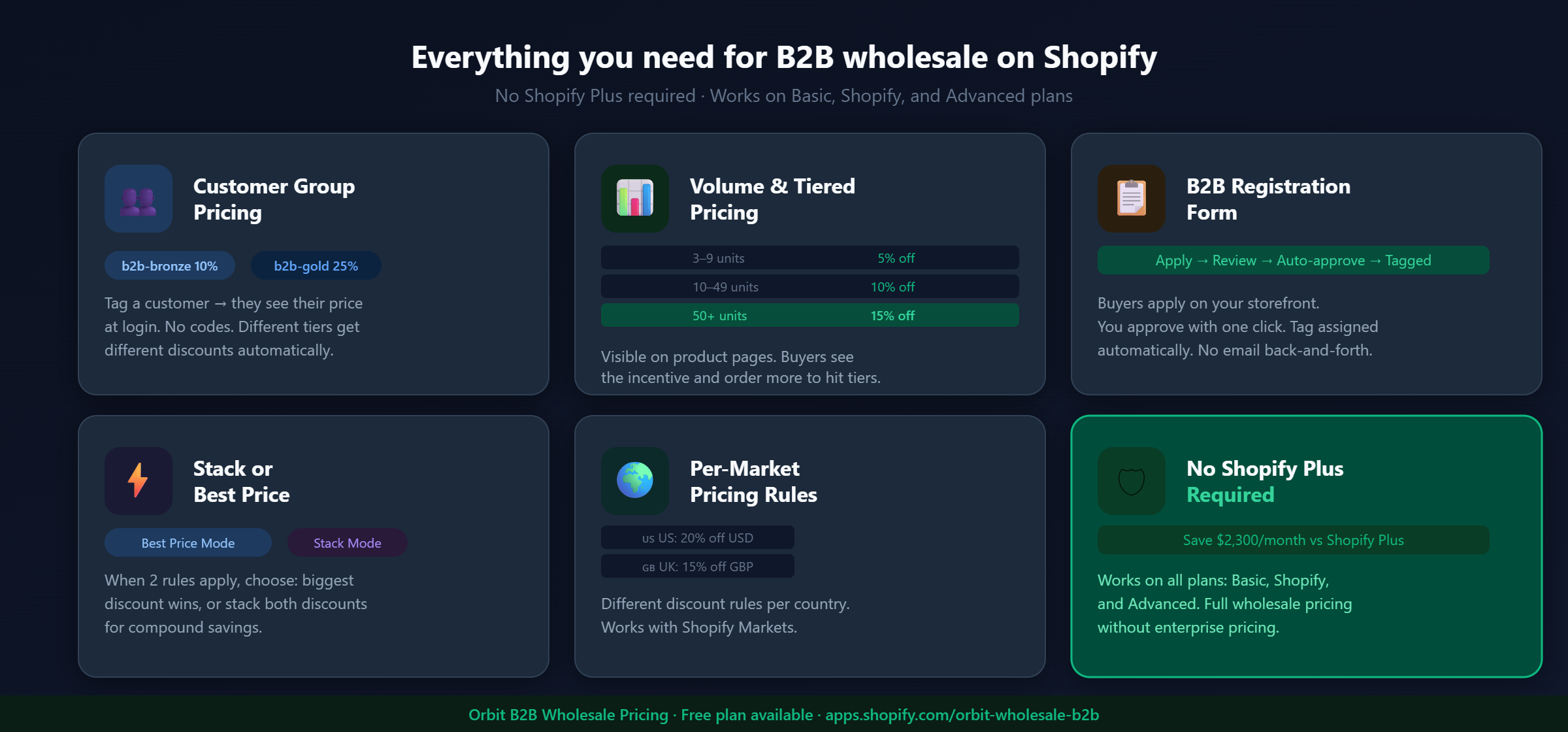
Built for B2B sellers
Stop Losing B2B Buyers to Friction.
Wholesale buyers don’t want to browse like retail shoppers — they want their price, their net terms, and the same cart they ordered last month. Give them all of it, on the Shopify storefront you already have.