
How to Let B2B Buyers Register for Wholesale Accounts on Your Shopify Store?
Every wholesale store starts the same way: a buyer emails “do you offer trade pricing?”, you reply asking for their business details, they send half of them, you create a customer record by hand, tag it, email them back to say they’re set up, and they email again a week later asking why they still can’t see wholesale prices. Multiply that thread by every prospect, and your inbox is your onboarding system.
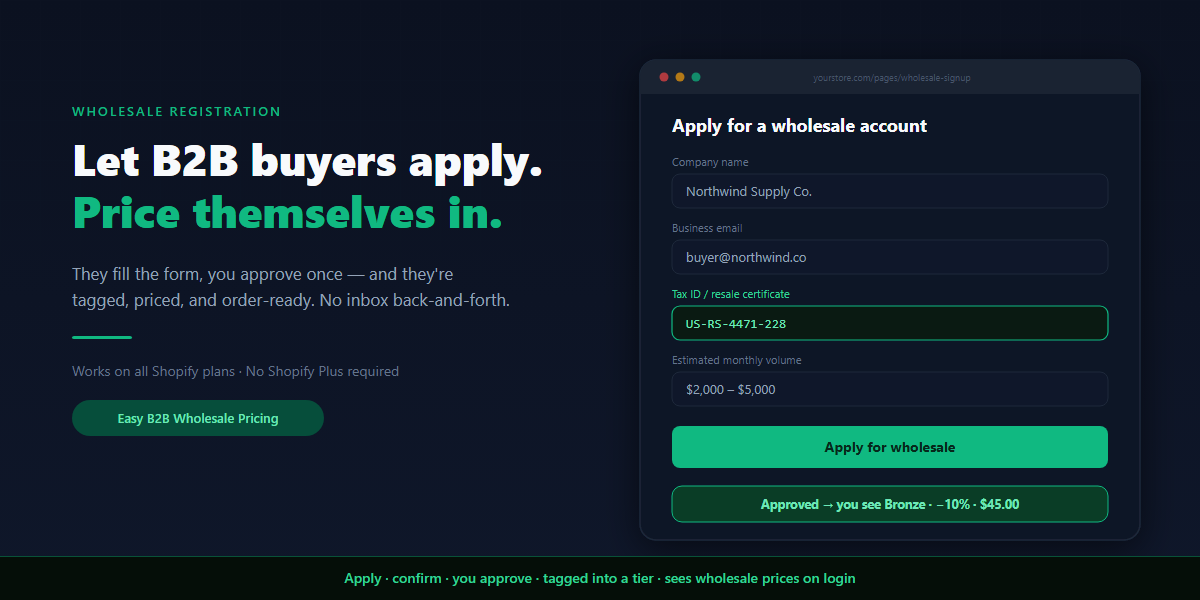
There’s a better way, and it’s the thing most B2B-on-Shopify guides skip past: a real Shopify wholesale registration form where buyers apply themselves, you approve with one click, and they’re automatically dropped into the right price tier — seeing their wholesale prices the moment they log in. No back-and-forth, no manual customer creation, no “what’s my price?” follow-ups.
This is a complete guide to building that flow: why Shopify’s default account signup quietly fails wholesale, what the five stages of a real registration flow are, what to put on the form, when to auto-approve versus review by hand, what “approve” should actually do, and how to roll it out without letting the public into your wholesale catalog.
Why Shopify’s default account signup fails wholesale
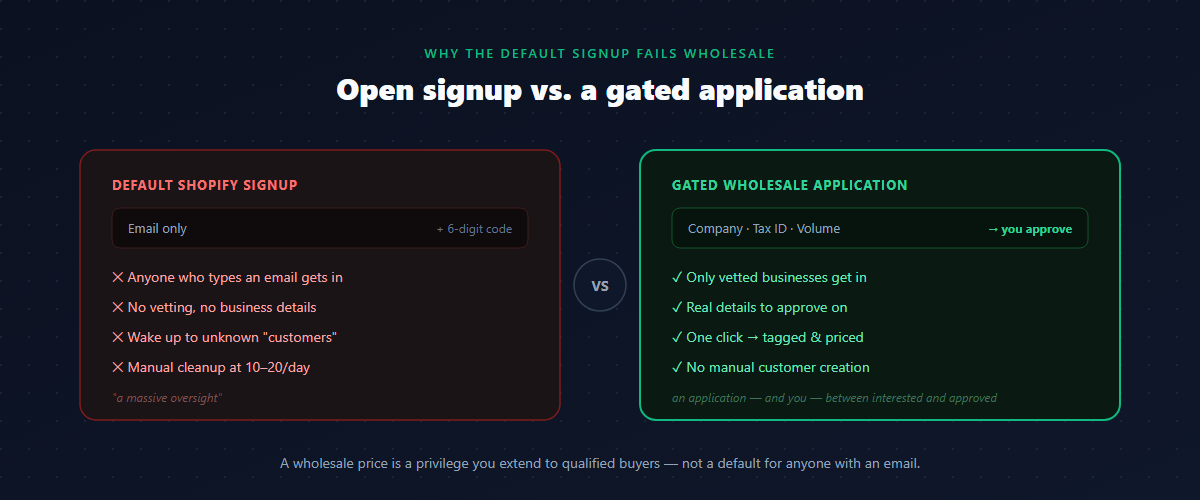
The instinct is to turn on customer accounts and call it done. The problem is that Shopify’s native signup answers the wrong question. It asks “does this person want an account?” when wholesale needs to ask “is this person a real business I want to sell to at trade prices?”
Out of the box, anyone who enters an email gets in. On the newer B2B login, a visitor types an email, receives a 6-digit code, and they’re a customer — your store “automatically creates new customers for anyone.” Merchants describe waking up to a pile of new “customers” they don’t recognize, with no way to tell a genuine reseller from a retail shopper who just wanted to see if hidden prices were cheaper. One merchant called the missing application-and-approval step a “massive oversight” in Shopify’s B2B design — and they’re not wrong.
That gap creates three predictable problems:
- No vetting. A wholesale price is a privilege you extend to qualified businesses. Open signup hands it to everyone who can type an email.
- Manual cleanup. Without an application, real resellers “miss the instructions,” self-create plain accounts, and your team ends up deleting and recreating records by hand — “a tedious task when you have 10–20 new applications a day.”
- No structure. A bare email gives you nothing to approve on. You don’t know their company, their tax status, or how much they intend to buy.
A wholesale registration form fixes all three by putting an application — and you — between “interested” and “approved.”
What a real wholesale registration flow looks like
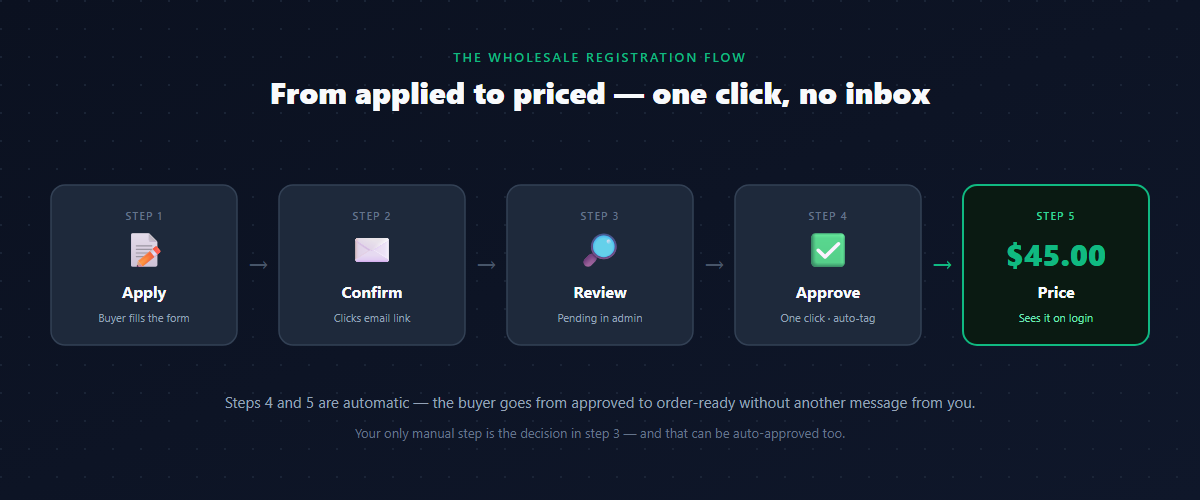
A proper flow has five stages. Each one exists to solve a specific failure of the bare-signup approach.
- Apply. The buyer fills in a wholesale registration form on your store — company details, contact, and whatever you need to qualify them.
- Confirm. They click a link in a confirmation email, proving the address is real. This alone kills bots and typo’d emails before they reach your review queue.
- Review. The application lands in your admin as pending. You see who they are and decide.
- Approve. One click creates (or attaches) their Shopify customer, assigns them to a price group, and tags them.
- Price. They log in and immediately see their wholesale prices — on the product page, in the cart, at checkout. No code, no email, no waiting.
The whole point is that stages 4 and 5 are automatic. The buyer goes from “approved” to “ready to order” without another message from you — which is exactly the onboarding gap most stores leave open. Your only manual step is the decision in stage 3, and even that can be automated when you don’t need it.
What to put on the registration form
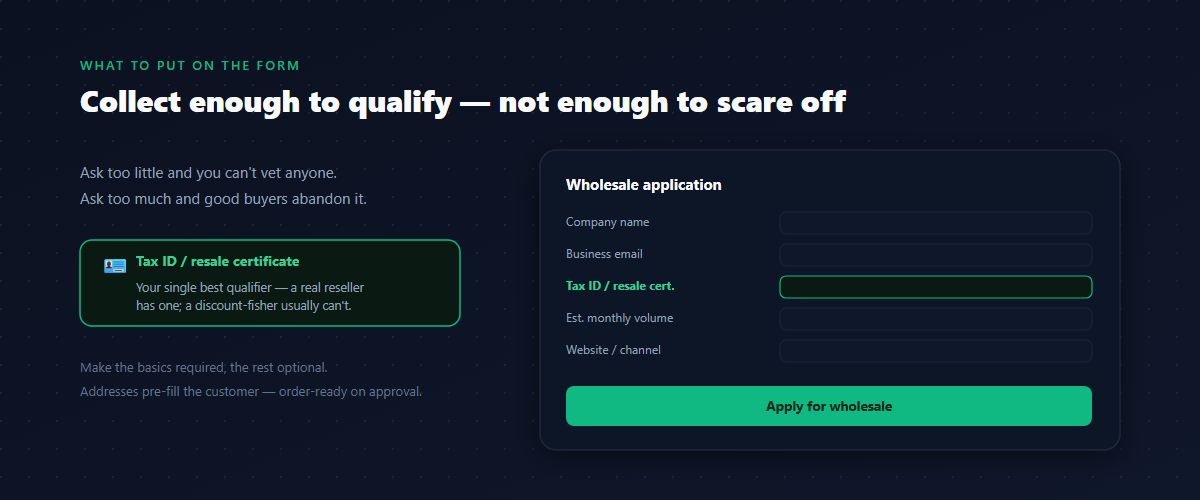
The form is where you collect everything you need to make the approve/reject call. Ask for too little and you can’t qualify anyone; ask for too much and good buyers abandon it. A field set that works for most B2B stores:
| Field | Why you collect it |
|---|---|
| First & last name | The contact you’ll actually deal with |
| Business email | Their login and where approval lands |
| Company name | Who you’re trading with; becomes the account name |
| Phone | Faster than email when an order has a problem |
| Billing & shipping address | Pre-fills the customer so they’re order-ready on approval |
| Tax ID / resale certificate / VAT | Proof they’re a real reseller — your single best qualifier |
| Website or sales channel | A 10-second sniff test for legitimacy |
| Estimated monthly order volume | Helps you decide their starting tier (Bronze vs Silver) |
The tax ID or resale certificate is the field that does the most work. A real wholesale buyer has one and supplies it without thinking; a retail shopper fishing for a discount usually can’t. Make the basics required and the nice-to-haves optional — a long mandatory form is the fastest way to lose a legitimate applicant.
One practical note: capture the address fields with proper country and province codes, not free text. When you approve, those map straight onto the Shopify customer as a usable shipping address, so the buyer is order-ready the instant they’re in.
Email confirmation: keep bots and typos out
Before an application ever reaches your review queue, it’s worth making the buyer confirm their email. The flow is simple: on submit, the application is held in an unconfirmed state and a confirmation link is emailed; only when they click it does it become a real pending application you can see.
This one step quietly removes a whole class of garbage — bots, fat-fingered addresses, and people who aren’t serious enough to click a link. It also guarantees the email you’ll later send approval to actually works. For a store taking real volume, turning on confirmation is the difference between a review queue full of qualified humans and one full of noise. (Stale unconfirmed applications can simply expire after a day so they never clutter the list.)
It’s optional — a low-volume store that vets every applicant by hand may not need it — but the moment you’re getting more than a trickle of signups, switch it on.
Auto-approve vs. manual review
Once an application is confirmed, you decide who gets in. There are two modes, and the right choice depends entirely on your risk tolerance.
Manual review holds every application as pending until you approve it. Use it when wholesale access is genuinely gated — you only sell to vetted partners, your prices are sensitive, or your margins don’t survive the wrong buyer getting trade rates. This is the default for most serious B2B stores, and it’s what merchants mean when they say they want to “keep it secure” and only sell “to our wholesaler partners.”
Auto-approve creates the customer and assigns the tier the moment a confirmed application comes in — no human step. Use it when your wholesale tier is low-risk (a modest first-tier discount), when volume is high enough that manual review would be a bottleneck, or when the resale-certificate field already does enough filtering for you. You’re trading a little control for a lot of speed.
A common middle path: auto-approve everyone into your lowest tier (Bronze, a modest discount), then promote the accounts that prove themselves to Silver or Gold by hand. New buyers get in instantly; your best rates still require a human nod.
What “approve” should actually do
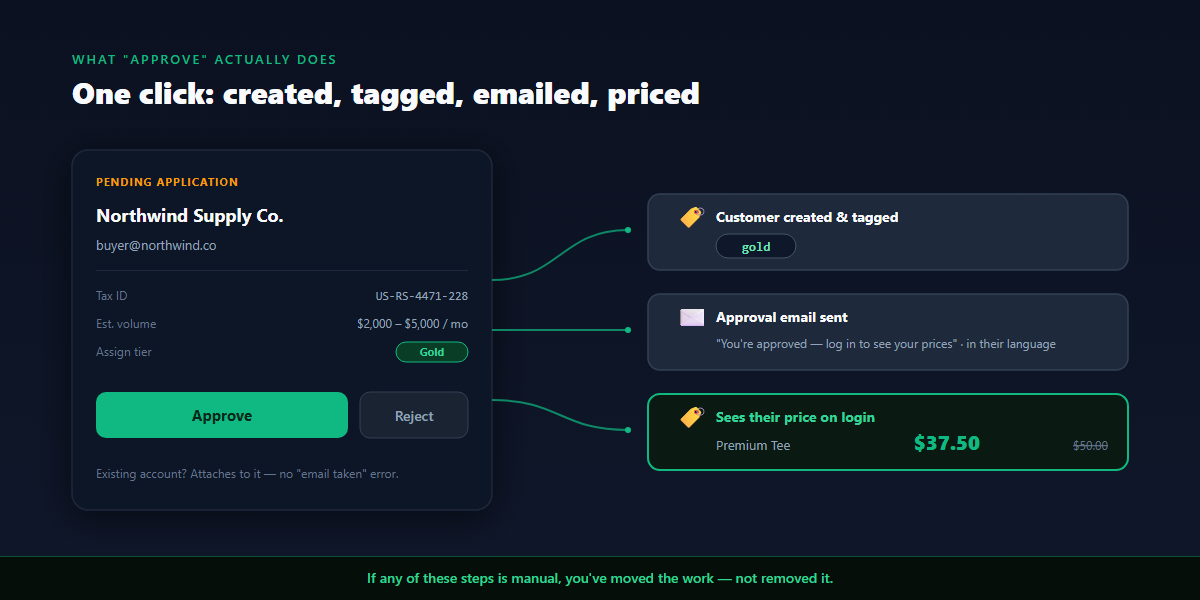
This is the stage that separates a real registration system from a glorified contact form. When you click Approve, a chain of things should happen automatically — and if any of them is manual, you’ve just moved the work, not removed it.
A proper approval does all of this in one click:
- Creates the Shopify customer from the application — or, if that email already has an account, attaches to the existing customer instead of erroring on “email already taken.”
- Assigns them to a price group — Bronze, Silver, or Gold — so a pricing rule already knows what to charge them.
- Tags the customer with that group’s tag (
bronze,silver,gold) on their Shopify record. - Makes the price visible to the discount engine so their wholesale prices show up immediately, not just at checkout.
- Sends an approval email welcoming them and pointing them to log in.
The buyer logs in and sees their tier price — on a $50 item, $45 as Bronze, $42.50 as Silver, $37.50 as Gold. They never see the tag or the rule; they just see their price. That’s the moment the whole flow pays off, and it happened without you touching a spreadsheet.
If you’ve already set up customer group pricing, approval simply drops the new buyer into a group you’ve already priced. Registration is the acquisition front-end; group pricing is the engine behind it.
Existing customers and company teams
Two real-world wrinkles trip up naive registration systems, and both are worth handling from day one.
The buyer already has an account. Plenty of wholesale applicants have shopped with you at retail before. A flow that blindly calls “create customer” fails with email has already been taken and leaves the buyer stuck. The right behavior is to detect the existing account by email and attach the wholesale group to it — same person, same record, now with their trade tier added. Their order history stays intact.
The buyer is one of several at a company. A distributor might have a buyer, an assistant, and an accounts-payable contact, all needing access under one company. A registration flow built for this lets the first person register the company, then share an invite link so colleagues join the same company and inherit its tier automatically — no re-vetting each person. For a solo applicant, none of this gets in the way; it’s just there when you need it.
The approval and rejection emails
Every state change should tell the buyer what happened, in their language. Three emails carry the flow:
- Confirmation — “click to confirm your email” (the gatekeeper before review).
- Approval — “you’re approved, here’s how to log in and see your prices.” For a company registration, include the team invite link so the contact can bring colleagues in.
- Rejection — and this is the one most stores get wrong. A rejection shouldn’t be a dead end. Include a short reason and a link to edit and resubmit — most rejections are a missing resale certificate or a typo’d company name, not a “no.” A resubmit link turns a rejection into a correction instead of a lost customer.
If you sell internationally, these emails should send in the applicant’s language, not yours. A German buyer who gets an approval email in English is a buyer who’s slightly less sure they’re dealing with a real operation. Localized templates are a small touch that reads as professionalism.
Comparing the approaches
Merchants reach for four different setups. Here’s where each one actually lands:
Manual email. The buyer emails, you create everything by hand. Works for your first five accounts; collapses at twenty. This is the “tedious task with 10–20 applications a day” everyone’s trying to escape.
Google Form / Typeform. A real form, but it’s disconnected from Shopify. You still copy each submission into a customer record, tag it by hand, and email the buyer yourself. You’ve made the application nicer and left the onboarding fully manual.
Shopify’s native company account requests. Genuinely useful, but it’s a B2B feature tied to the company/location model and the heavier B2B setup — and on most plans the native B2B pricing it pairs with sits behind Shopify Plus. For a store that just wants tagged wholesale customers with trade prices, it’s more machinery than the job needs.
An in-app registration flow. The form, the confirmation, the review queue, the one-click approve that creates-or-attaches the customer, tags them, and shows their price, plus the emails — all wired together on any Shopify plan. This is the version that actually removes the manual work instead of relocating it.
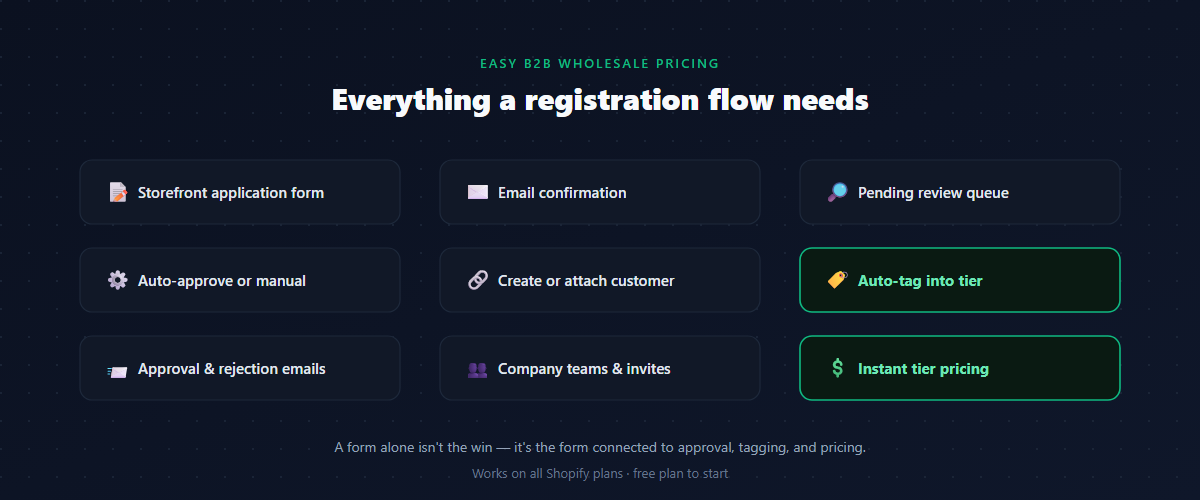
The honest summary: a form alone isn’t the win. The win is the form connected to approval, tagging, and pricing, so a confirmed application becomes a priced, order-ready customer with one click.
A worked example
A homewares and apparel brand sells direct-to-consumer and to about 60 stockists, with roughly 60% of revenue coming from wholesale. Before a registration flow, every new stockist meant an email thread: request details, create the customer, tag it bronze, reply to confirm, then field the inevitable “I still don’t see wholesale prices” message a few days later.
After putting up a registration form:
- A prospective stockist fills in the form — company, contact, address, resale certificate, estimated volume — and confirms their email.
- The application lands in the admin as pending. The owner glances at the resale certificate and company site, and clicks Approve, picking Bronze.
- That one click creates the Shopify customer, tags it
bronze, and assigns the Bronze group. An approval email goes out automatically. - The buyer logs in and sees 10% off across the catalog — $45 on a $50 line — with no code and no follow-up.
- Stockists who grow get promoted to Silver (15%) or Gold (25%) by hand; the top dozen accounts are Gold.
The “what’s my price?” emails stopped, and onboarding a new account went from a multi-message thread to a form submission and a single click. Wholesale is 60% of the business; the registration form is what lets it scale without scaling the inbox.
Roll it out without breaking anything
Before you point real buyers at the form, walk the whole path as a test applicant:
- Submit the form with a test email and confirm you receive the confirmation email.
- Click the confirmation link and check the application flips to pending in your admin.
- Approve it into a test group and confirm a Shopify customer is created and tagged correctly.
- Log in as that customer and verify the wholesale price shows on the product page, cart, and checkout — not just at checkout.
- Reject a second test application and confirm the rejection email arrives with a working edit/resubmit link.
- Re-submit with an email that already has an account and confirm it attaches to the existing customer instead of erroring.
If wholesale prices don’t show after approval, the usual culprit is the same one that breaks all tag-based pricing: the customer isn’t carrying the exact tag your rule targets, or they’re browsing while logged out. Check both before anything else.
Common mistakes with wholesale registration
- Leaving signup open. Bare account creation lets anyone in. If wholesale access matters, gate it behind an application you approve.
- A form that doesn’t connect to anything. Google Forms and Typeform collect data but leave the customer creation, tagging, and emailing manual. The connection is the feature.
- Skipping email confirmation at volume. Once signups pick up, an unconfirmed queue fills with bots and typos. Confirmation keeps the review queue human.
- Erroring on existing customers. Wholesale applicants often have a retail account already. Attach to it; don’t fail on “email already taken.”
- Dead-end rejections. A rejection with no resubmit link turns a fixable typo into a lost customer. Give a reason and a way to correct it.
- Approving but not pricing. If approval tags the customer but no rule prices that tag, the buyer logs in to retail prices and emails you anyway. Set up the group pricing before you open the form.
How to set up wholesale registration on Shopify without Plus
Shopify’s native B2B company accounts and account requests are real, but the pricing they pair with leans on Shopify Plus, and the flow is built around the company/location model. On Basic, Shopify, and Advanced plans, a wholesale app adds the registration-to-pricing flow directly.
When choosing one, look for an app that:
- Hosts a customizable registration form on your storefront, with the fields you need to qualify buyers.
- Supports email confirmation to keep the review queue clean.
- Gives you a pending review queue with one-click approve / reject.
- On approve, creates or attaches the Shopify customer (no “email already taken” failures).
- Auto-tags the customer into a price group and makes their wholesale price show immediately.
- Offers both auto-approve and manual review modes.
- Sends confirmation, approval, and rejection emails — localized, with a resubmit link on rejection.
- Handles existing customers and company teams, not just brand-new solo signups.
- Ties registration to customer-group pricing so an approved buyer is instantly priced, not just created.
FAQ
Does a Shopify wholesale registration form require Shopify Plus?
No. Shopify’s native company account requests pair with Plus-tier B2B pricing, but a wholesale app adds a registration form, approval queue, auto-tagging, and tier pricing on Basic, Shopify, and Advanced plans.
Can buyers apply for a wholesale account themselves?
Yes — that’s the point of a registration form. Buyers fill it in on your store, confirm their email, and land in your review queue. You approve, and they’re created, tagged, and priced automatically.
Should I approve wholesale customers automatically or manually?
Manually when wholesale access is gated or prices are sensitive — most serious B2B stores. Automatically when your first tier is low-risk and volume is high. A common middle path is auto-approving into a modest Bronze tier and promoting the rest by hand.
What information should I collect on the form?
Contact name, business email, company name, phone, billing/shipping address, and — most importantly — a tax ID or resale certificate. Estimated order volume and a website help you pick a starting tier. Make the basics required and the rest optional.
What happens when an applicant already has a retail account?
A good registration flow detects the existing account by email and attaches the wholesale group to it, instead of failing on “email already taken.” Their order history is preserved.
Why can’t a customer see wholesale prices after I approve them?
Almost always one of two things: the customer record isn’t carrying the exact tag your pricing rule targets, or they’re browsing while logged out (guests see retail by design). Check both first.
If you want B2B buyers to apply for wholesale accounts on your store — fill in a form, confirm their email, and become a tagged, priced, order-ready customer the moment you click approve — Easy B2B Wholesale Pricing handles the whole flow: a storefront registration form, email confirmation, a pending review queue with auto-approve or manual modes, create-or-attach on approval, auto-tagging into Bronze/Silver/Gold groups, localized approval and rejection emails with a resubmit link, company teams, and instant tier pricing — on a free plan you can test before you commit.
Built for B2B sellers
Stop Losing B2B Buyers to Friction.
Wholesale buyers don’t want to browse like retail shoppers — they want their price, their net terms, and the same cart they ordered last month. Give them all of it, on the Shopify storefront you already have.