
A retail shopper and a wholesale distributor land on the same product page. Shopify shows them the same price. That single default is the root of nearly every B2B pricing headache on the platform — and Shopify customer group pricing is how you fix it.
Customer group pricing means a buyer’s price is decided by who they are, not by a code they enter or a store they visit. The distributor sees their negotiated rate the moment they log in. The retail shopper sees full price. A new reseller sees a modest discount; a top account sees their loyalty rate. One store, one catalog, one checkout — and every buyer sees the price that belongs to them.
This is a complete guide to Shopify customer group pricing without Plus: how Shopify identifies a customer, how to organize buyers into groups, how a customer lands in a group, how the pricing rules resolve when a buyer matches more than one, how guest vs. logged-in pricing works, and how to layer volume breaks on top without giving away your margin.
What customer group pricing actually is
Shopify customer group pricing assigns a price tier to a segment of customers rather than to a product. You define the segments — retail, Bronze, Silver, Gold, a specific distributor — and each segment gets its own price on the products you choose.
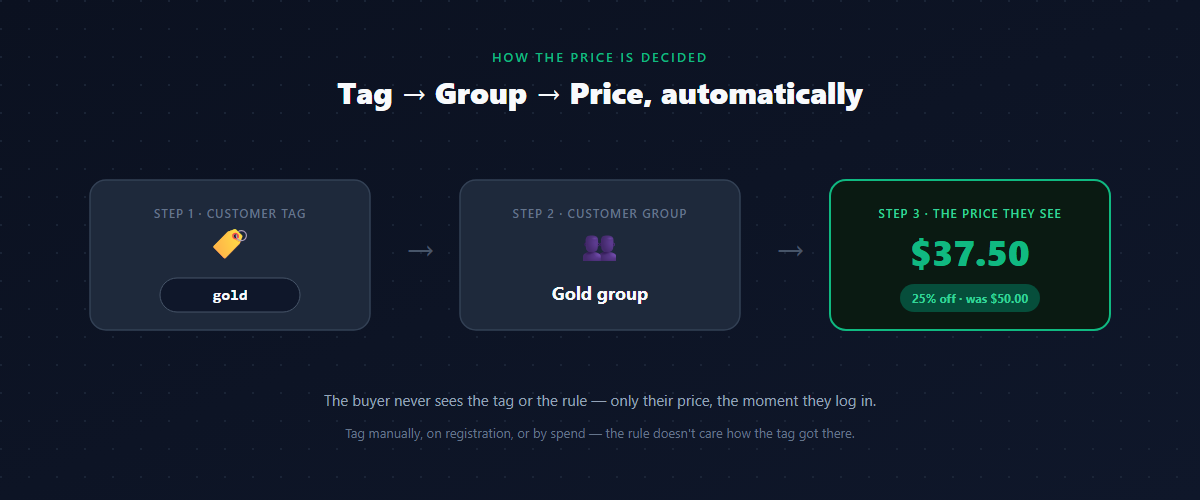
Underneath, Shopify has no native concept of a “customer group” for pricing on Basic, Shopify, or Advanced plans. What it does have is customer tags: free-text labels you can attach to any customer record. A customer-group pricing setup is really three moving parts working together:
- A tag on the customer (
wholesale,gold,distributor-acme). - A group that collects everyone with that tag.
- A rule that says “this group pays this price on these products.”
Get those three concepts straight and the rest of this guide is just detail. The buyer never sees the tag or the rule — they only see their price.
Why discount codes and separate stores don’t solve this
Most merchants reach for one of two workarounds first, and both break in predictable ways.
Discount codes answer “how do I give this customer a discount,” not “how does this customer see their price.” The buyer still browses at retail price, has to remember and enter a code, and never sees their real cost while deciding. Codes also leak — they get shared, posted, and applied by people who were never meant to have them. They’re a promotion mechanism, not a pricing system.
A separate wholesale store gives B2B its own prices, but now you maintain two catalogs, two inventories, and two sets of everything — and a customer who buys both retail and wholesale needs two accounts. It doesn’t scale past a handful of products.
Customer group pricing keeps one store and lets the customer’s identity drive the price. If you’re still weighing all three approaches, start with our guide to how to set up wholesale pricing on Shopify for the full trade-offs. The rest of this article assumes you’ve decided the identity-driven approach is the one that scales.
How Shopify knows who the customer is
Customer group pricing depends on Shopify knowing who is shopping — which means the customer has to be logged in. This is the part that trips people up, so it’s worth being precise.
- Logged-in customer: Shopify knows their account, and therefore their tags. The storefront can show their group price on the product page, in the cart, and at checkout.
- Guest (not logged in): Shopify has no identity, so there are no tags to read. A guest sees your retail price — and that’s the correct default.
This is why a wholesale buyer must have an account and be signed in to see wholesale prices. It’s not a limitation to fight; it’s the mechanism. Your B2B prices stay private from the public storefront precisely because they’re tied to a logged-in identity. We’ll come back to guest-vs-logged-in behavior in its own section, because it’s where most “my prices aren’t showing” tickets come from.
Building your groups: retail, Bronze, Silver, Gold
Start simple. A clean tiered structure most B2B stores can grow into:
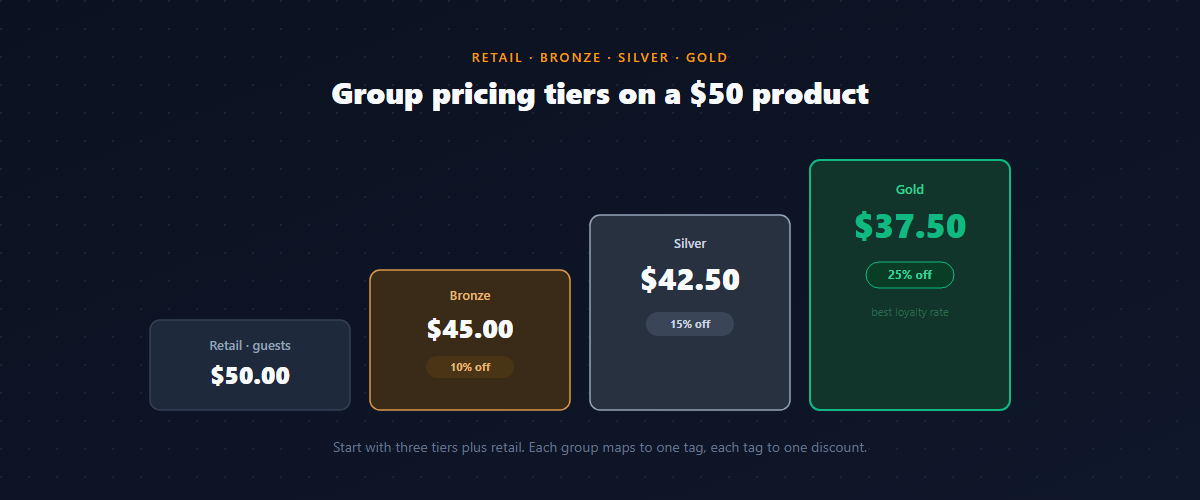
| Group | Tag | Discount off retail | Who it’s for |
|---|---|---|---|
| Retail | (none) | — | The public, guests, regular shoppers |
| Bronze | bronze | 10% off | New or small wholesale accounts |
| Silver | silver | 15% off | Established resellers |
| Gold | gold | 25% off | Top distributors, highest volume |
On a $50 product, that’s $50 retail, $45 Bronze, $42.50 Silver, $37.50 Gold. The exact percentages are yours to set — what matters is that each group maps to a single tag, and each tag maps to a single discount. Keep the tag names lowercase and consistent; a typo (Gold vs gold) is the quietest way to break a customer’s pricing.
Three tiers plus retail is plenty to start. Resist the urge to create ten micro-tiers — you’ll spend more time deciding which tier a customer belongs to than the extra precision is worth. Add tiers when real accounts cluster in a way your current tiers can’t express.
How a customer lands in a group
A group is only useful if customers actually get into it. There are three ways to assign the tag, and most stores use all three:
- Manual tagging. You open a customer record and add
gold. Fine for a handful of key accounts; painful past a few dozen. - Auto-tag on registration. A B2B buyer fills in a wholesale registration form, you (or an auto-approve rule) approve them, and they’re tagged automatically. This is how you scale acquisition — the buyer requests access, gets approved, and starts seeing their price without you touching anything. (We cover the full flow in our guide to letting B2B buyers register for wholesale accounts.)
- Tag by behavior. Promote a customer to the next tier once they cross a spend or order threshold. A Silver account that passes $20k in orders becomes Gold. This rewards loyalty automatically and gives buyers a reason to consolidate their purchasing with you.
The combination matters: manual for your named accounts, auto-tag for inbound signups, behavioral for loyalty progression. Each one feeds the same group system, so the pricing rules don’t care how a customer got their tag — only that they have it.
The rule: who sees what price, on which products
With groups defined and customers tagged, a pricing rule ties them to actual prices. A rule has three dimensions:
- Who — the group it applies to (
gold). - How much — percentage off, fixed amount off, or a fixed price per unit.
- What — the scope: the whole catalog, a collection, or specific products.
Scope is where customer group pricing gets powerful. You rarely want one flat discount across everything. A Gold distributor might get 25% off your core line but only 10% off accessories, and full price on clearance. Per-collection and per-product rules let you protect thin-margin items while being generous where you have room.
A practical default: one catalog-wide rule per group as your baseline, then a few narrower rules for the exceptions. Narrow rules should win over broad ones — which brings us to the single most important thing to understand about customer group pricing.
When a customer matches more than one rule
This is the part that quietly breaks setups, and almost nobody thinks about it until a buyer emails “my discount is wrong.”
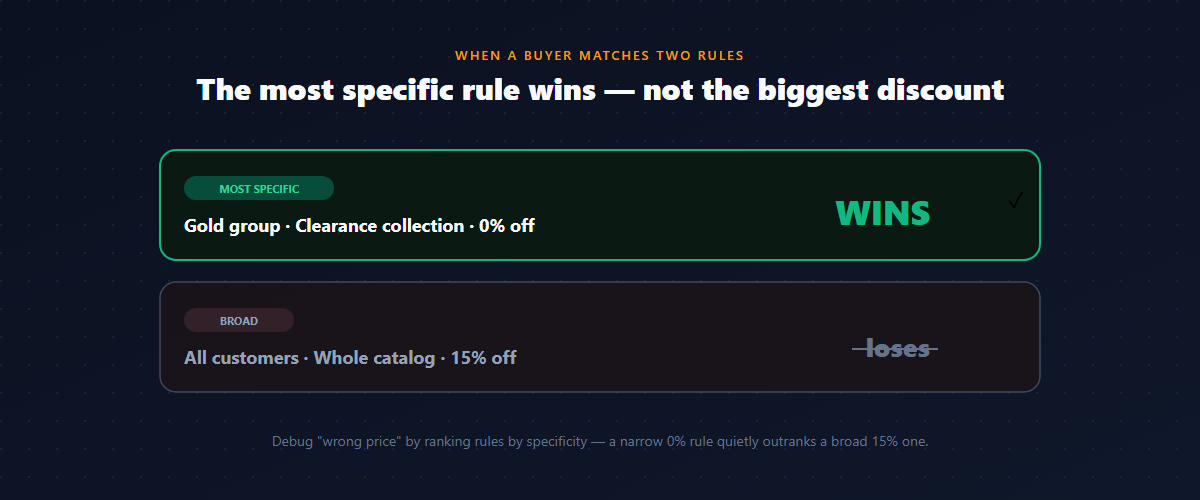
A logged-in Gold buyer can match several rules at once: a catalog-wide “all customers 15% off” rule, a “Gold group 25% off” rule, and a “clearance collection 0% off” rule. Which price do they see?
The answer is specificity — the most specific matching rule wins, not the biggest discount. A rule targeting a specific product beats a rule targeting a collection, which beats a catalog-wide rule. A rule targeting a named group beats a rule targeting “all customers.”
Here’s the trap: specificity is about how narrowly the rule is scoped, not about which discount is larger. A narrowly-scoped “logged-in customers, 0% off this collection” rule will silently outrank a broad “all customers, 15% off” rule — and your Gold buyer ends up paying full price on that collection, wondering where their discount went. The 0% rule isn’t a bug; it’s just more specific, so it wins.
So when a buyer reports the wrong price, don’t start by checking the discount amounts. List every rule the customer matches, rank them by specificity, and find the most specific one. Nine times out of ten, a narrow rule you forgot about is outranking the one you expected to apply.
Guest vs. logged-in pricing
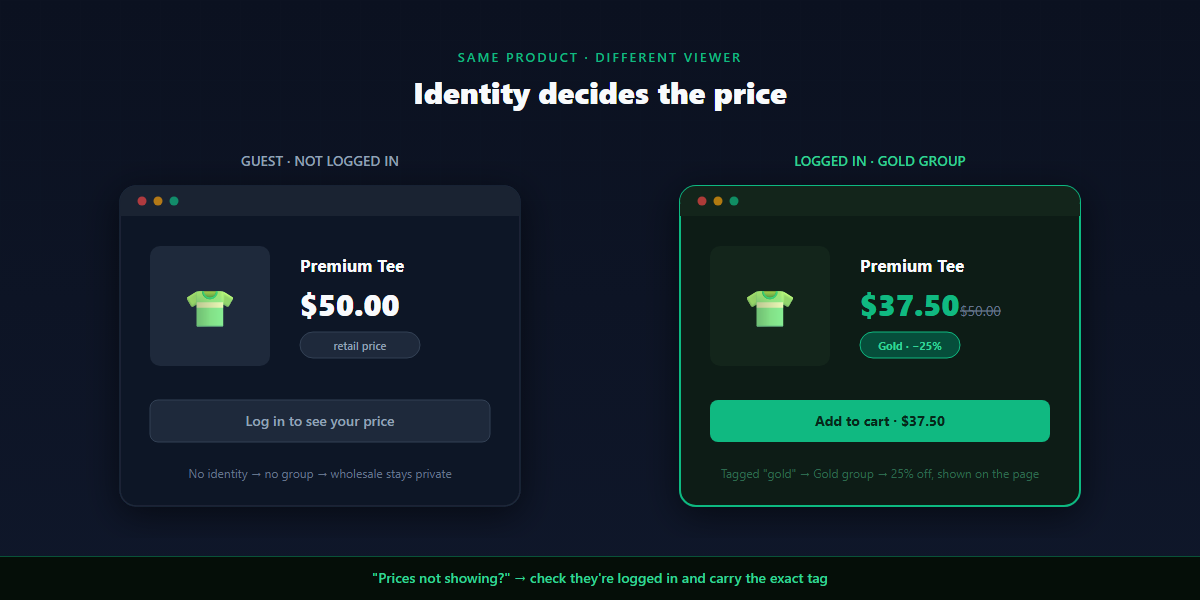
Because customer group pricing is identity-driven, the same product shows two different prices depending on whether the shopper is signed in:
- Guest / public: retail price. No identity, no tags, no group. This keeps your wholesale pricing private — exactly what you want.
- Logged-in group member: their group price, on the product page, in the cart, and at checkout.
You have a design decision here: what should a logged-in retail customer see versus a guest? Usually the same retail price — being logged in doesn’t earn a discount unless the account carries a group tag. The discount comes from the tag, not from merely having an account.
This is also the answer to “why don’t my wholesale prices show?” The buyer is browsing as a guest, or logged into an account that doesn’t carry the group tag. Two checks resolve almost every case: is the customer signed in, and does their record carry the exact tag your rule targets?
Layering volume discounts on top of groups
Customer group pricing answers who the buyer is. A volume discount answers how much they order. The strongest B2B setups use both: a tagged Gold buyer already sees their 25% group price, and a quantity break applies from there.
That combination rewards the two strongest signals in B2B at once. A new Bronze account gets a modest 10% and earns more by ordering volume; a Gold account gets their loyalty rate and a volume break on their largest orders. The group sets the buyer’s baseline price; the volume tier rewards the size of each order on top of it.
Layering two discounts raises an immediate question: do they combine, and if so, how?
Best price vs. stacking
When a buyer qualifies for both a group discount and a volume discount, you control what happens:
- Best price — the buyer gets the larger single discount. A Gold buyer (25%) ordering a volume-break quantity (15%) gets 25%. Predictable and margin-safe.
- Stack — both apply, and the trap is that they compound, not add. 25% then 15% is not 40% off. It’s 0.75 × 0.85 = 0.6375 — about 36% off.
On a $50 product, best-price lands the Gold buyer at $37.50; stacking drops them to about $31.88. That gap is real margin on every unit of every large order. Start in best-price mode, and turn on stacking only where you’ve modeled the compound number against your landed cost — never the naive sum.
Per-market and per-country pricing
Identity isn’t only about wholesale tier. The same logic extends to where a buyer is: a retailer in one market may need different pricing than one in another, on top of currency conversion. Shopify Markets handles presentment currency, but the discount logic — who in which market sees what — still runs through your rules.
For most stores, market-based pricing is a later refinement layered on the group system once the core tiers are stable. Mentioning it here so you know the same who-is-this-buyer framing scales from “wholesale vs retail” all the way to “Gold distributor in Germany.” You don’t need it on day one.
A worked example
A homewares brand sells direct to consumers and to about 60 stockists. Before customer group pricing, stockists emailed for a quote, got a one-off discount code, and browsed the public site at retail prices the entire time. Support fielded “what’s my price on X?” emails weekly.
After setting up groups:
- Retail shoppers and guests see standard prices — unchanged.
- New stockists register through a wholesale form, get auto-tagged Bronze on approval, and immediately see 10% off across the catalog.
- Established stockists are tagged Silver (15%); the top dozen accounts are Gold (25%).
- Core lines carry the full group discount; a thin-margin clearance collection is scoped to 0% for every group, so it never gets discounted twice.
- Gold accounts get a volume break layered on top in best-price mode on their largest orders.
The “what’s my price?” emails stopped — every stockist sees their own price the moment they log in. Onboarding a new account went from a manual email thread to a form submission and one approval click.
Common mistakes with customer group pricing
- Inconsistent tag names.
Gold,gold, andgold(trailing space) are three different tags. Pick a convention — lowercase, no spaces — and never deviate. - Forgetting specificity. A narrow 0% rule outranks a broad 15% rule. When a price looks wrong, rank rules by specificity, not by discount size.
- Expecting guests to see group prices. No login, no identity, no group price. This is by design — it keeps wholesale pricing private.
- One blanket discount across the whole catalog. Thin-margin and clearance lines need narrower rules or they get discounted into the red.
- Turning on stacking without modeling margin. 25% + 15% feels like 40%; it compounds to ~36% — and that gap is margin on your biggest orders.
- Manual tagging at scale. Past a few dozen accounts, tag on registration and by behavior instead of by hand.
How to set up Shopify customer group pricing without Plus
Shopify reserves native customer-segment pricing — company accounts and price lists — for Shopify Plus B2B, which starts well above what most B2B-on-the-side merchants can justify. On every other plan, a wholesale pricing app adds it.
When choosing one, look for an app that:
- Prices by customer tag / group, so the buyer’s identity drives the price automatically.
- Shows the group price on the product page, not just at checkout.
- Supports rule scope — catalog-wide, per-collection, and per-product.
- Resolves overlapping rules by specificity in a way you can predict and inspect.
- Handles guest vs. logged-in behavior cleanly, keeping wholesale prices private.
- Lets you auto-tag customers on wholesale registration.
- Lets group pricing layer with volume discounts, with best-price and stack modes.
- Applies discounts through Shopify’s discount function (not cart scripts, which are Plus-only).
Roll it out without breaking anything
Before you turn group pricing on for real buyers, test as each persona. Create a test customer for one group, and walk the full path:
- As a guest — confirm the product page shows retail price, with no wholesale pricing leaking.
- As a logged-in group member — confirm the group price shows on the product page, cart, and checkout.
- Overlap check — pick a product that matches more than one rule and confirm the most specific rule wins, not the biggest discount.
- Excluded scope — check a clearance product stays full price for every group.
- Layered check — if you’ve added volume breaks, confirm a group buyer at a volume quantity matches your chosen best-price or stack mode.
If a price looks wrong, the usual culprits are a tag mismatch (the customer isn’t in the group you think) or a more specific rule quietly outranking the one you expected.
FAQ
Does customer group pricing require Shopify Plus?
No. Native customer-segment pricing is a Plus feature, but a wholesale pricing app adds tag-based group pricing on Basic, Shopify, and Advanced plans, with the discount applied automatically at checkout.
How does Shopify decide which customer is in which group?
Through customer tags. You tag a customer (gold), a group collects everyone with that tag, and a rule prices that group. The tag can be applied manually, automatically on wholesale registration, or by spend/order behavior.
Why aren’t my wholesale prices showing for a customer?
Almost always one of two things: the customer isn’t logged in (guests see retail by design), or their account doesn’t carry the exact tag your rule targets. Check both before anything else.
What happens when a customer matches more than one pricing rule?
The most specific rule wins — a per-product rule beats a per-collection rule beats a catalog-wide rule. Note that specificity, not the size of the discount, decides — a narrow 0% rule can outrank a broad 15% rule.
Can I show different prices in different countries too?
Yes. The same identity-driven logic extends to market and country with Shopify Markets for currency, layered on top of your group rules. Most stores add this after the core tiers are stable.
Can group pricing combine with volume discounts?
Yes. A group price sets the buyer’s baseline and a volume break applies on top. Choose best-price (the larger single discount) or stack (compound — 25% and 15% is ~36%, not 40%).
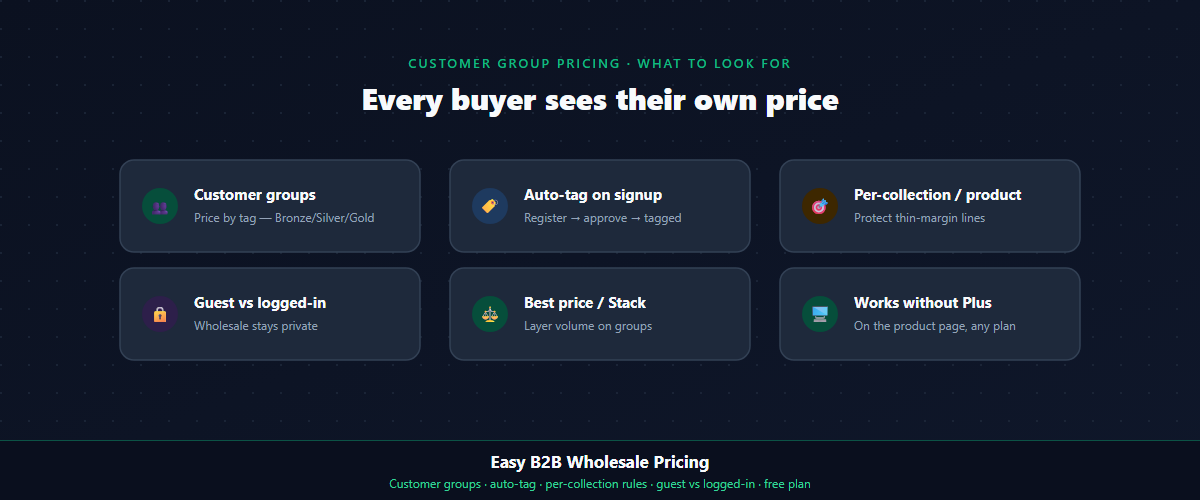
If you want to show every customer their own price on one Shopify store — retail to guests, and Bronze, Silver, or Gold to tagged buyers, with the price visible on the product page — Easy B2B Wholesale Pricing handles tag-based customer groups, per-collection and per-product scope, predictable specificity, guest-vs-logged-in pricing, auto-tagging on registration, and volume layering with best-price or stack modes, on a free plan you can test before you commit.
Built for B2B sellers
Stop Losing B2B Buyers to Friction.
Wholesale buyers don’t want to browse like retail shoppers — they want their price, their net terms, and the same cart they ordered last month. Give them all of it, on the Shopify storefront you already have.