Most stores don’t have a Shopify wholesale pricing strategy. They have a discount-code habit — and a fundamental mismatch in how they price for B2B.
They treat it as a discount problem: “how do I give this customer 20% off?” They create a discount code. They email it out. They move on.
That’s not B2B pricing. That’s a workaround — and it quietly leaks margin, confuses buyers, and falls apart the moment you have more than a handful of accounts.
Real B2B pricing starts with a different question: who is this buyer, and what is their price?
A distributor ordering 500 units a month has a price. A reseller who just signed up has a price. A retailer in Germany has a price. None of them are the same — and none of them should ever see someone else’s price.
The moment you frame it that way, the strategies below stop being a random list of options and start being answers to a single question: what defines this buyer’s price? Get the framing right and the tooling becomes obvious. Get it wrong and you’ll spend the next year patching discount codes.
What Defines a B2B Price
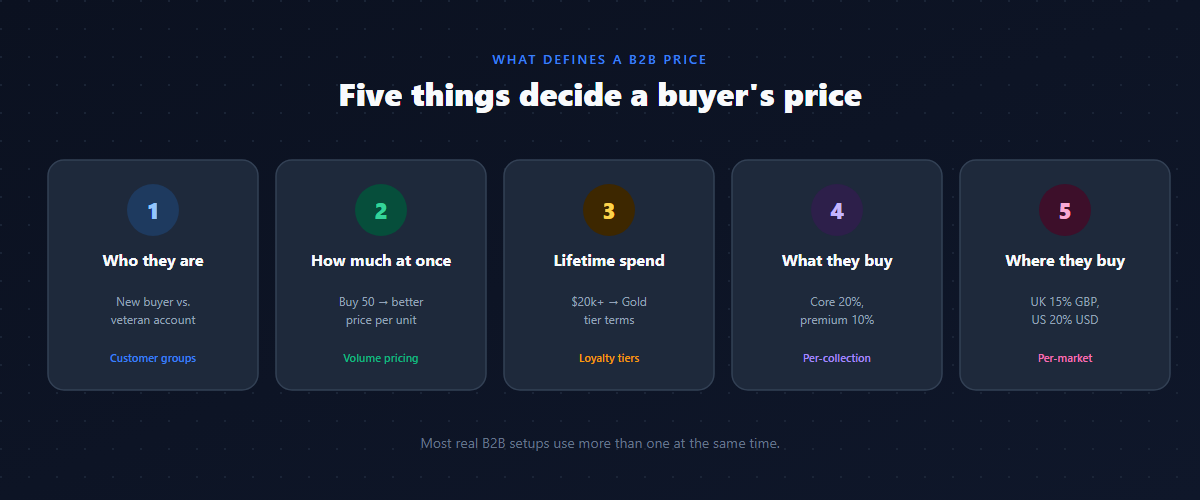
There are five things that can make one buyer’s price different from another’s:
- Who they are — their relationship with you (a brand-new account vs. a veteran distributor).
- How much they order at once — volume changes your fulfillment economics, so it can change the price.
- How much they’ve bought over time — loyalty and lifetime value deserve to be reflected in price.
- What they’re buying — margins differ by product line, so a blanket discount rarely fits the whole catalog.
- Where they’re buying from — geography changes duties, competition, and landed cost.
Each of the five strategies below is one of these five definitions. Almost every real B2B setup uses more than one at the same time — and the interesting decisions (covered later) are about how they interact.
A quick note before the strategies: none of this requires Shopify Plus. Everything here works on Basic, Shopify, and Advanced plans with a wholesale pricing app that resolves each buyer’s price at render time. Where the app matters, it’s called out honestly.
Strategy 1: Price by Who They Are (Customer Group Pricing)
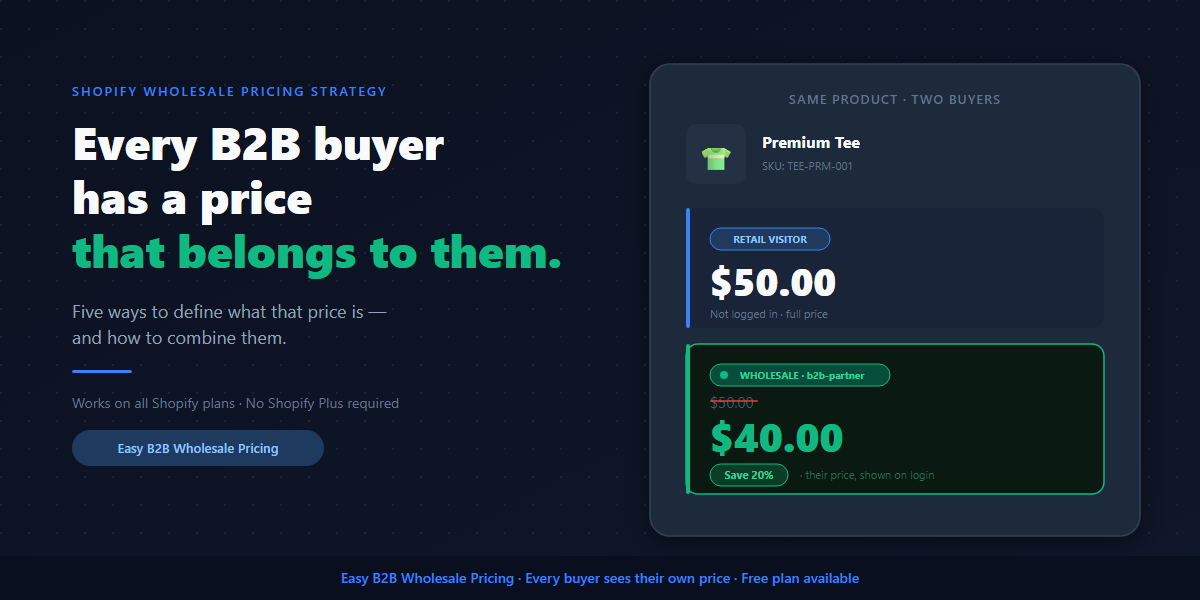
The simplest definition of a price: this buyer is a wholesaler, so their price is 20% below retail.
You tag your wholesale customers (e.g. wholesale, b2b-partner), create a rule that targets that tag, and everyone in that group sees their price — on the product page, in the cart, and at checkout. Not as a code they have to remember. Not as a surprise at the end. Their price, visible from the first moment they land.
| Customer type | Tag | Price on a $50 product |
|---|---|---|
| Retail | (none) | $50.00 |
| Wholesale | wholesale | $40.00 (20% off) |
How it works on Shopify. A wholesale pricing app reads the logged-in customer’s tags and applies the matching rule before the page renders, then enforces the same discount at checkout through Shopify’s native discount function — no coupon code, no manual draft order. The buyer simply sees the right number everywhere.
A real scenario. A homeware brand sells to interior designers. Every approved designer gets the trade tag and sees 25% off the whole catalog the instant they log in. No more “email us for trade pricing” — the price is just there, which means the designer can quote their own client on the spot without a back-and-forth with you.
When this is the right answer: you have one clear type of wholesale customer, everyone in that group should get the same terms, and you want the simplest possible setup.
Where it falls short: it doesn’t distinguish a buyer who signed up yesterday from one who’s ordered for three years. Everyone in the group gets the same deal regardless of contribution — which is exactly the gap Strategy 3 closes.
Strategy 2: Price by How Much They Order (Volume Pricing)
Some things genuinely get cheaper at scale: you save on picking, packing, and shipping when an order consolidates. Volume pricing makes that economics visible to the buyer and turns it into a reason to order more.
You set quantity tiers, and — this is the part most stores get wrong — the buyer sees their tier price live on the product page, not after adding to cart, not at checkout.
| Quantity ordered | Price per unit | Discount |
|---|---|---|
| 1–2 | $50.00 | — |
| 3–9 | $47.50 | 5% off |
| 10–49 | $45.00 | 10% off |
| 50+ | $42.50 | 15% off |
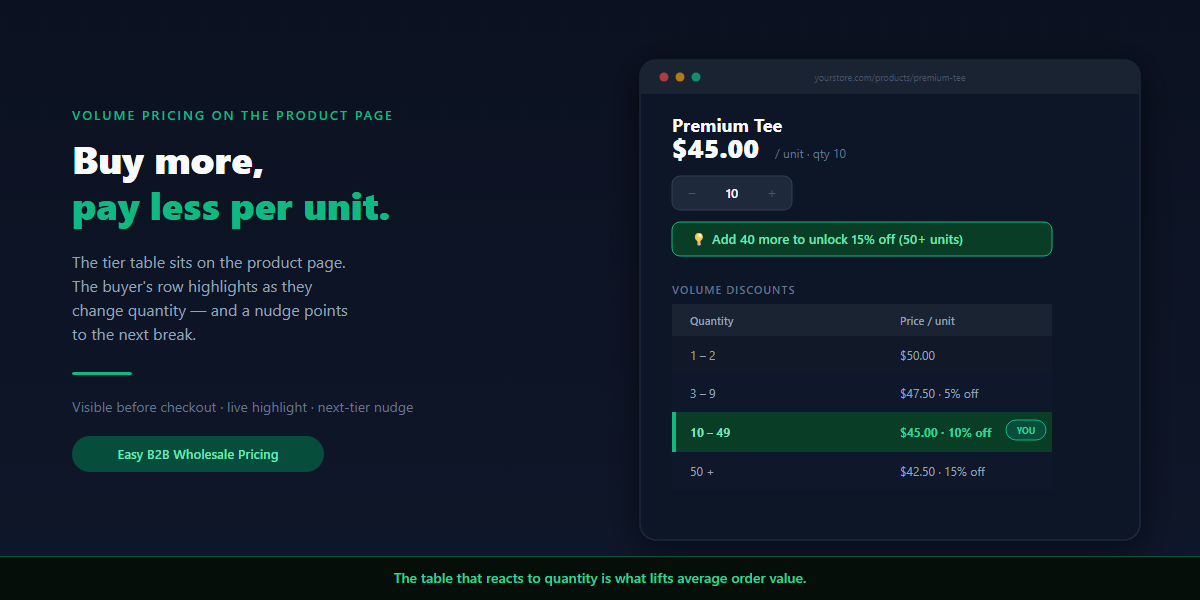
What actually moves order value. A static table is fine; a table that reacts is what changes behavior. The strongest setup does three things on the product page:
- The full table is visible before checkout.
- The row for the buyer’s current quantity highlights live — they watch the per-unit price tick down as they change the number.
- A one-line prompt shows how close they are to the next break: “Add 2 more to unlock 10% off.”
That last nudge is the lever. A buyer heading for 8 units rounds up to 10; a buyer eyeing 40 bumps to 50. It’s the same psychology as a free-shipping progress bar, applied to volume — and it’s the difference between a table that informs and a table that sells.
The margin math you can’t skip. Volume pricing gives away per-unit margin, but your handling cost per order is roughly fixed whether the box holds 6 units or 50. Pushing the same revenue through fewer, larger orders usually offsets most of the discount. Model your top tier against landed cost before you publish it — the 50+ row should still be profitable on its own.
When this is the right answer: you want to raise average order value, your margins genuinely improve at higher quantities, and you sell to buyers who can absorb inventory.
Where it falls short: on its own it ignores who the buyer is — a one-off retail shopper who buys 50 gets the same price as your top distributor. The fix is to layer it on Strategy 1 or 3, covered below.
For a step-by-step on tiers, thresholds, and the product-page nudge, see our deep-dive on setting up a Shopify volume discount.
Strategy 3: Price by How Long They’ve Been Buying (Loyalty Tiers)
A buyer who’s spent $20,000 with you over two years deserves different terms than someone on their first order. Loyalty tiers make that explicit and turn pricing into a retention tool, not just an acquisition one.
You create a tag per tier, assign buyers as they qualify, and map each tier to its own rule.
| Tier | Qualifies when | Tag | Discount |
|---|---|---|---|
| Bronze | New B2B account | b2b-bronze | 10% off |
| Silver | $5k+ lifetime spend | b2b-silver | 15% off |
| Gold | $20k+ lifetime spend | b2b-gold | 25% off |
Make the upgrades automatic. The manual version — you watching spend and retagging by hand — doesn’t scale and you’ll forget. Shopify Flow can watch lifetime spend and retag a customer the moment they cross a threshold; the new price applies on their next login. The buyer feels the reward without you lifting a finger.
A real scenario. A coffee roaster moves cafés from Bronze to Silver automatically at $5k lifetime. The café owner gets an email (“you’ve unlocked Silver pricing — 15% off”) that does double duty: it rewards them and it tells them exactly how much more buying gets them to Gold. That single message drives reorders better than any campaign.
When this is the right answer: you have an established base, you want high-value accounts to consolidate their spend with you, and you want price to function as loyalty.
Where it falls short: thresholds create edge cases. A buyer sitting at $19,900 lifetime will notice they’re one order from Gold and may ask for it early. Decide your policy in advance so your team answers consistently.
Strategy 4: Price by What They’re Buying (Per-Product / Per-Collection Rules)
Not everything should get the same discount. Some products run on thin margins — 20% off would make the sale unprofitable. Others are high-margin and can absorb a deeper cut. Some lines shouldn’t be discounted at all.
Per-product pricing means your wholesale rules follow your actual margin structure instead of a blanket number that only works for part of the catalog.
| Product line | Wholesale discount |
|---|---|
| Core products | 20% off |
| Premium line | 10% off |
| Bundles | 15% off |
| New releases (first 60 days) | 5% off |
| Clearance | 0% — already reduced |
How to keep it maintainable. Target collections, not individual products. Map a rule to your “Clearance” or “Premium” collection and every product that enters or leaves that collection inherits or drops the rule automatically. That turns an unmanageable per-SKU chore into a handful of durable rules.
When this is the right answer: your catalog has meaningfully different margins across categories, and you need to protect margin on some lines while being aggressive on others.
Where it falls short: more rules to reason about as the catalog grows, and it works best only if your product lines map cleanly to collections. If your taxonomy is messy, fix the collections first.
Strategy 5: Price by Where They’re Buying From (Per-Market Pricing)
A distributor in Germany operates under different economics than one in the US: different duties, different competition, different distributor agreements. A single “20% off” rule doesn’t apply equally across markets.
Per-market pricing lets you define a buyer’s price by geography, in their currency.
| Market | Tag | Discount | Currency |
|---|---|---|---|
| United States | wholesale | 20% off | USD |
| United Kingdom | wholesale | 15% off | GBP |
| Germany | wholesale | 18% off | EUR |
How it works on Shopify. This builds on Shopify Markets. A rule scoped to a market only applies to buyers in that market, so the same wholesale tag can mean 20% in the US and 15% in the UK without cloning customers or running separate stores.
When this is the right answer: you actively sell B2B across countries with different agreements, or your landed cost and competitive pressure differ by region.
Where it falls short: it requires Shopify Markets to be set up, and not every wholesale app supports per-market rules — verify before you commit. It also adds a dimension to manage, so only reach for it when geography genuinely changes your pricing.
Combining Strategies: A Worked Example
Most of the value is in the combination. Here’s a realistic setup for an apparel brand with a serious B2B channel, using three strategies at once.
The setup:
- Who they are + loyalty (Strategy 1 + 3): every B2B account is tagged by tier — Bronze 10%, Silver 15%, Gold 25% — upgraded automatically by lifetime spend.
- How much they order (Strategy 2): volume breaks on top — 3–9 = 5%, 10–49 = 10%, 50+ = 15% — with the live tier highlight and next-tier nudge on the product page.
- What they’re buying (Strategy 4): the new-season collection is excluded from discounting for its first 60 days; clearance is excluded entirely.
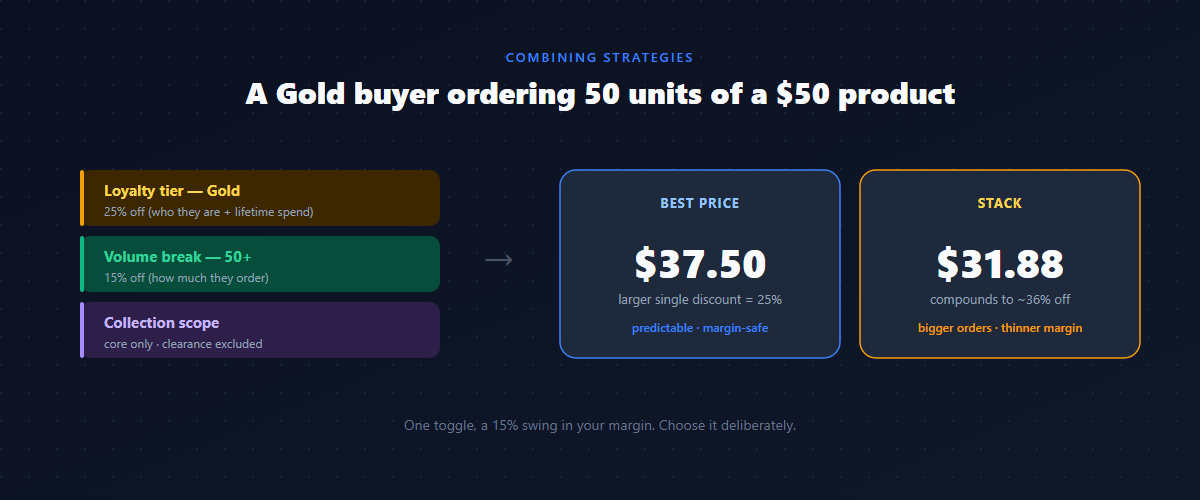
What a Gold buyer sees on a $50 core product, ordering 50 units, with “best price” mode:
- Group discount (Gold): 25% → $37.50/unit
- Volume discount (50+): 15% → $42.50/unit
- Best price picks the larger: 25% → $37.50/unit
Switch the same product to “stack” mode and it compounds (more on that next): 0.75 × 0.85 = 0.6375 → ~36% off → $31.88/unit. Notice that’s a 15% swing in your margin from a single toggle — which is exactly why the next section matters.
When Two Rules Apply: Stack, Best Price, or Specificity
In a real setup a buyer often qualifies for more than one rule. You control the outcome three ways.
Best price — the customer gets whichever single discount is larger. With a 25% group discount and a 15% volume discount, they get 25%. Simple, predictable, margin-safe. Start here.
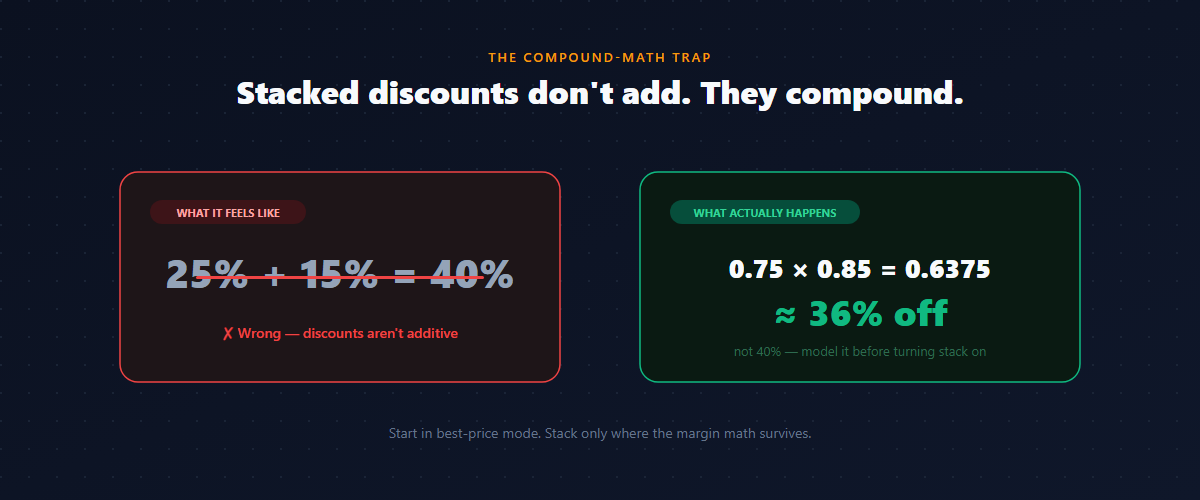
Stack — both apply, and they compound rather than add: 25% then 15% is not 40% off, it’s 0.75 × 0.85 = 0.6375, about 36% off. Powerful as a limited promotion, dangerous as a permanent setting. Model it on your highest-volume products before turning it on.
Specificity — when two rules of the same kind could match, the more specific rule should win. A rule targeting b2b-gold should outrank a rule targeting “all logged-in customers.” This matters more than people expect: a broad rule left switched on can silently override a narrower one, and the buyer ends up on the wrong price. When a discount “isn’t applying,” the cause is almost always two rules competing — list every rule that matches the buyer and check which one is winning.
| Mode | Gold + 50 units on $50 | Effective discount |
|---|---|---|
| Best price | $37.50/unit | 25% |
| Stack | $31.88/unit | ~36% |
Run that across your real order mix before deciding. Stack drives bigger orders; it also compresses margin fast on your best accounts.
Guests, Logged-Out, and Untagged Buyers
One rule that protects you: anyone who isn’t logged in, and any logged-in customer without a B2B tag, sees retail price. The price belongs to the account, not to the URL — so a wholesale link forwarded to a friend doesn’t leak wholesale pricing.
This also defines your onboarding edge. A buyer who hasn’t been approved yet sees retail until you tag them, which is why a storefront registration form matters: buyers apply directly on your store, you approve from the dashboard, the tag is applied, and their wholesale price appears on the next login — no email thread required.
Common B2B Pricing Mistakes on Shopify
- Using discount codes as your pricing system. Codes show retail until checkout, leak to coupon sites, and can’t express tiers cleanly. Fine for two occasional accounts; a liability beyond that.
- One blanket discount across the whole catalog. It overpays on thin-margin lines and underpays on premium ones. Use per-collection rules.
- Leaving a broad rule switched on. A catch-all “all logged-in customers” rule can silently outrank your tier rules. Audit which rule actually wins.
- Turning on stacking without modeling margin. “25% + 15%” feels like 40%; it compounds to ~36% and erodes margin on exactly your biggest orders.
- Hiding volume tiers behind checkout. If the buyer can’t see the breaks while deciding, they won’t order more. Put the table on the product page.
- Manual loyalty tier upgrades. You’ll forget. Automate retagging by lifetime spend.
The Practical Path to a Shopify Wholesale Pricing Strategy
Shopify’s default gives every customer the same price. On Basic, Shopify, and Advanced plans, none of the five strategies above exist natively. Your options:
- Discount codes — one flat discount at checkout, not on product pages, no per-buyer pricing. A workaround, not a system.
- Draft orders — fully manual, nothing shows on the storefront, doesn’t scale past a few orders a week.
- A separate wholesale store — clean separation but double the catalog, inventory, and app maintenance; it drifts out of sync within weeks.
- A wholesale pricing app — the only option that shows each buyer their own price across every touchpoint (product page, collection, cart, checkout) and enforces it through Shopify’s native discount function.
Only the last option actually answers the question this article opened with: every buyer sees the price that belongs to them. If you’re weighing these in detail, start with how to set up wholesale pricing on Shopify.
How to Roll This Out Without Breaking Anything
Before you flip pricing on for real customers, test as one. Create a test account, tag it for each tier, and walk a full purchase:
- Product page — does the right price (and volume table) appear immediately on login?
- Collection page — are prices correct across every product in the rule’s scope?
- Cart — does the total reflect the discount before checkout?
- Checkout — does the discount apply with no code entered?
- Edge cases — log out (should see retail), check an excluded collection (should see retail), and check a second tier (should see its own price).
If a step shows retail instead of wholesale, it’s almost always one of two things: the customer tag doesn’t exactly match the rule (tags are case-sensitive), or the app embed isn’t enabled on your live theme.
FAQ
Can I use multiple B2B pricing strategies at the same time on Shopify?
Yes — and you usually should. A buyer can have a customer-group discount and a volume discount active together. You decide whether they stack (compound) or use best price.
Does B2B pricing on Shopify require Shopify Plus?
No. Customer groups, volume breaks, loyalty tiers, per-collection rules, and per-market pricing all work on Basic, Shopify, and Advanced with a wholesale pricing app. Plus adds native company accounts and payment terms, but none of these strategies need it.
How do I decide which discount a buyer gets when they qualify for several?
By mode and specificity. “Best price” gives the larger single discount; “stack” compounds them; and a more specific rule (e.g. targeting b2b-gold) should outrank a broad one (e.g. “all logged-in customers”).
What price does an untagged or logged-out buyer see?
Retail. Wholesale prices are tied to the account, not the link. A registration form lets buyers apply for wholesale access directly on your store.
Do volume tier prices show on the product page or only at checkout?
On the product page — with the right app, the table is visible, the active tier highlights as the buyer changes quantity, and a prompt points them to the next break. Visibility before checkout is what lifts order value.
Won’t stacking two discounts hurt my margin?
It can, fast. 25% and 15% stacked is ~36% off, applied to your biggest orders. Start in best-price mode and only stack where you’ve checked the compound math against landed cost.
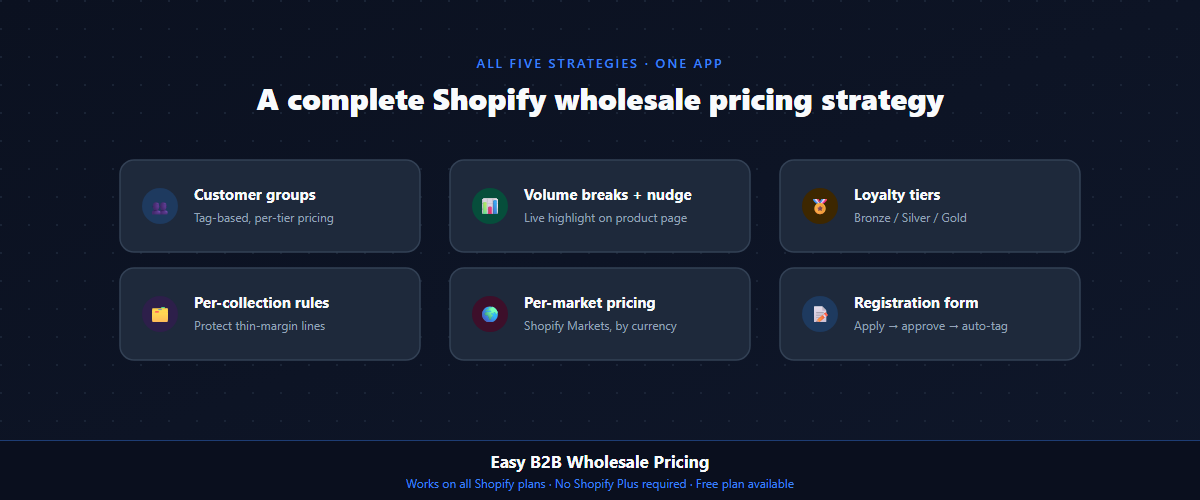
If you’re building a Shopify wholesale pricing strategy and want a system that actually reflects how you sell, Easy B2B Wholesale Pricing supports all five strategies above — customer groups, volume breaks (with live tier highlighting and a next-tier nudge), tiered loyalty pricing, per-collection rules, and per-market eligibility, plus a B2B registration form — with a free plan to get started.