
Shopify Volume Discount: How Quantity Breaks Lift B2B Order Value
A Shopify volume discount rewards a customer for buying more: the per-unit price drops as the quantity climbs. It’s the oldest lever in wholesale — and on Shopify, one of the most underused, because the platform doesn’t offer it natively on Basic, Shopify, or Advanced plans.
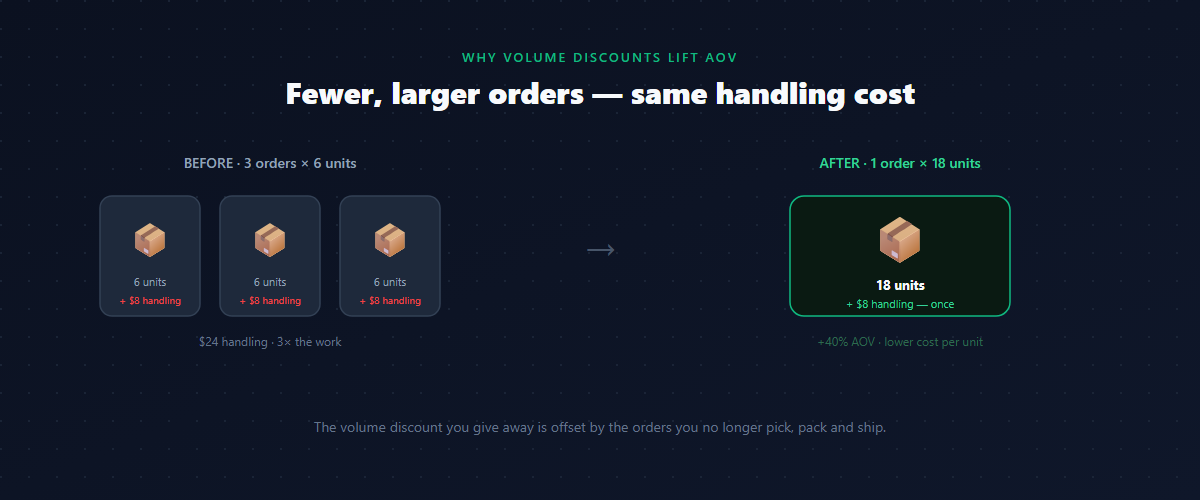
That gap costs B2B merchants real revenue. A boutique orders 6 units, sells through, comes back two weeks later, and orders 6 more. Three small orders instead of one large one — same pick, pack, and ship overhead on each, and no movement on volume. The buyer has no reason to commit to more in a single order, so they don’t.
A volume discount fixes that by making “buy more, pay less per unit” visible at the moment the buyer is deciding how much to order. This is a complete guide: how a quantity break works, the three discount types, how the quantity is counted across variants, where to set your tiers, the product-page details that actually move average order value, and how to protect your margin while you do it.
What a Shopify volume discount actually is
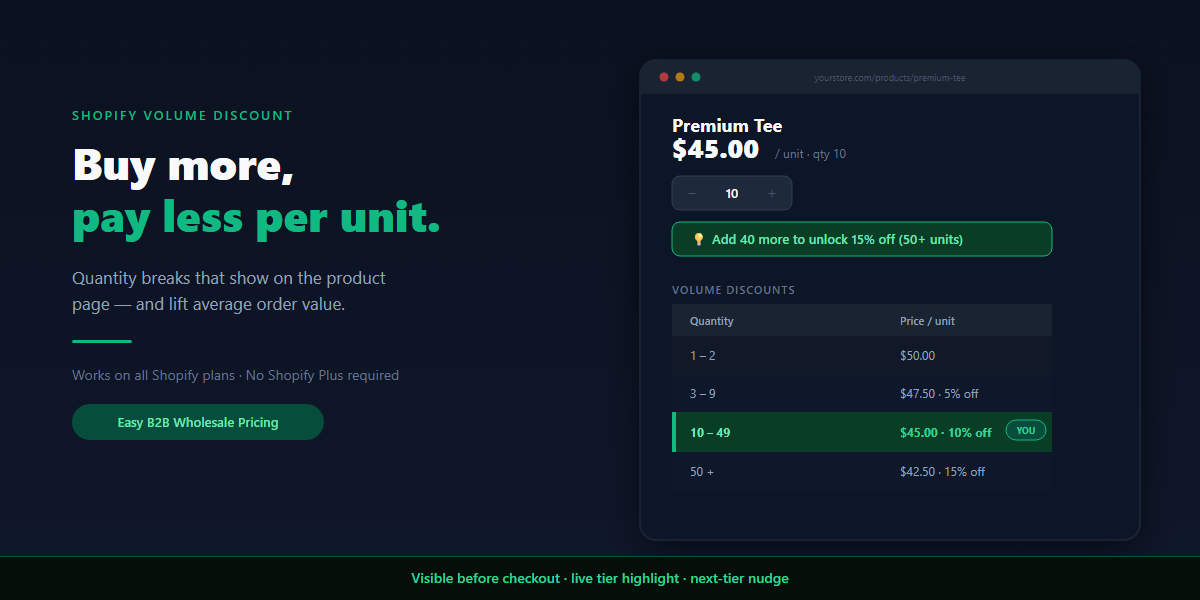
A Shopify volume discount (also called quantity break, tiered, or volume pricing) sets price tiers based on how many units a customer adds. Buy 1–2 and pay full price; buy 10 and the per-unit price drops; buy 50 and it drops further.
The mechanic is simple. The part most merchants get wrong is visibility. If the discount only appears in the cart or at checkout, it doesn’t change behavior. The whole point is to let the buyer think “if I add a few more, the price per unit drops” while they’re still deciding — which means the tiers have to be visible on the product page, before anything goes in the cart.
It’s worth separating a volume discount from a coupon. A coupon is a one-time, flat reduction the buyer has to remember and enter. A volume discount is a standing rule baked into the price the buyer sees: no code, no expiry, applied automatically at checkout through Shopify’s discount function. For a B2B buyer placing repeat orders, that difference is the difference between a promotion and a pricing system.
Quantity break, amount off, or fixed price: the three tier types
“Volume discount” usually means a percentage, but each tier can express its discount three ways. Choosing the right one per product keeps your margins intact.
| Tier type | What it does | Best for |
|---|---|---|
| Percentage off | e.g. 10% off at 10+ units | Most catalogs — scales with price |
| Fixed amount off | e.g. $5 off per unit at 10+ | Products where a flat per-unit saving reads cleaner |
| Fixed price per unit | e.g. exactly $42.50/unit at 50+ | Contract pricing — you want the exact landed number |
Percentage is the default and the easiest to reason about. Fixed price per unit is the quiet power tool for B2B: when you’ve negotiated a specific per-unit number with a buyer or a channel, you set the tier to that price directly rather than reverse-engineering a percentage.
Why a volume discount works on B2B buyers
Retail shoppers buy what they need. B2B buyers buy what they can resell — and they’re doing margin math the entire time.
When a wholesale buyer sees that 50 units cost meaningfully less per unit than 12, they’re not thinking about the discount — they’re thinking about their own sell-through: lower cost per unit means higher margin on every sale, and one larger order means they don’t have to reorder for two months. A volume discount doesn’t feel like a price cut to them. It feels like a reason to commit to inventory.
There’s a margin upside for you, too. The cost to pick, pack, and ship an order is roughly fixed whether it contains 6 units or 50. Pushing the same revenue through fewer, larger orders lowers your per-order handling cost — which often offsets much of the per-unit discount you gave away. That’s the part most merchants miss: a volume discount isn’t only a top-line AOV lever, it’s a fulfillment-efficiency lever.
How many tiers — and where to set them
Start with three tiers. More than that is hard for a buyer to read at a glance, and you can always add a step once you see where real orders cluster.
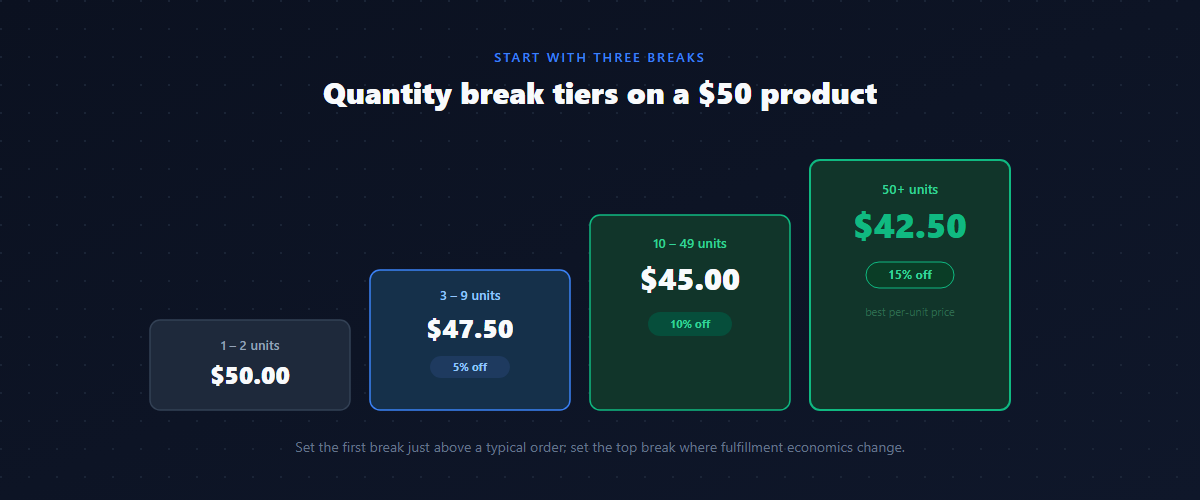
A sensible default for a $50 product:
| Quantity ordered | Price per unit | Discount |
|---|---|---|
| 1–2 | $50.00 | — |
| 3–9 | $47.50 | 5% off |
| 10–49 | $45.00 | 10% off |
| 50+ | $42.50 | 15% off |
The thresholds matter more than the percentages. Set the first break just above your typical single-order quantity, so most buyers are one small bump away from a better price. Set the top break at a quantity that genuinely changes your fulfillment economics. Then adjust after a few weeks of real orders — if nobody ever hits the 50+ tier, your top threshold is too high; if everybody lands there immediately, it’s too low and you’re giving away margin.
Does the quantity count per variant, or across the order?
This is the question that quietly makes or breaks a volume discount for apparel and multi-variant catalogs — and most merchants never think about it until a buyer complains.
Say your tiers start at 10 units. A boutique orders 4 Small, 4 Medium, and 4 Large of the same tee — 12 units total. Do they get the 10+ price? It depends on how the quantity is counted:
- Per variant (same variant): each variant is counted on its own. 4 + 4 + 4 doesn’t qualify — none of the three reached 10. Strict, but correct when each variant is a distinct SKU you stock and pick separately.
- Mix variants (across the product): quantities across all variants of the product add up. 4 + 4 + 4 = 12 → the whole order gets the 10+ price. This is almost always what apparel buyers expect, because they buy a size run, not 10 of one size.
- Mix products (across the cart): quantities across every product in the rule’s scope add up. Best for consumables or “buy any 50 units across the range” deals.
Pick the mode that matches how your buyers actually order. Getting this wrong is the single most common reason a buyer emails “why didn’t my discount apply?” — they ordered a size run and your rule was counting per variant.
Quantity tiers vs. order-amount tiers
Most volume discounts are quantity-based: tiers trigger on units ordered. But you can also tier on order amount — spend $500 and unlock a better rate regardless of unit count.
Quantity tiers suit catalogs where unit volume drives your costs (apparel, consumables, packaging). Amount tiers suit high-mix catalogs where a buyer spreads a large order across many SKUs and “units” isn’t a clean signal — a hardware distributor ordering one of everything still deserves a volume rate. Some stores run quantity tiers on core lines and amount tiers on the long tail.
Show the per-unit price, not just the percentage
Buyers run their margin math on the actual price, not the discount label. “$45.00” lands harder than “10% off” because it’s the number they’ll plug into their own spreadsheet.
So make the table show the per-unit price for each tier, in the customer’s currency. The percentage can sit alongside it, but the price is what drives the decision — especially for buyers comparing your landed cost against another supplier’s.
The product-page experience that converts
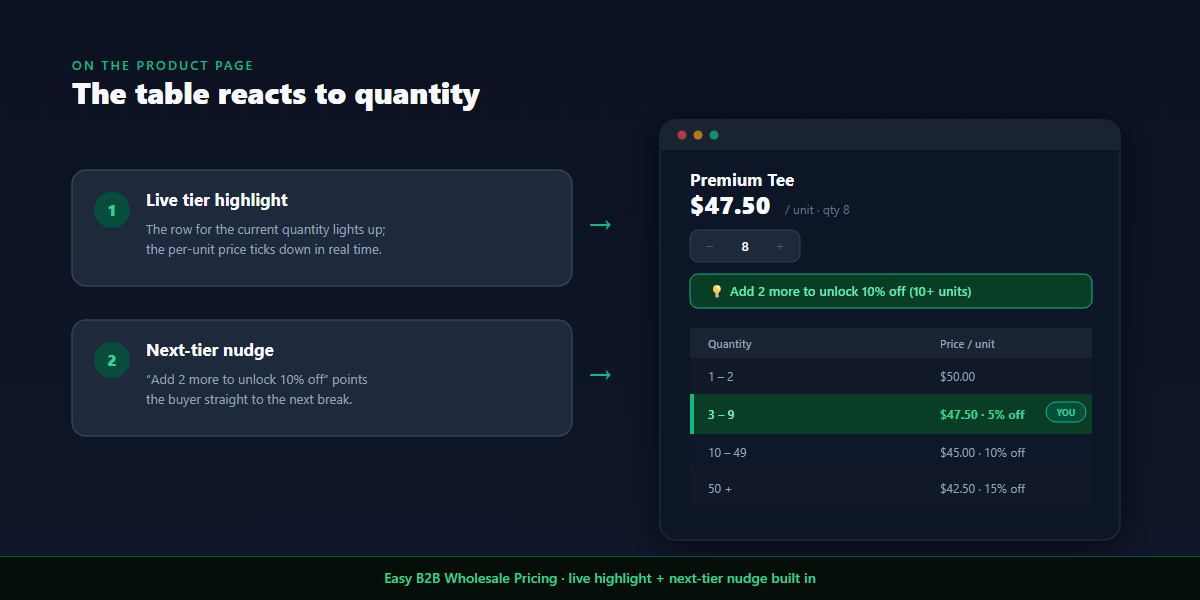
This is where a Shopify volume discount earns its keep — not in the pricing itself, but in how the tiers appear on the product page. Three details do the heavy lifting:
- The full table is visible before checkout. All tiers, with per-unit prices, right under the product.
- The current tier highlights live. As the buyer changes the quantity, the row they’re in lights up — they watch their per-unit price tick down in real time.
- A next-tier prompt nudges them up. A single line shows how close they are to the next break: “Add 2 more to unlock 10% off.” Buyers heading for 8 round up to 10; buyers eyeing 40 bump to 50.
It’s the same psychology as a free-shipping progress bar, applied to volume. The table that merely informs leaves money on the table; the table that reacts — highlight plus nudge — is the one that lifts order value. Hide it behind checkout and none of it happens.
A worked example: turning 6-unit orders into 18-unit orders
Here’s how this plays out in practice, using round numbers from a typical apparel B2B channel.
Before volume pricing: boutiques ordered in small, frequent batches — about 6–8 units per order, average order value ~$420. Every order carried the same handling cost, and there was no reason to consolidate.
After volume pricing (tiers at 3 / 10 / 50, with the live highlight and next-tier nudge on the product page):
- Average B2B order value: up ~40% (~$420 → ~$590)
- Units per order: up ~55% — the bigger driver than fewer-but-larger orders
- Reorder frequency: down — expected and fine; buyers hold more stock per order
- Margin per order: roughly flat to slightly up — the volume offset the per-unit discount because fulfillment cost per order stayed fixed while order size grew
Two caveats in the spirit of honesty: this is one store, and the messaging (the on-page nudge) changed at the same time as the pricing — so you can’t cleanly separate the two. But the direction is what matters, and it’s consistent with the economics: when the cheaper per-unit price is visible next to the quantity a buyer had in mind, a meaningful share of them round up.
Best price vs. stacking (the compound-math trap)
A volume discount rarely lives alone. A Gold-tier wholesale buyer who orders 50 units might qualify for both a 25% customer-group discount and a 15% volume discount. You control what happens:
- Best price — the customer gets the larger single discount. With 25% and 15%, they get 25%. Simple, predictable, margin-safe.
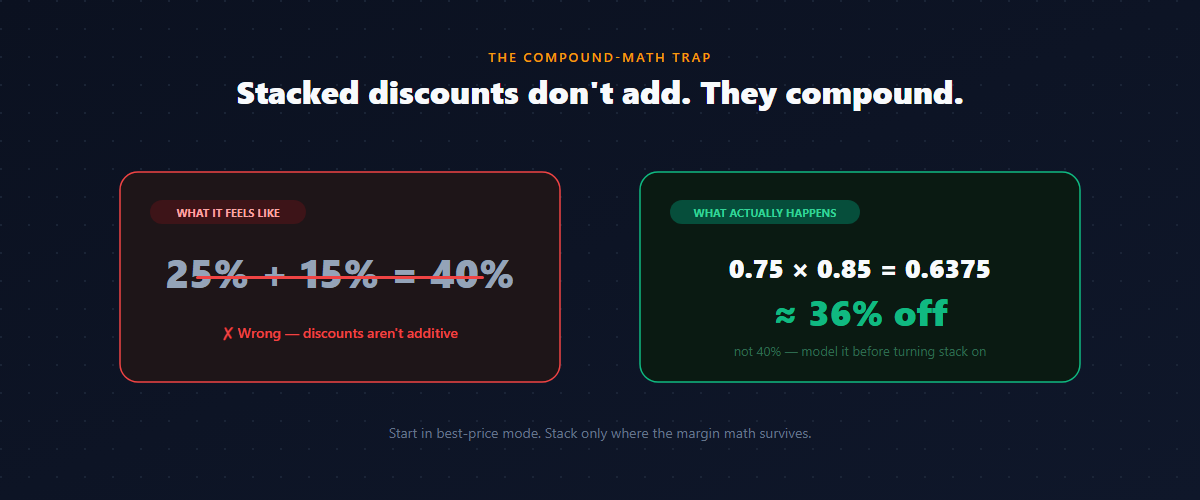
- Stack — both apply, and here’s the trap: they compound, not add. 25% then 15% is not 40% off. It’s 0.75 × 0.85 = 0.6375 — about 36% off.
Stacking is powerful as a short promotion and dangerous as a permanent setting. On a Gold buyer’s largest orders, the difference between best-price ($37.50/unit) and stack ($31.88/unit) is real margin. Model it against landed cost on your highest-volume products before you turn it on.
Layering a volume discount on customer-group pricing
A volume discount doesn’t have to stand alone — the strongest B2B setups layer it on top of customer-group pricing. A tagged wholesale buyer already sees their wholesale price, and the quantity break applies from there.
That combination rewards who the buyer is and how much they order at once — the two strongest signals in B2B. A new account gets a modest group discount and earns more by ordering volume; a top-tier account gets their loyalty rate and volume on top (under whichever mode you’ve chosen). For the full picture of how customer groups, loyalty tiers, per-collection, and per-market pricing fit together, see our guide to B2B pricing strategies on Shopify.
Protect your margin
A volume discount is a margin decision, not a marketing one. Before launching:
- Check the per-unit cost at each tier against your landed cost — the top tier should still be profitable on its own, not just “worth it for the volume.”
- If you stack volume on top of a group discount, run the compound number, not the sum.
- Exclude thin-margin or clearance products from the rule so they don’t get discounted twice.
- Watch where orders cluster after launch. If everyone instantly lands in the top tier, the threshold is too low and you’ve simply cut your price.
Done right, the larger orders more than pay for the per-unit cut. Done blindly, the top tier quietly sells at a loss.
Common mistakes with Shopify volume discounts
- Hiding the tiers behind checkout. If the buyer can’t see the breaks while deciding, the discount can’t change behavior. Put the table on the product page.
- Counting per variant when buyers order size runs. A 12-unit size run that “doesn’t qualify” for the 10+ tier generates support tickets and lost trust. Use mix-variant counting for apparel.
- Setting the top tier below where it’s profitable. A 50+ price that loses money on its own isn’t a volume strategy, it’s a leak.
- Turning on stacking without modeling margin. “25% + 15%” feels like 40%; it compounds to ~36% on your biggest orders.
- One blanket rule across the whole catalog. Thin-margin and clearance lines need to be excluded or they get discounted into the red.
- Showing only percentages. Buyers decide on the per-unit price. Show it.
How to set up a Shopify volume discount without Plus
Shopify doesn’t offer quantity-break pricing natively on Basic, Shopify, or Advanced plans — it’s reserved for Shopify Plus B2B, and even there it’s tied to company accounts. For everyone else, a volume pricing app is the practical path.
When choosing one, look for an app that:
- Shows the tier table on the product page, not just at checkout.
- Displays the per-unit price for each tier, not only the percentage.
- Highlights the buyer’s current tier live and shows a next-tier nudge.
- Supports all three tier types — percentage, fixed amount off, and fixed price per unit.
- Lets you choose how quantity is counted — per variant, mix variants, or mix products.
- Lets volume breaks layer on top of customer-group / wholesale pricing, with best-price and stack modes.
- Applies the discount through Shopify’s discount function (not cart scripts, which are Plus-only).
If you’re still deciding between discount codes, a separate store, and an app, start with how to set up wholesale pricing on Shopify for the trade-offs.
Roll it out without breaking anything
Before you turn volume pricing on for real buyers, test as one. Create a test customer, and walk a full purchase:
- Product page — does the tier table appear, and does the highlighted row track the quantity you set?
- Size run — add a mix of variants and confirm the quantity counts the way you intended (per variant vs. mix).
- Cart — does the per-unit price reflect the right tier before checkout?
- Checkout — does the discount apply with no code entered?
- Edge cases — check an excluded product (should stay full price) and a stacked customer-group buyer (should match your chosen mode).
If a tier doesn’t apply, the usual culprits are the counting mode (a size run under per-variant counting) or a product that falls outside the rule’s scope.
FAQ
Does a Shopify volume discount require Shopify Plus?
No. Quantity-break pricing isn’t native to Basic, Shopify, or Advanced plans, but a volume pricing app adds it on any plan, with the discount applied automatically at checkout.
Will the tier prices show on the product page or only at checkout?
With the right app, the full tier table — including the per-unit price — shows on the product page, the active tier highlights as the buyer changes quantity, and a prompt points them to the next break. Visibility before checkout is what actually lifts order value.
Can a buyer combine variants to reach a volume tier?
Only if you set the counting mode to mix variants (or mix products). Under per-variant counting, each variant must reach the threshold on its own. For apparel size runs, use mix-variant counting.
Can a volume discount combine with a wholesale customer-group discount?
Yes. Volume breaks can layer on top of customer-group pricing. Configure whether the two stack (compound) or use best price — and remember that stacking 25% and 15% is ~36% off, not 40%.
How many quantity tiers should I use?
Start with three. Set the first break just above your typical single-order quantity and the top break where your fulfillment economics genuinely change, then refine once you have real order data.
Does it work on quantity or order value?
Both. Quantity tiers trigger on units ordered; amount tiers trigger on order value. Use quantity for unit-driven catalogs and amount for high-mix orders spread across many SKUs.
If you want to add a Shopify volume discount that shows on the product page — with live tier highlighting and a next-tier nudge built in — Easy B2B Wholesale Pricing handles quantity and amount tiers, all three discount types, per-variant or mix counting, layering on customer-group pricing, and best-price or stack modes, with a free plan to test whether volume pricing moves your average order value before you commit.
Built for B2B sellers
Stop Losing B2B Buyers to Friction.
Wholesale buyers don’t want to browse like retail shoppers — they want their price, their net terms, and the same cart they ordered last month. Give them all of it, on the Shopify storefront you already have.