Your Best B2B Buyers Don’t Want to Check Out — They Want to Negotiate. Here’s How to Let Them on Shopify (2026)
I learned why every wholesale store needs a Shopify request a quote flow the hard way — by losing a deal. A buyer I’ll call Dana found my store on a Tuesday night. She runs four boutique fitness studios and was sourcing branded apparel for all of them — forty SKUs, mixed sizes, the kind of order that pays a month’s rent. She added everything to her cart, saw a $14,000 total, and then did what every serious B2B buyer does at that number: she stopped.
She didn’t check out. She opened my contact form and typed one line: “Can we talk about pricing and terms if I commit to this every month?”
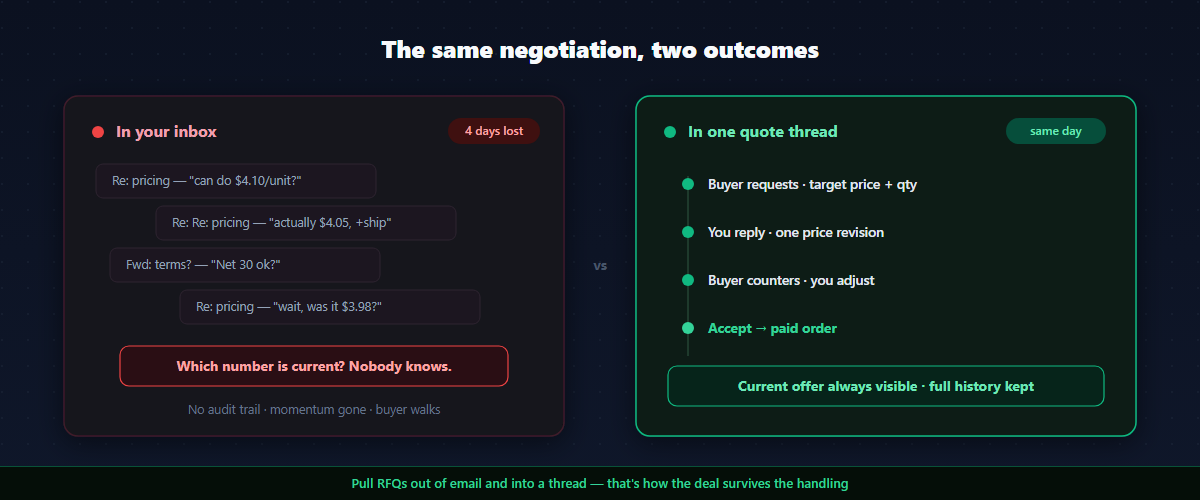
That message is the most valuable thing that happens on a wholesale store. And for the first two years I ran mine, I handled it the worst possible way — I replied from my personal email. Then she replied. Then I sent a revised price in a second email, forgot to update the shipping, sent a third. Four days and nine messages later, neither of us could remember which number was current, and Dana — polite, busy, running four businesses — quietly went with a supplier who’d answered her in one clean thread the same afternoon.
I lost a $14k-a-month account to my own inbox.
Here’s the thing I’d gotten exactly backwards. I’d done the easy part right: 87% of B2B buyers check the price before they ever contact you, and 86% want that price transparency upfront — so I’d put real wholesale prices on the storefront, gated behind a login, applied automatically. Great for the $200 reorder. Useless for Dana. Because the small repeat order is a transaction, and her deal was a negotiation, and I was trying to run a negotiation through tools built for a transaction.
This guide is the system I wish I’d had that Tuesday: how to add a Shopify request a quote flow that turns “can we talk?” into a structured conversation and then a paid order — plus the B2B sales technique to actually win those quotes once they land, instead of losing them to your own email like I did.
Why the checkout button is the wrong tool for a big B2B order
A checkout is a transaction. A quote is a negotiation. They are different jobs, and forcing the second through the tooling for the first is why so many wholesale deals stall.
Think about what a serious B2B buyer is actually deciding when they ask for a quote:
- Price — not “what’s the list,” but “what will you do for me at this volume, on a recurring basis.”
- Terms — Net 15, Net 30, 50% prepay. Cash flow is the buyer’s real constraint, often more than the unit price.
- Shipping — freight on a pallet order isn’t a flat-rate calculator number; it’s a line they need quoted.
- Trust — B2B buyers are skeptical of new suppliers. They’re testing whether you’re responsive, organized, and someone they can build a standing relationship with.
A “Buy now” button answers exactly none of those. The buyer ready to commit to a five-figure standing order and the buyer topping up a $200 reorder are not the same person, and they should not hit the same wall. The reorder buyer wants frictionless self-serve. The big buyer wants a conversation — and the ability to start it without leaving your store, digging up your email, and writing a cold message into the void.
That conversation has a name in B2B, and it’s older than ecommerce: the RFQ — Request for Quotation. It’s the de facto way business buyers negotiate. Your job is to bring it onto your storefront instead of losing it to your inbox.
The B2B sales psychology behind a good quote flow
Before the how-to, the why — because the tooling only works if you run the sales play behind it. A few principles from B2B selling that should shape how your quote flow behaves:
Buyers buy results, not products. The best negotiators don’t lead with “we can do 3% off.” They tie the price to the buyer’s outcome — a reliable monthly supply, a margin they can build their own pricing on, terms that ease their cash flow. Your quote thread is where that conversation happens. Keep price as one lever among several (terms, shipping, validity), not the only one.
Don’t just cut price — restructure the deal. When a buyer pushes on price, a rookie discounts. A pro uses “what-if”: “I can’t hit that unit price at 40 units — but at 60 units on a standing monthly order, here’s what I can do, with Net 30.” That keeps you negotiating terms, not just numbers, and it’s only possible if your quote tool lets you adjust quantity, discount, shipping, and payment terms together — not just slap a percentage on.
Speed builds trust. B2B buyers are testing you. A quote that sits for four days says “this supplier is disorganized.” A reply within one business day says “these people are easy to work with.” The whole point of pulling RFQs out of email is that they stop getting buried.
Never lose the audit trail. Six months later, when the buyer says “you quoted me $4.10,” you need the thread. Email negotiations scatter across inboxes and get contradicted. A single, timestamped quote record is both a sales tool and a liability shield.
Step 1: Put the “Request a Quote” button where buyers will use it
A quote flow that buyers can’t find doesn’t get used. There are two high-intent moments to surface it, and a good setup covers both.
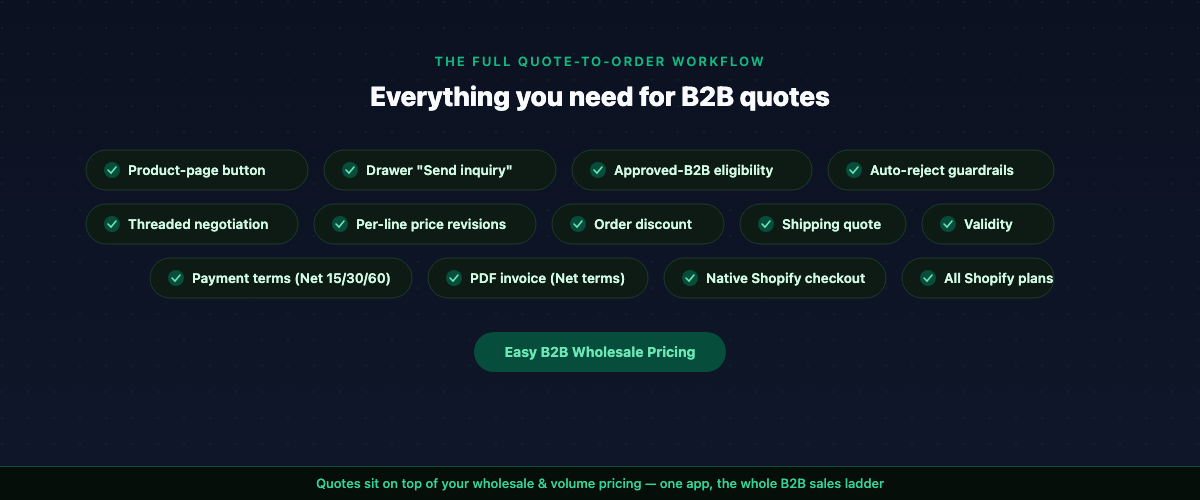
On the product page. A buyer looking at a wholesale product is the most qualified person on your site. A “Request a Quote” button right there — next to or below the add-to-cart — catches the intent at its peak. With Easy B2B Wholesale Pricing, this is a theme app extension block you drop onto the product template in the theme editor; no code. It pre-fills the current product so the buyer starts the request one click in.
On the bulk-order drawer. If you’ve already given B2B buyers a variant drawer to order a full size run at once (12 sizes × 4 colors in one view), that’s the other natural launch point. The drawer has a “Send inquiry” action that carries the exact rows and quantities the buyer just selected straight into a quote — so a buyer who realizes mid-order “this is too big to just check out” can pivot to a negotiation without re-entering anything.
The principle from sales: meet the buyer at the moment of intent. Don’t bury “contact us for bulk pricing” in a footer. Put the quote button where the buying decision is actually being made.
Step 2: Decide who’s allowed to request a quote
Not every visitor should be able to open a negotiation. You get to set the bar, and the right setting depends on how you run your B2B channel:
- Approved B2B only (the safe default). Only customers who’ve been approved into a wholesale customer group — or who belong to a company — can request a quote. This keeps your inbox full of real buyers, not tire-kickers. It pairs naturally with a registration-and-approval flow: a buyer applies, you approve them into a tier, and now they can quote.
- Any logged-in customer. Looser — anyone with an account can quote. Useful if you’re actively trying to grow the channel and want a lower barrier.
- Public. Anyone, no login. Maximum reach, maximum noise — only sensible with guardrails (see auto-reject below).
Tying quotes to approved buyers is itself a sales technique: it makes wholesale access feel earned, and it means every quote that lands is from someone who’s already qualified themselves into your funnel.
Step 3: Set guardrails so you’re not drowning in junk quotes
The fear merchants have about opening up quotes — “I’ll get a hundred lowball requests a day” — is legitimate, and it’s why a good quote flow has automatic filters before anything reaches you:
- Price floor. Auto-reject any request whose target price is below a percentage of catalog price you set. Someone asking for 80% off gets a polite “we can’t accept this as-is, please adjust” — without wasting your time.
- Minimum quantity. Quotes are for real wholesale volume. Set a minimum-quantity threshold so single-unit “quotes” never reach your inbox.
- Rate limiting. In public mode, cap requests per IP per hour so nobody can spam the form.
Each rejection comes back to the buyer with a clear, specific reason and the threshold, so a legitimate buyer who tripped a rule knows exactly how to fix and resubmit. This is the difference between a filter that protects your time and one that quietly loses you deals: the good ones tell the buyer how to qualify, not just “no.”
Step 4: Run the negotiation like a B2B pro
This is the heart of it. A quote lands. Now you reply — and this is where the sales craft pays off.
Picture Dana’s request coming in cleanly this time: forty SKUs, her target price about 8% under catalog, a note that she’ll reorder monthly. The amateur move — the one I used to make — is to look at “8% under” and either cave or refuse. The pro move is to restructure.
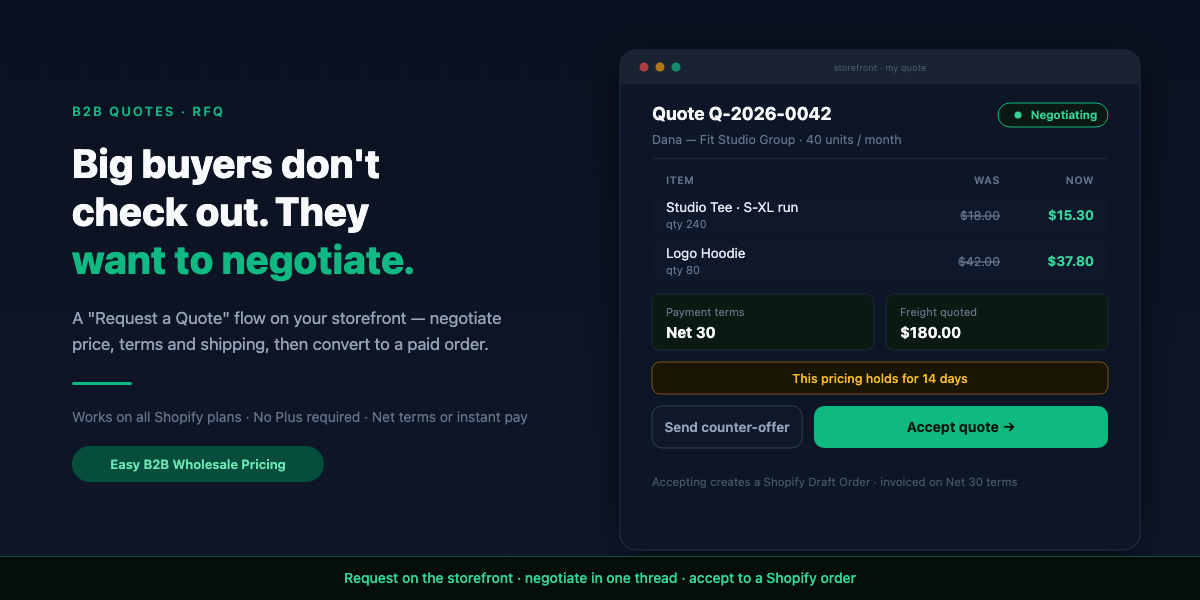
My reply to Dana isn’t “no” and it isn’t “fine, 8% off.” It’s: “I can’t hit that price at your current quantities — but you mentioned a standing monthly order. At these volumes committed monthly, here’s pricing that’s actually a touch better than you asked on the high-movers, I’ve quoted your freight, and I’ve put you on Net 30 so it’s easier on your cash flow. This holds for 14 days.”
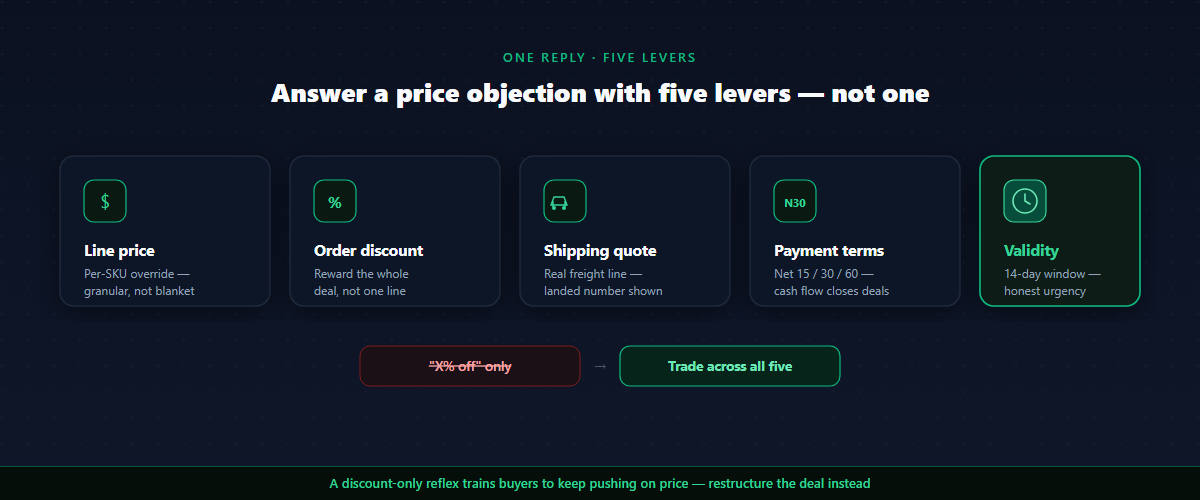
I just answered a price objection with quantity, terms, shipping, and a deadline — four levers instead of one. That’s only possible because a strong reply does more than change a number. In a single revision you can:
- Override the price per line — and not uniformly. Maybe you hold firm on the high-demand SKU and give more on the slow mover. Granular beats blanket.
- Add an order-level discount — a volume incentive tied to the whole deal, which reads as a reward for commitment rather than a price you were inflating.
- Quote the shipping — a real freight line, so the buyer sees the landed number, not a surprise at checkout.
- Set payment terms — Net 15, Net 30, Net 60, or a prepay split. For many B2B buyers this is the lever that closes the deal; cash flow beats unit price.
- Put a clock on it — a validity window (default 14 days) creates honest urgency. “This pricing holds through the 30th” moves a buyer off the fence without a fake “sale ends tonight.”
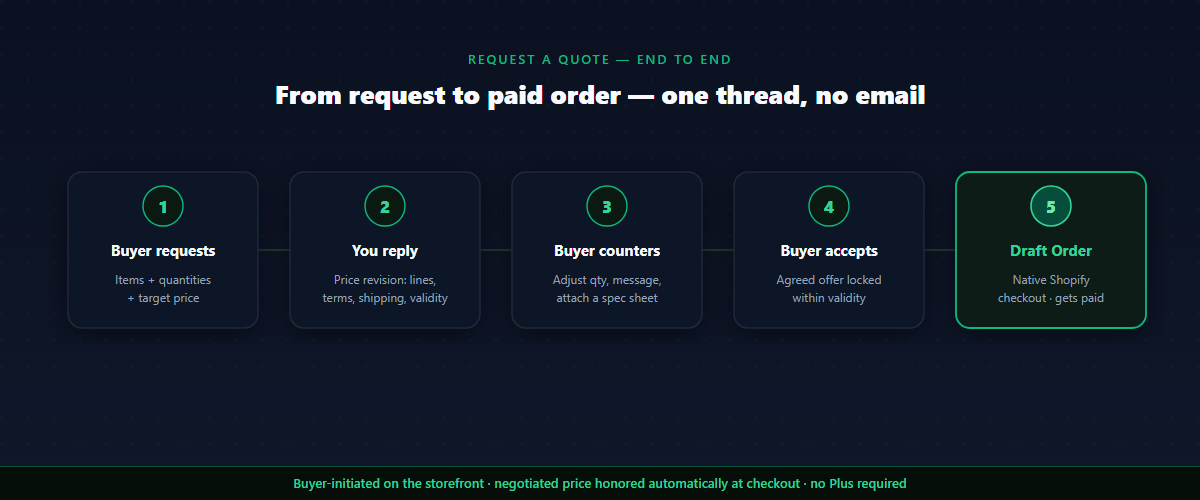
Then the buyer counters — adjusts quantities, sends a message, attaches a spec sheet — and you go again. Every message is timestamped in one thread. No “which email had the latest number?” Both sides always see the current offer.
The sales-training move here: never answer a price objection with only a price. Every time the buyer pushes on cost, bring quantity, terms, or validity into the trade. A quote tool that lets you move all four levers at once is what makes that possible — a tool that only does “X% off” forces you to negotiate with one hand.
Step 5: Convert the agreed quote into a paid order
A negotiation that ends in “great, email me an invoice” leaks deals. The close has to be one step — and the right step depends on the terms you agreed.
When the buyer accepts, the app converts the agreed quote into a Shopify Draft Order — carrying every negotiated detail: the per-line prices, the order discount, the shipping line, the payment terms, and a reference back to the quote number. What happens next follows the payment terms on the quote:
- Due on receipt — the buyer gets an invoice link and pays immediately through native Shopify checkout. No coupon codes, no manual order entry, no Plus required.
- Net 15 / 30 / 60, a prepay split, or custom terms — the buyer receives a PDF invoice by email on the terms you set, and you mark the order paid when the payment lands. This is exactly how “invoice me on Net 30” is supposed to work: native checkout can’t defer payment, so terms-based deals close as an invoice rather than a card charge — and the app runs that path for you instead of leaving you to raise invoices by hand.
Either way, the order lands in your normal Shopify flow — same reporting, same payouts, same fulfillment — and everything you negotiated is honored automatically. The buyer can’t accidentally pay list price; the agreed numbers are baked into the order. The conversation and the transaction finally connect.
And because the quote carries its own number and history, the order is traceable straight back to the negotiation that produced it — the audit trail closes the loop instead of scattering across your inbox.
Dana would have accepted on Tuesday night. One thread, one revised offer she could read in thirty seconds, a Net 30 invoice that respected her cash flow, and an order she never had to re-enter. The whole thing closes in the time it took me, the old way, to write my second confused email. That’s the difference between a quote flow and an inbox: not that you negotiate harder, but that you never lose the deal in the handling.
Where this fits with the rest of your B2B setup
A quote flow isn’t a standalone bolt-on; it’s the top of your B2B sales ladder:- Self-serve reorders at the bottom — small, repeat, frictionless, automatic tier pricing. No human needed.
- Bulk drawer orders in the middle — a buyer placing a big-but-standard order in one view.
- Quotes at the top — the deals big enough, custom enough, or relationship-defining enough to be worth a conversation.
Common mistakes with B2B quotes on Shopify
- Hiding the quote option. “Contact us for bulk pricing” in the footer is where deals go to die. Put the request button on the product page and in the bulk drawer, at the moment of intent.
- Negotiating in email. The moment a deal leaves a structured thread for your inbox, you lose the audit trail and the momentum. Keep the whole negotiation in one record.
- Answering every objection with a discount. Price is one lever. Terms, shipping, quantity, and validity are four more. A pro trades across all of them; a discount-only reflex trains buyers to keep pushing on price.
- Letting quotes go stale. A reply that takes four days reads as “disorganized supplier.” Speed is a trust signal. Validity windows on your side keep the buyer moving too.
- No guardrails, then giving up. Merchants open quotes, get buried in lowballs, and switch the feature off. Set a price floor and a minimum quantity first, and only real buyers reach you.
- Forgetting the close. A quote that ends in an agreed price but no payable link is a half-finished sale. The accept step has to produce a real, payable order — a checkout link or an invoice — automatically.
FAQ
Can I add a “Request a Quote” button on Shopify without Shopify Plus?
Yes. A B2B pricing app adds a request-a-quote flow on any Shopify plan — Basic, Shopify, or Advanced — with a storefront button, a negotiation thread, and conversion to a Shopify Draft Order the buyer either pays through native checkout or is invoiced for on terms. No Shopify Plus required.
How is a quote different from a draft order?
A draft order is merchant-initiated from the admin — the buyer can’t start it and there’s no buyer-facing negotiation. A quote is buyer-initiated from the storefront: they request items and a target price, you negotiate in a thread, and on acceptance it becomes a draft order with a checkout link or a PDF invoice, depending on the payment terms. The quote is the conversation; the draft order is the result.
Will I get spammed with lowball quote requests?
Not if you set guardrails. Auto-reject rules — a price floor, a minimum quantity, and rate limiting in public mode — filter out junk before it reaches you, and each rejection tells a legitimate buyer how to adjust and resubmit.
Can buyers negotiate payment terms in a quote?
Yes. A reply can set Net 15, Net 30, Net 60, or a prepay split alongside the line prices, an order discount, and a shipping quote. For many B2B buyers, terms are the lever that closes the deal.
Who can request a quote on my store?
You decide: approved B2B customers only (the default), any logged-in customer, or the public. Tying quotes to approved buyers keeps your inbox full of qualified requests.
What happens when a buyer accepts a quote?
The agreed quote converts to a Shopify Draft Order carrying the negotiated prices, discount, shipping, and payment terms. If the terms are due-on-receipt, the buyer gets a link to pay through native Shopify checkout; if you agreed Net 15/30/60 or a prepay split, the app emails a PDF invoice on those terms and you mark it paid when the payment arrives — no coupon codes, no manual order entry either way.
Does a quote expire?
Yes. Each quote has a validity window (default 14 days, configurable). The buyer is emailed before it expires, and stale quotes close out automatically — which also gives you honest urgency in the negotiation.
If you want to give your biggest B2B buyers a real way to negotiate — a “Request a Quote” button on the product page and bulk drawer, a threaded back-and-forth where you move price, discount, shipping, terms, and validity together, and a one-click close that converts the agreed quote into a payable Shopify order — Easy B2B Wholesale Pricing adds the full quote-to-order workflow on top of your wholesale and volume pricing, with auto-reject guardrails so only real buyers reach your inbox and native Shopify checkout or an on-terms PDF invoice handling the payment.
Built for B2B sellers
Stop Losing B2B Buyers to Friction.
Wholesale buyers don’t want to browse like retail shoppers — they want their price, their net terms, and the same cart they ordered last month. Give them all of it, on the Shopify storefront you already have.