
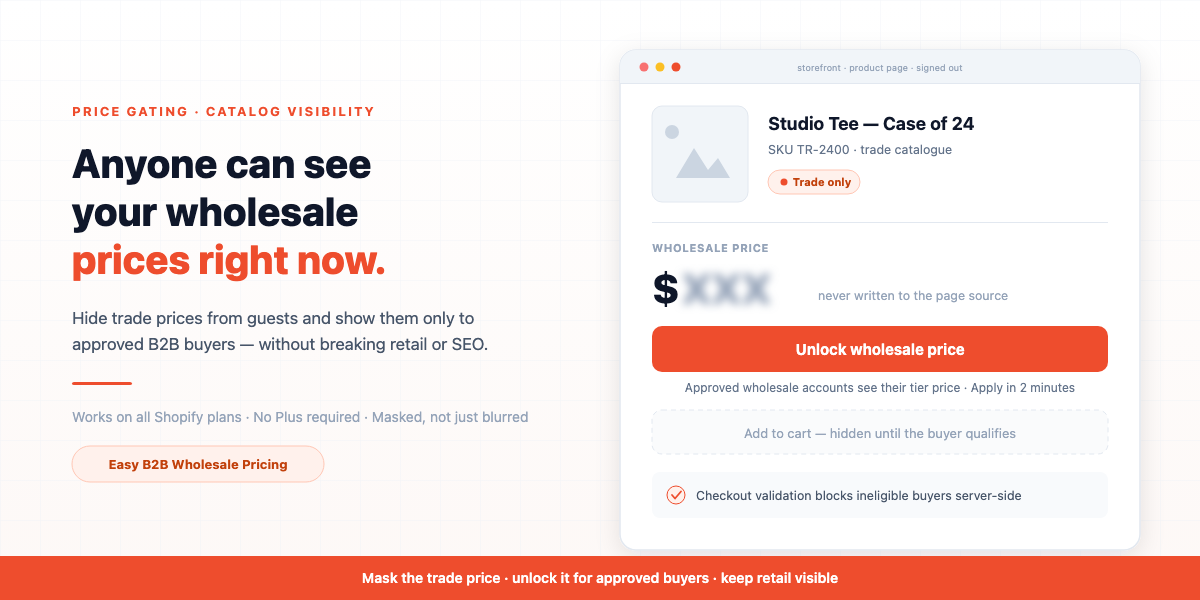
A reseller I’d never sold to emailed me a screenshot of my own wholesale price list. He’d built it himself, in about ten minutes, by making a free customer account on my store and clicking through forty products. Then he took that sheet to one of my actual stockists and undercut them by four percent.
I lost the stockist. Not because my prices were bad, but because I’d been treating pricing as public information and eligibility as a formality.
So I did what most merchants do at that moment: I panicked and hid everything. Every price, every add-to-cart button, storewide, behind a login. Traffic didn’t drop — my conversions did. Retail shoppers who’d have bought at full margin hit a wall of blank prices and bounced. Google stopped showing my products with prices in search. My own returning customers emailed me to ask if the site was broken.
I’d swapped one problem for a worse one. It took me a rebuild to learn the actual lesson: hiding prices is a conversion decision, not a security toggle. The goal isn’t to hide prices from everyone. It’s to hide the wholesale price from the wrong people, show the retail price to everyone else, and turn the moment of “you can’t see this” into the moment they sign up.
This guide is the complete Shopify hide price until login setup: who to gate, what to gate, how to stop the price leaking out the side doors most setups never check, and how to make the locked price convert instead of bounce.
Short answer
To set up Shopify hide price until login: install a B2B pricing app with a catalog-visibility feature, choose who is allowed to see prices (any logged-in customer, or only customers in your approved wholesale groups), choose whether to hide the price alone or the price and the add-to-cart button, scope it to your wholesale products rather than the whole store, and replace the hidden price with an “Unlock wholesale price” button that links to sign-in. Shopify has no native setting for this on any plan, and theme code alone can’t do it safely because the real price stays in the page source. No Shopify Plus required.
Shopify hide price until login: what it actually means
Price gating — also called catalog visibility — is the rule that decides which shoppers are allowed to see a product’s price, and what everyone else sees instead. It sits above your pricing rules: before Shopify decides what price a buyer gets, the gate decides whether they get to see a price at all.
That’s the distinction that makes the whole thing click. Most merchants already have some form of customer group pricing — Bronze sees one price, Gold sees another, retail sees list. Price gating is the inverse: it’s not “which price,” it’s “any price?” And because it’s an access layer, it has to win over everything downstream. If your volume-discount table still renders for a shopper who isn’t allowed to see prices, you haven’t gated anything — you’ve just moved the leak.
A complete price-gating setup has five decisions in it:
- Audience — who is allowed to see prices.
- Coverage — which products are gated, and which stay public.
- Depth — price only, or price plus the ability to buy.
- Replacement — what a gated shopper sees where the price used to be.
- Enforcement — what stops a technical user from getting around it.
Skip any one of them and you get the outcome I got: either a leak you don’t know about, or a storefront that stopped selling.
Why merchants hide wholesale prices in the first place
Worth being honest about the motive, because it determines how aggressively you should gate.
- Channel conflict. If your stockists resell your product, your wholesale price is the floor of their margin. Publishing it lets any shopper — or any competing reseller — work out exactly what your partners paid. This was my case, and it’s the most expensive one.
- Competitor intelligence. Your competitors absolutely check your pricing. A public wholesale sheet is a gift to anyone building a quote against you.
- Buyer qualification. Some merchants gate not to hide numbers, but to force a conversation. If seeing the price requires an approved account, every price view is a lead you know something about.
- MAP and contract obligations. If you distribute brands with minimum advertised price agreements, exposing trade pricing publicly can put you in breach.
Notice what’s not on that list: hiding prices from retail shoppers. That’s the trap I fell into. If you sell both retail and wholesale from one store, your retail price should stay visible to the world — it’s the thing that earns you search traffic and impulse orders. It’s the trade price that needs the lock.
The three DIY ways to hide prices — and why each one breaks
Before reaching for an app, most merchants try one of these. Here’s what actually happens.
| Method | What you do | Why it breaks |
|---|---|---|
Theme code (if customer) | Wrap the price in Liquid so it only renders for logged-in customers | Only covers the templates you edited. Prices leak through search results, quick-view popups, the cart drawer, JSON endpoints like /products/handle.js, and any section you forgot. Breaks on every theme update. |
| Password-protect the store | Turn on Shopify’s storefront password | All-or-nothing. Kills retail sales and search indexing entirely. Fine for a pre-launch, useless for a live dual-channel store. |
| Separate wholesale store | Second Shopify store, wholesale-only | Two subscriptions, two inventories to reconcile, two themes to maintain, two SEO footprints. Solves the leak by doubling the workload. |
There’s a fourth non-solution worth naming: setting wholesale variants to $0.00 and telling buyers to “contact us.” It doesn’t hide anything — it breaks things. Shopify treats zero-price items as free, your analytics become fiction, and shoppers read a $0 product as a bug.
The reason none of these hold is that a Shopify storefront exposes product data in more places than a theme file. Price gating has to happen at the point of render, everywhere, for everyone who isn’t eligible — which is what a purpose-built feature does and a Liquid if never will.
The mistake almost every price-gating setup makes: hidden isn’t hidden
This is the part I want you to test on your own store today, whatever tool you’re using.
Gate a product. Then load the page as a guest, open your browser’s view-source, and search the page for the price. If the number is in there, the price is not hidden — it’s covered. Anyone who opens developer tools, disables a CSS class, or reads the raw HTML sees the exact figure you thought you’d protected. Blur filters, display: none, opacity tricks, and “spoiler” overlays are all in this category. They stop a casual shopper. They stop a competitor for about fifteen seconds.
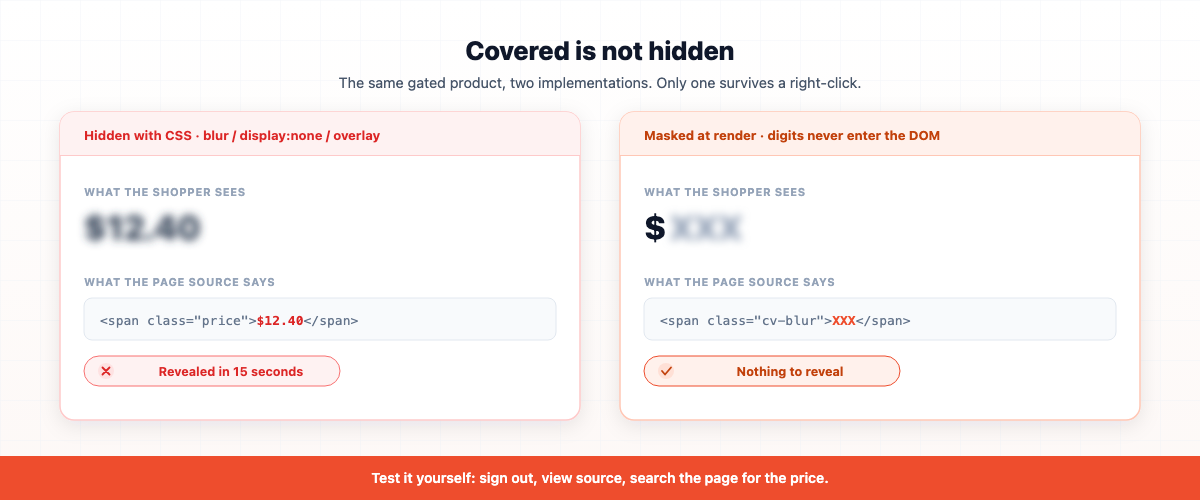
The correct behavior is masking, not covering: the real digits are never written into the page at all. What renders is the currency symbol plus a placeholder — $XXX — so the DOM literally does not contain the number. Strip every stylesheet and you still learn nothing.
In Easy B2B Wholesale Pricing this is how catalog visibility renders by default: the price node is replaced with a blurred XXX next to the sharp currency symbol, and every numeric run is masked — so price ranges ($10 – $20) don’t leak the endpoints, which is a common gap in simpler tools.
Keeping the currency symbol visible is deliberate, and it’s a conversion choice: the shopper still understands they’re on a product with a real price in their currency, which reads as “locked,” not “broken.” A blank space reads as a bug.
Step 1: Decide who is allowed to see prices
Two settings cover almost every real store, and picking the wrong one is the most common misconfiguration.
Any logged-in customer. Anyone with an account sees prices; only guests are gated. Use this when your goal is lead capture and your entire customer base is trade. It’s the lower-friction option — but remember, an account on Shopify costs a shopper thirty seconds and an email address. That’s the setting that let a stranger rebuild my price list.
Approved B2B groups only. Prices are visible only to customers whose tags put them in a wholesale group you’ve defined. Everyone else — guests and signed-in retail shoppers — is gated. This is the one you want if channel conflict is your reason for gating, because it makes “having an account” worthless on its own. Access has to be granted.
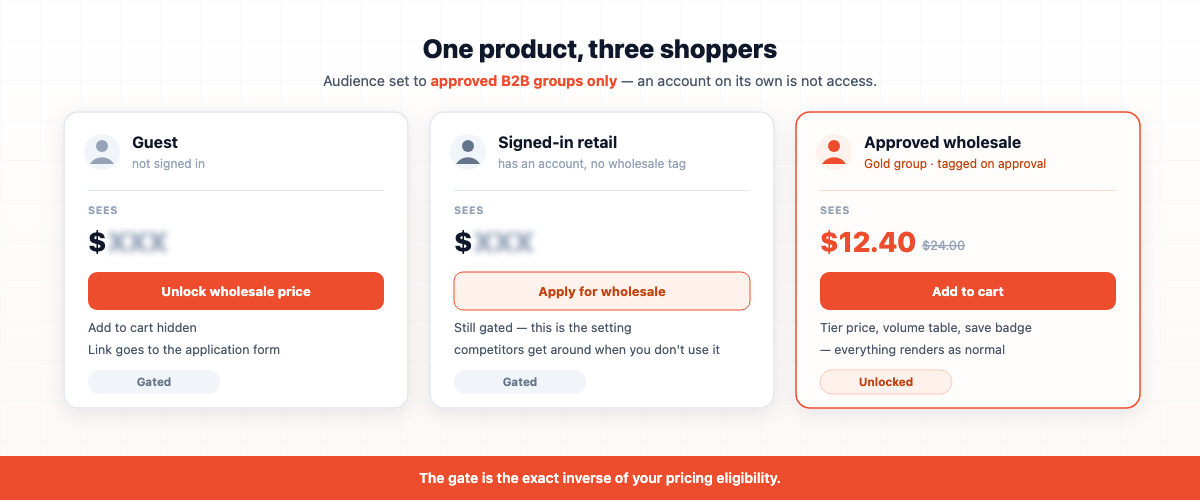
The second option only works if you have a way to grant it, which is why price gating and B2B registration are two halves of one system: the buyer applies, you approve them into a tier, the tag lands on their account, and the prices unlock on their next page load. If you gate prices without an application flow, you’ve built a locked door with no doorbell.
A useful way to hold this in your head: the gate is the exact inverse of your pricing eligibility. Whoever qualifies for a wholesale price is whoever should see one.
Step 2: Decide how deep the gate goes
Two modes, and the difference is whether an ineligible shopper can still buy.
Hide price only. The price is masked, but add-to-cart still works. This feels contradictory until you see the use case: you want the trade number private, but you’re happy for anyone to buy at whatever price applies to them. It also keeps the product functionally shoppable, which matters if the gate is scoped broadly.
Hide price and add-to-cart. The price is masked and the buy button is removed, replaced by the unlock call-to-action. This is a true trade-only catalog: the product is browsable, indexable, and completely unpurchasable until the buyer qualifies. If you’re gating because of MAP obligations or channel conflict, this is the mode you want.
One detail people miss in the second mode: if you have minimum-order-quantity badges (“Min 12 pcs”) on those products, they should disappear along with the price. A quantity floor next to a locked price is a confusing half-message — it tells the buyer what they must buy without telling them what it costs.
Step 3: Don’t gate your whole store (this is where the SEO damage happens)
Here’s the mistake that cost me conversions: I set the scope to “everything.”
Gating storewide has consequences beyond the shoppers you meant to block:
- Search snippets lose price data. Product structured data with no price means no price in rich results, and reduced eligibility for shopping surfaces. If you feed Google Merchant Center, gated products can be disapproved for a price mismatch — the feed says one thing, the crawlable page shows a placeholder.
- Retail demand evaporates. Every shopper who would have bought at full margin now has to make an account first. Most won’t.
- Your bestsellers stop working as landing pages. The pages that earn your organic traffic are the ones you least want to lock.
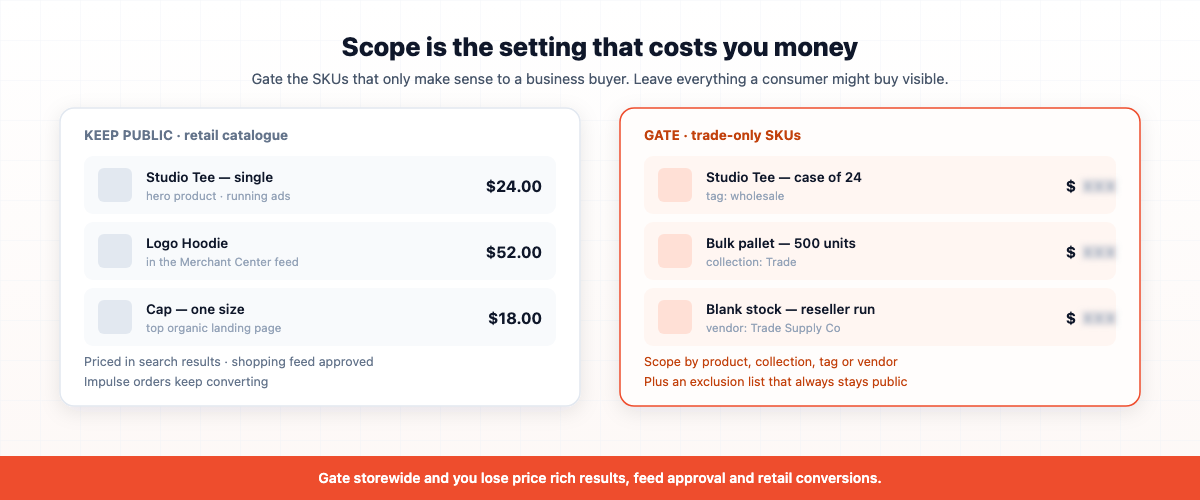
So scope deliberately. Gate by product, collection, product tag, or vendor — the trade-only lines, the case-pack SKUs, the bulk collection — and leave your retail catalog visible to the world. Then use an exclusion list for the handful of products that must always stay public, even if they’d otherwise fall inside a gated collection: your hero product, whatever you’re running ads to, anything in a shopping feed.
The rule of thumb: gate the SKUs that only make sense to a business buyer. Anything a consumer might plausibly buy, leave open. You can always tighten later; you can’t recover the quarter you spent invisible.
Step 4: Plug the side doors
You’ve gated the product page. The price is still leaking, and this is the step most setups skip entirely.
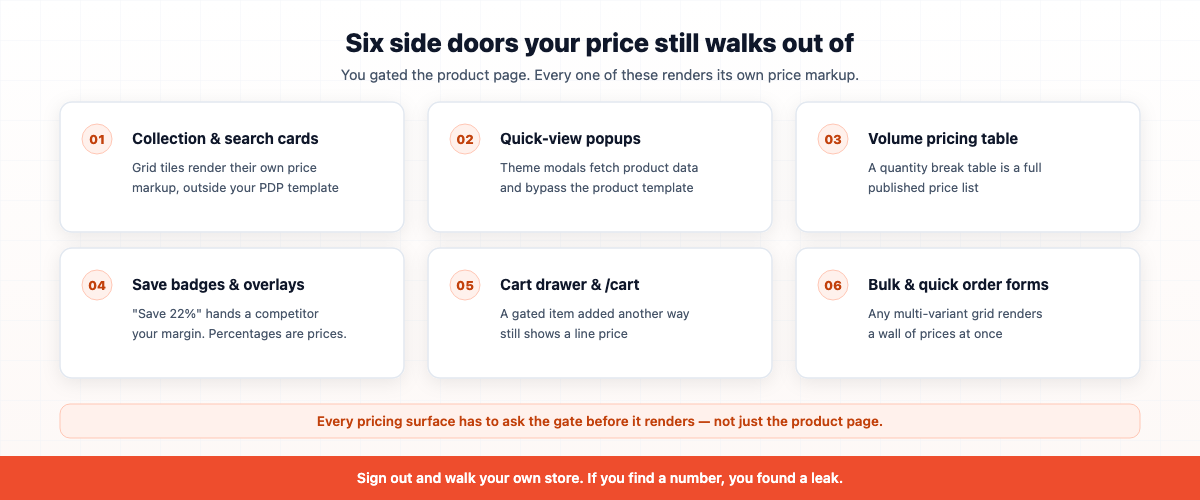
Run through this list on your own store as a signed-out visitor:
- Collection and search cards. Grid tiles render their own price markup, separate from the product page.
- Quick-view popups. Many themes fetch product data into a modal that bypasses your product template completely.
- The volume pricing table. If you show a quantity break table on gated products, it’s a full published price list sitting right under the masked price.
- Save badges and B2B price overlays. “Save 22%” tells a competitor your discount depth even when the number is masked. Percentages are prices.
- The cart drawer and
/cart. A gated product added by other means still shows a line price. - Bulk-order drawers and quick order forms. Any multi-variant ordering surface renders a grid of prices.
The reason these leak is architectural: a gate implemented in one template doesn’t know about the others. What you need is a gate that every pricing surface asks before it renders. In Easy B2B Wholesale Pricing, catalog visibility publishes a single check that the product page, listing cards, quick-view, cart, and the volume table each consult first — so when a shopper is gated, no pricing surface renders at all, even when a wholesale discount or volume rule would otherwise apply to them. The access layer wins over the pricing layer, everywhere, by design.
Test it the boring way: sign out, and walk your own store like a stranger. Homepage, collection, search, quick view, cart. If you find a number, you found a leak.
Step 5: Enforce it where it counts
Storefront JavaScript is a user-experience layer. It masks the price and removes the button, and for 99% of shoppers that’s the end of the story. But a technically capable visitor can still add a product to the cart with a direct AJAX call, bypassing the button you removed.
If your gate is cosmetic, that’s a real hole — the buyer reaches checkout and pays whatever price the cart calculated.
The fix on Shopify is a cart and checkout validation function: server-side logic that blocks checkout when an ineligible buyer has a gated product in the cart. It’s the strongest enforcement Shopify allows on the online store, it runs whether or not the buyer’s browser cooperated, and it applies in the hide-price-and-add-to-cart mode where “can’t buy” is an actual rule rather than a UI preference.
Two layers, doing different jobs: JavaScript makes the store behave right for humans, the validation function makes the rule true for everyone. Ask any price-gating app you’re evaluating whether it has the second one. Many don’t.
Step 6: Make the locked price convert
This is the difference between a gate that costs you money and one that makes you money, and it’s the part I got most wrong the first time.
A gated product page has a job: turn a stranger into an applicant. That means what sits where the price used to be is a call to action, not an error message.
- Use a button, not a sentence. “Login to see price” as grey body text is ignorable. An “Unlock wholesale price” button, bordered, sitting exactly where the price would be, on the product page and on collection cards, is a thing people click. Cards matter as much as product pages — a shopper scanning a collection of masked prices needs an obvious next step without a click-through.
- Say what’s behind the door. “Unlock wholesale price” beats “Sign in.” The first tells the shopper there’s a better price waiting and that they might qualify. The second sounds like a chore.
- Point new buyers at the application, not the login. A returning stockist needs sign-in. A new one needs your wholesale registration form. If the only link is “sign in,” every genuinely new buyer hits a dead end — and new buyers are the entire point of being visible in search.
- Translate it. If you sell across locales, that button is one of the highest-traffic strings on your storefront. In Easy B2B Wholesale Pricing the unlock label lives in Settings → Storefront Text, so it’s translated in one place with the rest of your storefront copy rather than hard-coded into a theme.
- Set expectations about approval. One line under the button — “Approved in one business day” — converts better than silence, because the shopper’s real question isn’t “how do I sign up,” it’s “how long until I can order?”
A 2026 reality check on the login itself
One thing that has changed and catches merchants out: Shopify’s classic accounts have been retired in favor of new customer accounts, which use passwordless sign-in — the shopper enters an email and gets a one-time code. Sign-in happens on Shopify-hosted pages.
Practically, that means:
- You can’t build a custom login modal in your theme anymore. The old “login popup right on the product page” pattern isn’t possible. Your unlock button links out to Shopify’s sign-in.
- The return path matters more than ever. Make sure the link sends the shopper back to the page they were on after they sign in. A buyer bounced to the account home page after unlocking has to find your product again, and many won’t.
- No password to forget is a conversion win. The friction of gating dropped in 2026. A returning stockist unlocks prices in about fifteen seconds with an emailed code.
Don’t fight the hosted flow. Design around it: clear CTA, correct return URL, and an application link for anyone who isn’t a customer yet.
Where price gating fits in your B2B funnel
Price gating isn’t a feature you turn on in isolation — it’s the front door of a four-part system, and it only pays off when the rest exists:
- The gate — a stranger hits a masked price and an unlock button.
- The application — they apply, you review, you approve them into a tier.
- The groups — approval tags them, and their tier’s pricing becomes their price automatically.
- The pricing — from that point they see their own numbers on every page: tier price, volume breaks, and a quote thread for the deals big enough to negotiate.
Turn on step 1 without steps 2 through 4 and you’ve built a wall. Build all four and you’ve built a funnel: every gated product page becomes a qualification step, and every approval turns a browser into a buyer who sees prices nobody else does. That exclusivity is worth something to the buyer too — which is exactly why gating done right raises perceived value instead of lowering conversions.
None of this requires Shopify Plus. B2B features opened to all Shopify plans in April 2026, and price gating itself has always been app territory rather than a plan feature — a store on Basic can run the whole ladder.
Common mistakes when hiding prices on Shopify
- Gating the entire catalog. The single most expensive error. Gate trade SKUs; leave the retail catalog visible for search and impulse buyers.
- Hiding with CSS. If the number is in the page source, it isn’t hidden. Mask, don’t cover.
- Forgetting the side doors. Collection cards, quick view, cart drawer, volume tables, and save badges each render their own price. Sign out and check every one.
- Leaving the discount percentage visible. “Save 22%” on a masked price hands a competitor your margin structure. Percentages are prices.
- No enforcement behind the JavaScript. If your gate is UI-only, a direct cart call walks straight through it. Use a checkout validation backstop when “can’t buy” is a real rule.
- A dead-end unlock. Linking only to sign-in strands every buyer who doesn’t have an account yet. Give new buyers the application form.
- Gating “any logged-in customer” when you meant “approved wholesale.” A free account takes thirty seconds. If channel conflict is your worry, gate to approved groups.
- Setting wholesale prices to $0.00. Not a gate. Shopify treats it as free, your reporting becomes fiction, and shoppers read it as broken.
Key takeaways
- Hiding prices is a conversion decision, not a security toggle — the goal is hiding the trade price from the wrong people, not hiding all prices from everyone.
- Mask, don’t cover. If the number is in the page source, it isn’t hidden.
- Gate to approved B2B groups, not “anyone logged in,” if channel conflict is your reason.
- Scope narrowly. Storewide gating costs you retail conversions and search visibility.
- Check the side doors — cards, quick view, cart, volume tables, save badges.
- Back the UI with a checkout validation function when ineligible buyers must not be able to purchase.
- Replace the price with a call to action, and give new buyers a path to apply, not just to sign in.
FAQ
How do I hide prices on Shopify until a customer logs in?
Shopify has no native setting for it, so you use a B2B pricing app with catalog visibility: enable the gate, set the audience to logged-in customers or approved wholesale groups, choose whether to hide the price alone or the price and add-to-cart, scope it to your wholesale products, and replace the hidden price with an “Unlock wholesale price” button. It works on every Shopify plan — no Plus required.
Can I hide prices from guests but show them to wholesale customers only?
Yes, and that’s usually the setting you want. Gating to approved B2B customer groups means guests and ordinary signed-in shoppers see a masked price, while customers tagged into a wholesale group see their real tier pricing. Gating to “any logged-in customer” is weaker, because anyone can create an account in thirty seconds.
Does hiding prices hurt my SEO?
It does if you gate the whole store. Gated products can lose price data in structured data and rich results, and products in a Google Merchant Center feed can be disapproved when the feed price doesn’t match a crawlable page. Scope the gate to trade-only SKUs, keep your retail catalog public, and use an exclusion list for anything in a shopping feed or ad campaign.
Can I hide the add-to-cart button too?
Yes. That’s the second mode: the price is masked and the buy button is replaced by the unlock call-to-action, so the product is browsable but unpurchasable until the buyer qualifies. Pair it with a checkout validation function so a technical user can’t add the item with a direct cart call.
Can shoppers see the price by inspecting the page?
Only if your tool hides the price with CSS. Blur filters, hidden elements, and overlays all leave the real number in the page source. A correct implementation never writes the digits into the DOM at all — it renders the currency symbol plus a masked placeholder, so there’s nothing to reveal.
Do I need Shopify Plus to hide prices?
No. Price gating is app functionality on every Shopify plan, and Shopify opened its B2B features to all plans in April 2026. A store on Basic can run gated trade pricing, approvals, tier pricing, and volume breaks together.
What should I show instead of the price?
A masked price with the currency symbol intact, plus a bordered “Unlock wholesale price” button, on both the product page and collection cards. Keep the currency symbol so the page reads as locked rather than broken, and give new buyers a link to your wholesale application, not just to sign-in.
Can I show a custom login popup on the product page?
No. With Shopify’s new customer accounts, sign-in is passwordless and hosted by Shopify, so an in-theme login modal is no longer possible. Link to the Shopify sign-in with a return URL back to the product page the shopper started from.
Will hiding prices reduce my conversions?
Only if you gate products consumers would have bought. Gating trade-only SKUs usually raises qualified conversions, because the locked price signals exclusivity and every gated page becomes a sign-up prompt. Gating storewide reliably reduces conversions, which is why scope is the most important setting on the page.
How do I stop the volume discount table from leaking prices on gated products?
Use a system where the visibility gate is evaluated before any pricing surface renders. In Easy B2B Wholesale Pricing, the volume table, save badges, and B2B price overlays all check the gate first and skip rendering entirely for gated shoppers — so a quantity break table can’t publish a price list that the masked price was meant to protect.
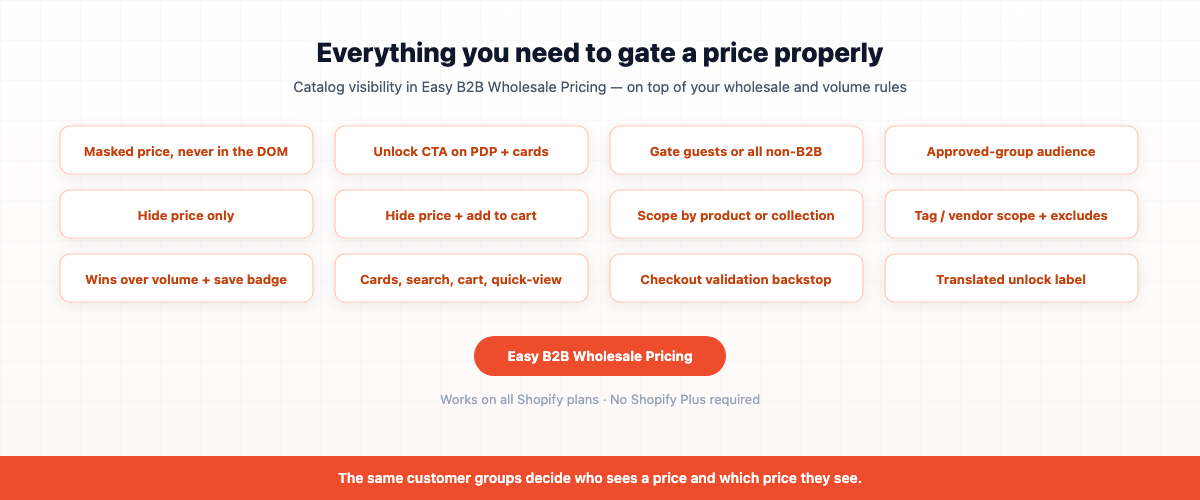
If you want price gating that actually holds — masked prices the page source never contains, visibility scoped to the trade SKUs you choose, access granted to approved wholesale groups rather than anyone with an account, an “Unlock wholesale price” call to action on product pages and collection cards, and a checkout validation backstop so ineligible buyers can’t slip a gated product through — Easy B2B Wholesale Pricing adds catalog visibility on top of your wholesale and volume pricing, with the same customer groups driving both who sees a price and which price they see.
Built for B2B sellers
Stop Losing B2B Buyers to Friction.
Wholesale buyers don’t want to browse like retail shoppers — they want their price, their net terms, and the same cart they ordered last month. Give them all of it, on the Shopify storefront you already have.